
Claude Code × Medical Application
[Claude Code] Turning an In-House BI Dashboard into an AI Dashboard, Part 3: Adding Generative AI — Deciding What to Leave to the AI
1. Introduction — what to leave to the AI
When you add generative AI to an in-house BI dashboard, the first decision is what to leave to the AI. Do you let it answer questions and do the aggregation too, or only operate the screen? The scope you set here shapes everything: the correctness of the numbers, how you test, and the cost.
By the end of Part 2, numbers that had passed the checks were showing on screen. Part 3 adds “talk to it and it moves.”
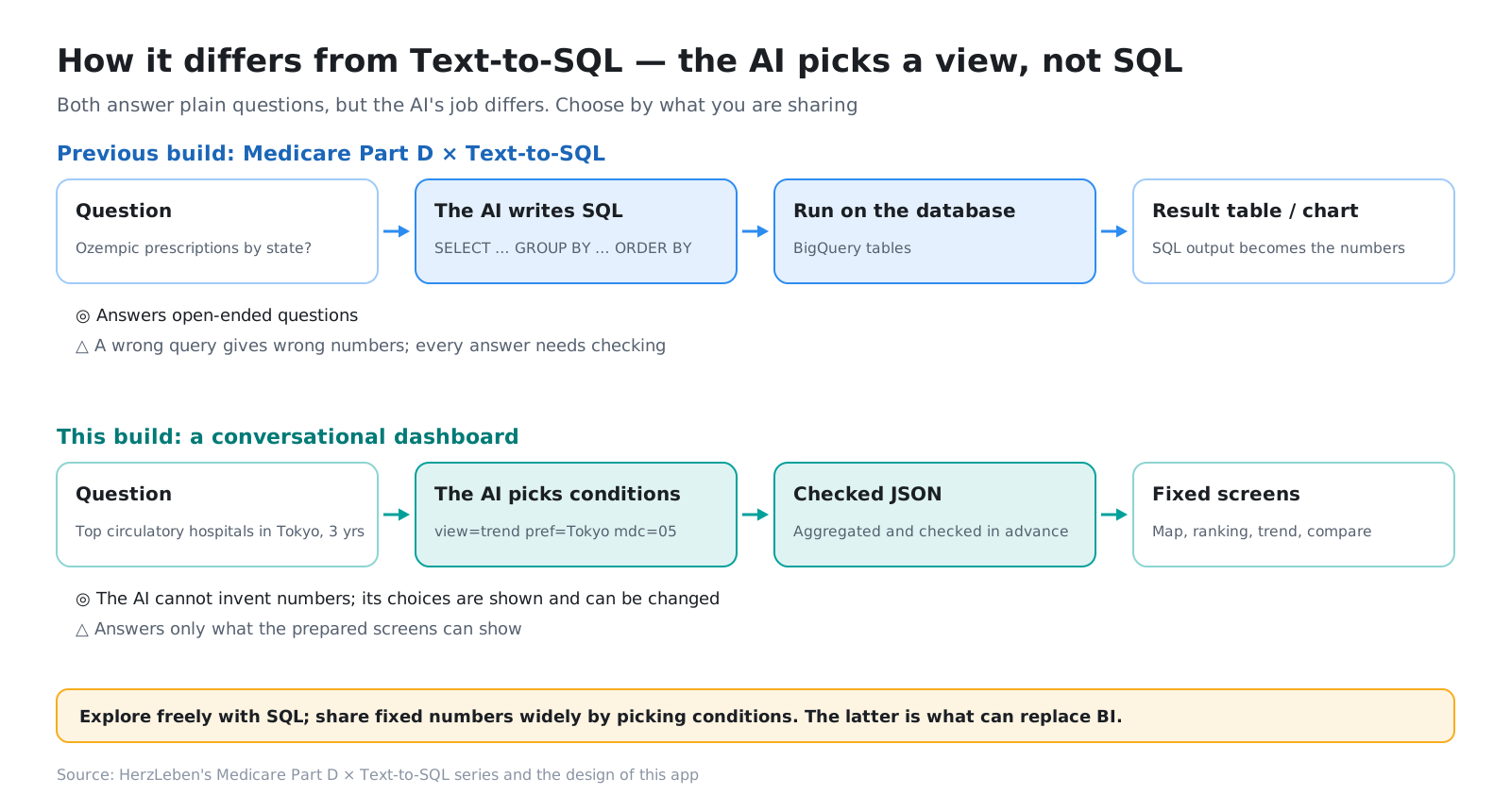
In our previous series, “Medicare Part D × Text-to-SQL,” the AI wrote SQL and did the aggregation itself. This time we went the other way: the AI only picks the screen’s conditions.
Here is how this post is organized.
- Introduction (this section)
- Set the scope with the screen’s type
- What we wrote in the instructions
- Four checkpoints before the screen
- Splitting the tests into three tiers
- Even when the tests pass, a person reads the explanations
- Stop variation with rules on the server
- This post’s harness / Summary
2. Set the scope with the screen’s type
2-1. Make the screen’s state a single type
While building the screens, we gathered the screen’s state into a single type (ViewState): which screen is showing, the year, MDC, disease, surgery branch, prefecture, secondary medical area and hospital. The map, the ranking and the trend are all drawn from this one type, and the URL query uses the same names.
With this in place, the AI’s job is only to read the question and fill in this type. The conditions the AI picks reach the screen in the same form as conditions a viewer picks by hand. They stay in the URL and appear on screen as chips. If one is wrong, the viewer can fix it on the spot.
2-2. Just three tools
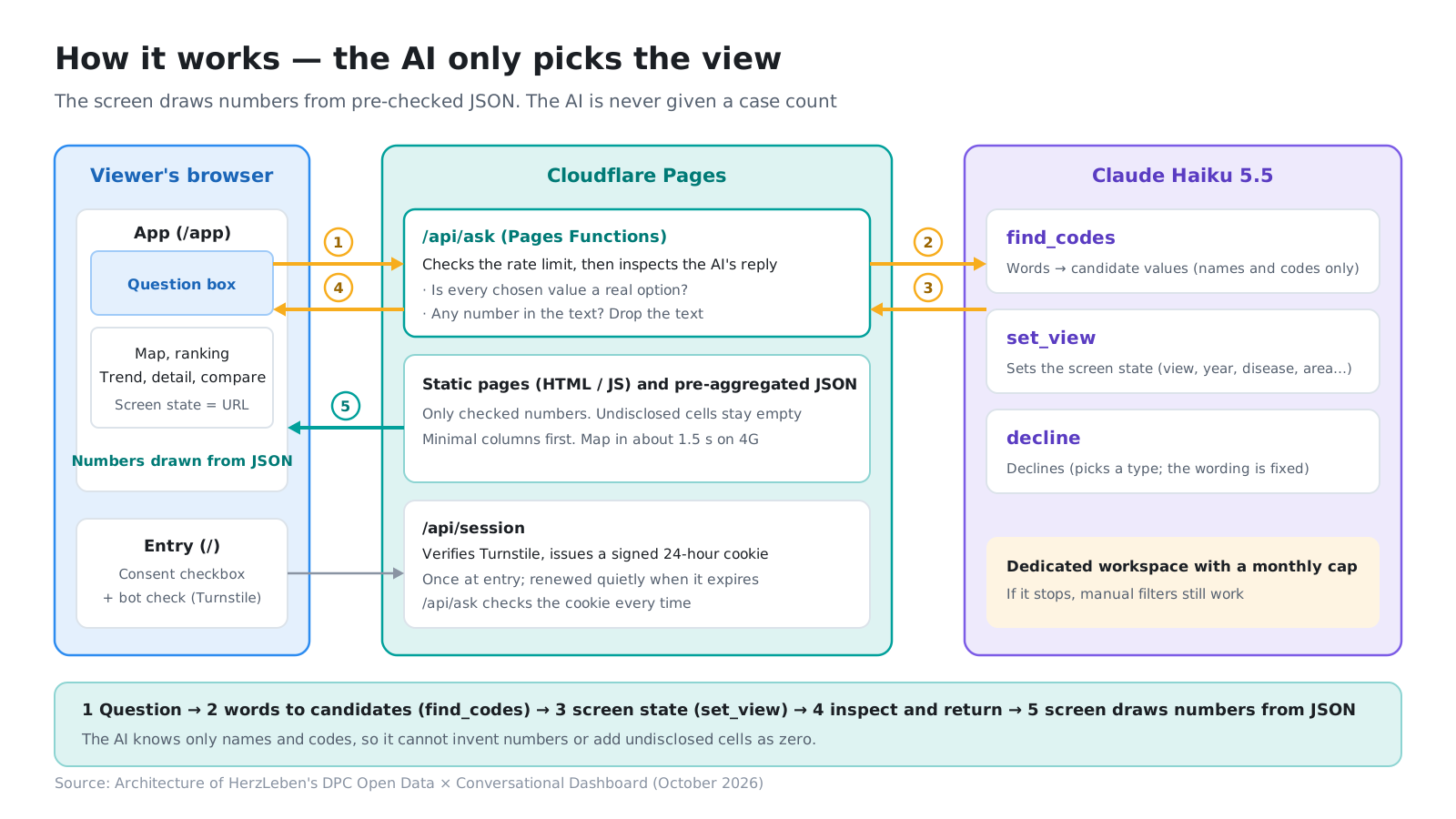
The AI (Claude Haiku 5.5) gets three tools.
| Tool | Role | Returns |
|---|---|---|
find_codes |
Turns words into codes (“circulatory,” “heart failure,” “Sapporo,” “PCI” → values the screen can select) | Names and codes only. Never counts |
set_view |
Sets the screen (each field of ViewState, a short explanation, and the reason when it cannot answer) |
The screen’s conditions |
decline |
Declines (unrelated questions, attempts to rewrite the instructions, medical advice, hospitals that cannot be found) | Only the type. The decline message is one we wrote |
The key point is that find_codes never returns counts. The AI may know the code for Sakakibara Heart Institute, but it never sees that hospital’s counts. So the kind of accident where the AI invents a number, or adds an undisclosed value as zero, cannot happen by design.
For set_view, the list of selectable values (prefectures, years and so on) is enumerated inside the tool definition, and the result is returned in strict form. Values that do not exist become hard to return in the first place.
3. What we wrote in the instructions
The instructions (the system prompt) start by defining the AI’s role as “the operator of the screen.” These five points are at the core.
- Your job: read the question and set the screen’s state with
set_view. For diseases, surgeries, medical areas and hospital names, use only values you first confirmed withfind_codes - The explanation is one short sentence: write only the conditions you chose. Do not write numbers such as case counts, hospital counts, ranks or percentages. You do not know the numbers. The screen produces the numbers from published data
- Choosing how to answer: “hospitals with the most” → ranking; “compare by …” → regional ranking; “three years” → trend; “compare A and B” → comparison
- What each screen shows: the trend screen shows three years for the regional total and three years for each of the top ten hospitals (a sentence added in section 6)
- Do not change conditions nobody asked about: conditions not in the question, such as region, year or surgery, stay as they are on the current screen (a sentence added in section 6)
The instructions are the same every time, so they are read from the cache (prompt caching). One question called the AI one to three times, with roughly 200–2,000 input tokens and 450–650 output tokens. We did not rely on memory for the model name and price; we checked the official pricing page before using them ($0.10 input and $0.50 output per million tokens). That comes to about 0.1 yen per question.
4. Four checkpoints before the screen
Asking “do not write numbers” in the instructions does not guarantee the AI will comply. So that the screen stays correct even when the request is broken, the server passes every AI reply through four checkpoints before it reaches the screen.
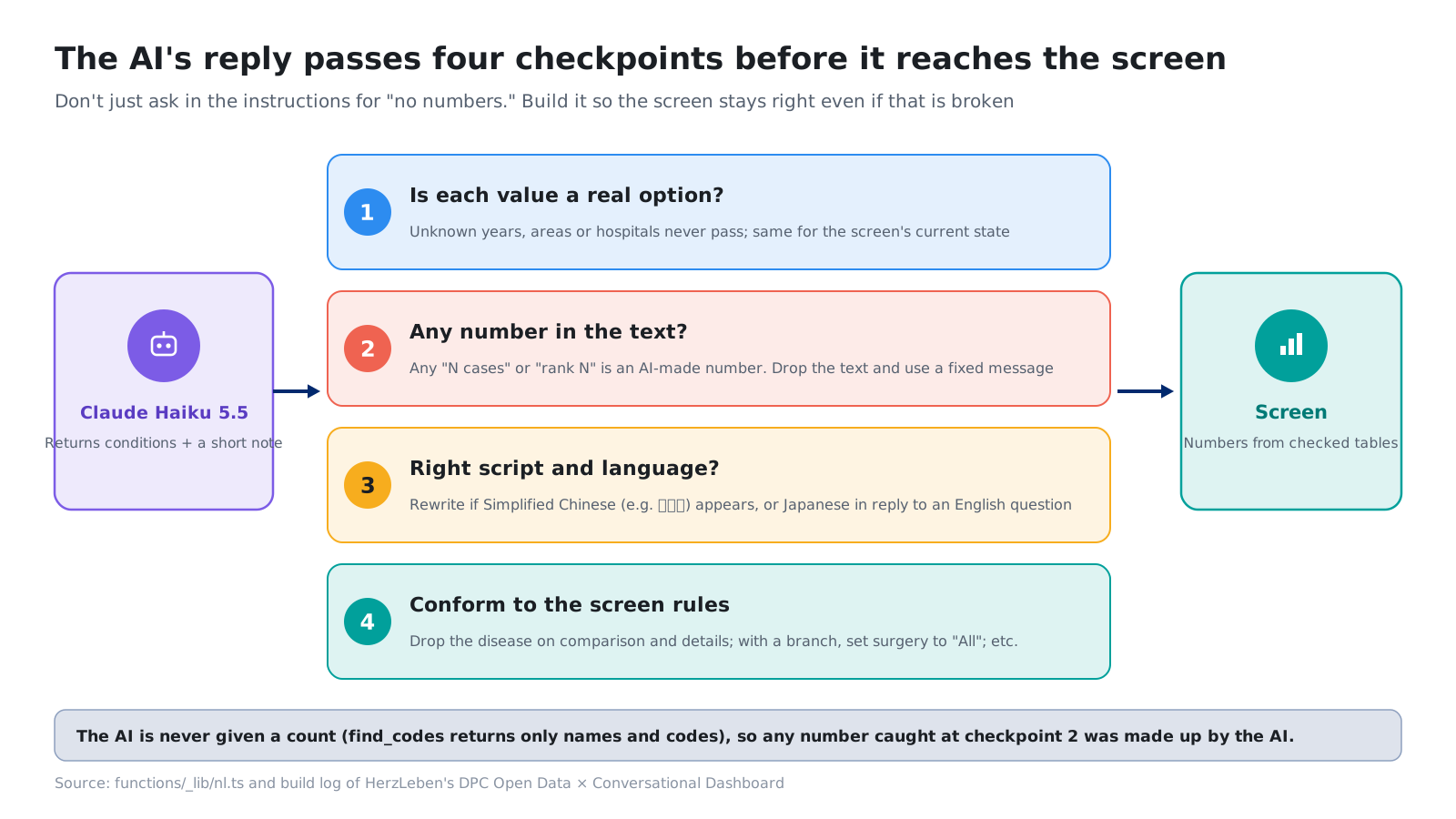
- Is the value one of the screen’s options? Years or medical areas that do not exist do not pass. The “current state” sent from the screen is not trusted either; it goes through the same checks as the AI’s reply
- Is there a number in the explanation? The AI is never given counts, so if “N cases” or “No. N” appears in the explanation, it is a number the AI made up. The whole explanation is dropped and replaced with a fixed sentence. In testing, we confirmed that an explanation reading “Chibanishi General Hospital is No. 1 with 9,265 cases” was replaced
- Are the characters and language right? Once, a decline reply contained Chinese characters (救急车, simplified Chinese for “ambulance”). We stopped letting the AI write decline messages and switched to a fixed message for each type. If simplified Chinese characters appear in the explanation for a chosen set of conditions, an error is returned and the AI rewrites it
- Does it fit the screen’s rules? For example, drop the disease on the comparison screen. These are the rules added in section 7
If the AI returns only text without using a tool, the screen does not change either. Only a set_view that has passed the checkpoints can move the screen.
5. Splitting the tests into three tiers
5-1. Tests without API calls, the real API, and variation checks
Testing an app with AI built in gets expensive when it calls the real API, and the answers vary. From the start, we asked Claude Code to “keep tests that call the real API separate from tests that do not.”
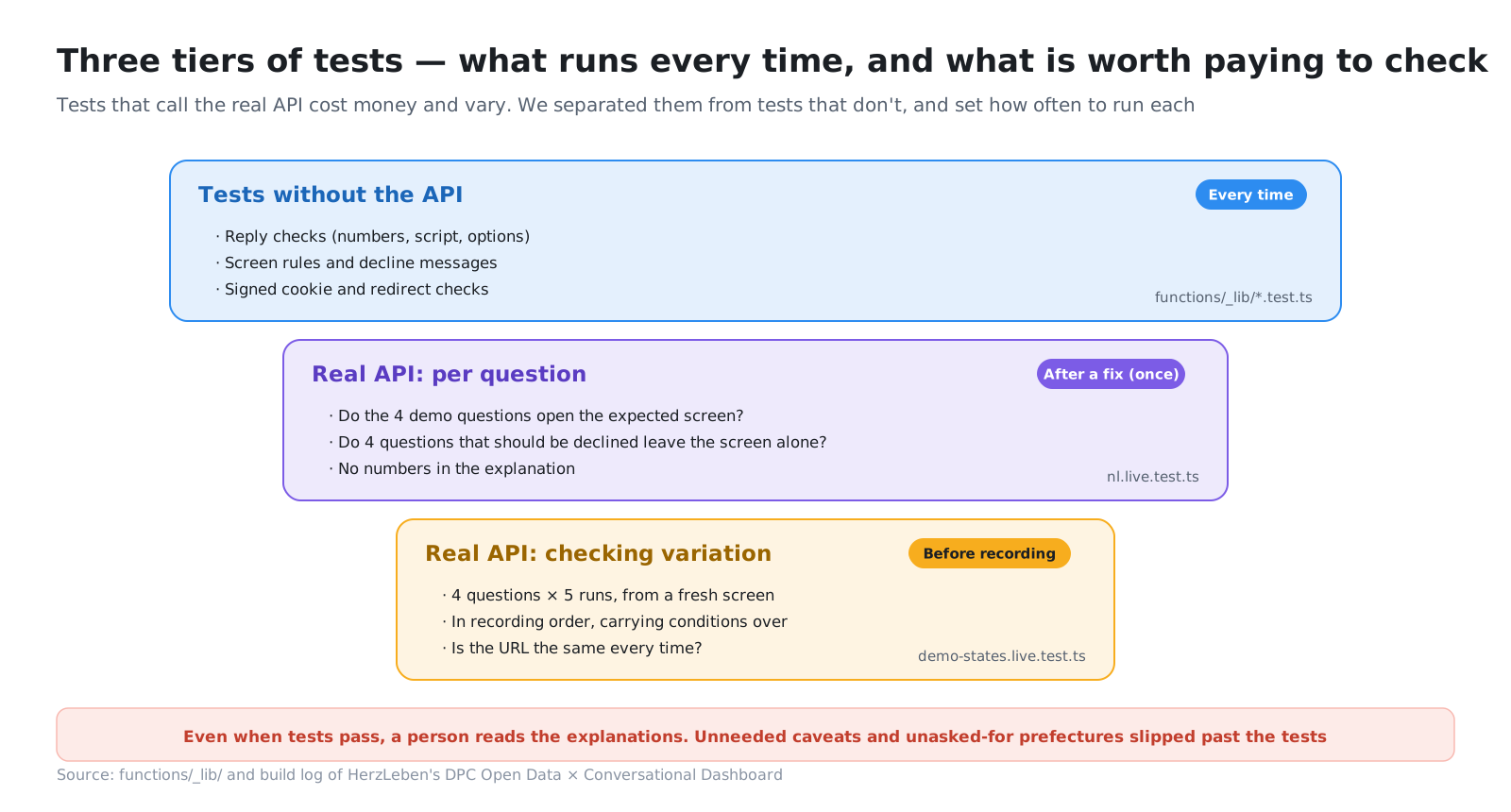
- Tests without API calls: reply checks, the fixed decline messages, the screen’s rules and so on. The AI’s reply is swapped for prepared values. They cost nothing however often they run
- Real API, question by question: the four demo questions and four questions that should be declined (weather, rewriting the instructions, advice on a drug, a hospital that does not exist). All eight produced the expected screen state; the four to be declined left the screen unchanged, and no number appeared in any explanation
- Real API, variation checks: the same question five times each. Used in section 7
Tests that call the real API run with a key from a dedicated workspace created in Anthropic, with a monthly spending cap. To avoid using up the production rate limits, they skip the HTTP endpoint and call the functions directly on the local machine.
5-2. Snags getting the tests to run
At first, the tests that call the real API did not run.
- When the settings file holding the key (
.dev.vars) was empty, the regular expression that reads it matched across the line break and picked up the next line (a Japanese comment) as the key, so the run failed before any request was sent. We changed it to treat an empty file as “no key” and skip - The default test timeout (5 seconds) was shorter than the time needed to call the AI twice, so three questions timed out (the answers themselves were correct). We raised it to 60 seconds. The test tool does not print output for tests that pass, so we had it write the results to a file instead
In both cases, Claude Code traced the cause from the failure message and fixed it. What the person did was set up the workspace and the cap, and enter the key.
6. Even when the tests pass, a person reads the explanations
6-1. All eight passed, and yet
In the real-API tests, all eight questions produced the expected screen state. Even so, when a person read the explanations, there were two things to fix.
- In question 1 (hospitals in Tokyo with the most circulatory cases, over three years), the AI added an unnecessary caveat that “a three-year ranking by hospital is not in the open data.” The trend screen shows three years for the top ten hospitals, so the question can be answered
- In question 3 (comparing two hospitals), it chose a prefecture (Tokyo) that nobody had asked for
What the tests checked was whether the required fields of the screen state were correct. They did not look at the wording of the explanation or at extra conditions. The cause was that we had not told the AI “what each screen shows” or “do not change conditions nobody asked about.” We added these to the instructions, and added two cases to the real-API tests: “no caveat on question 1” and “the region does not change on question 3.”
6-2. Decline only once
Question 4 (the three-year trend for heart failure nationwide) cannot be answered from the open data alone. Counts by disease are published only for FY2024, so a three-year trend for heart failure alone cannot be produced.
In the first version, the same caveat appeared in three places, the reply text, the “What cannot be shown” field and the top of the trend screen, which was repetitive. The reply text is now one short sentence with only the chosen conditions, and the reason appears once, at the top of the screen. This too was decided by a person looking at the screen, not by a test.
7. Stop variation with rules on the server
7-1. Starting from a blank screen was not enough
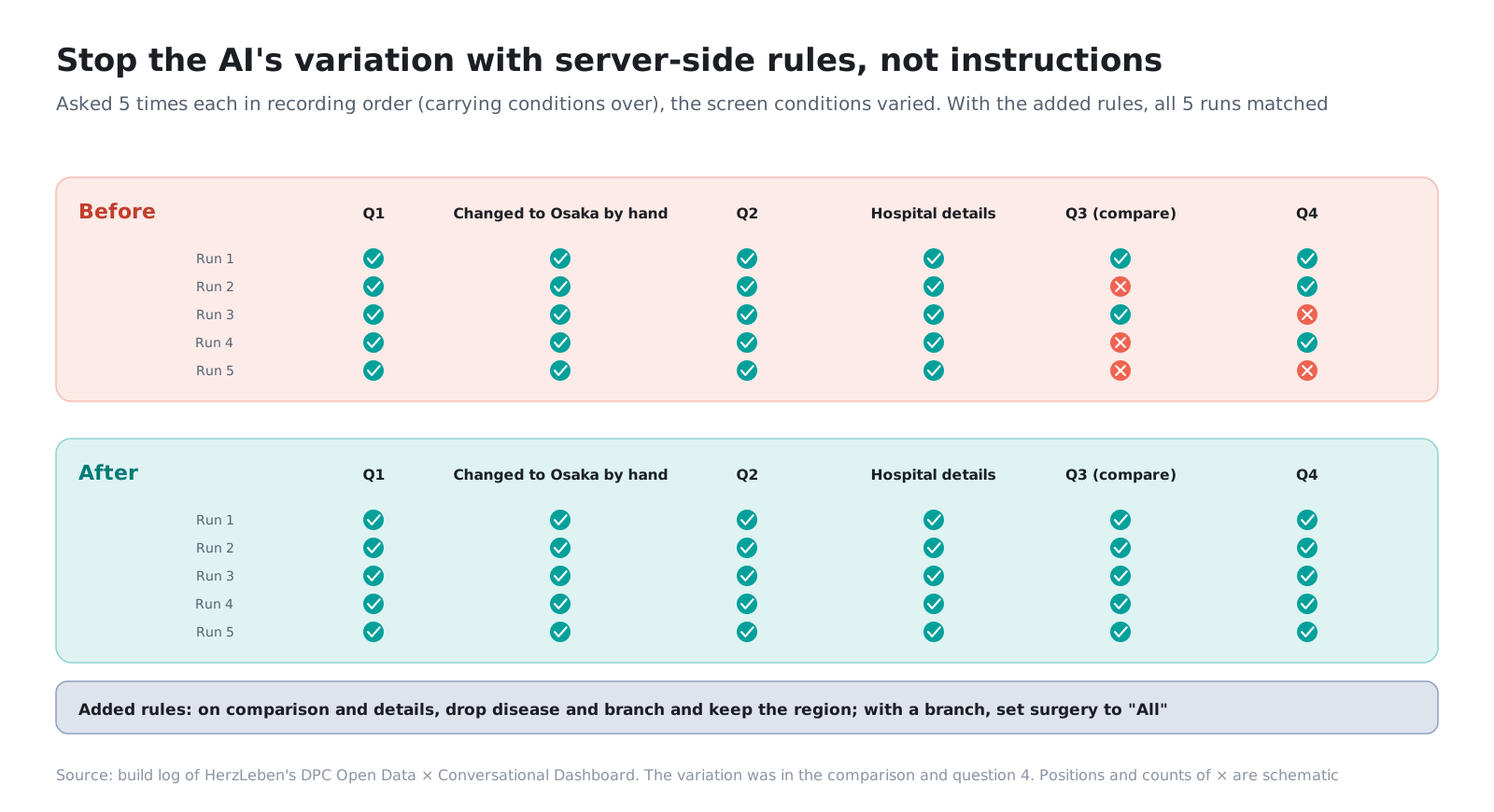
Before recording the demo video, we asked each of the four demo questions five times to check whether the AI picked the same screen state every time. Asked from a blank screen, the expected fields matched in all 20 runs.
But when we asked again in the same order as the recording, carrying over the conditions from the previous scene, the answers varied. On the comparison question, the AI sometimes kept and sometimes dropped the previous question’s disease or “with surgery”; on question 4, it carried over Hokkaido or the two hospitals from the comparison. In real use, the screen will not always start from a blank state.
7-2. Make it a rule instead of relying on the instructions
Here we stopped asking in the instructions and made it a rule on the server.
- The comparison and hospital-details screens do not use region or disease. The region is kept as is; the disease and the branch are dropped
- When a surgery branch is chosen, “with or without surgery” is set to “all” (the branch takes priority, so the screen is the same; this removes a source of variation)
With these added, we ran the recording order five times, and the URL was the same in all five runs for every scene. The reply text differs a little each time, but that does not affect the screen (in the video’s captions, too, we wrote them so the reply text is not read out).
7-3. Listing phrases can invite them
There was also a failure in the opposite direction. While trying to fix a caveat that slipped into the English reply for question 4, we listed specific phrases in the instructions (such as “shown at the MDC level” (「MDC 単位で示す」)). After that, the Japanese question 1 started getting an unnecessary “What cannot be shown.” Listing phrases seems to invite those very words. We went back to a single general sentence.
Even in the fixed version, the unnecessary “What cannot be shown” still appeared once in nine runs, about the same rate as the variation that was there before. This is hard to turn into a rule, so for filming the video we decided to “reshoot if it appears.” Absorbing variation you cannot fully stop through the procedure for how it is used is one option too.
8. This post’s harness
| Tool | What it is in this codebase | Role |
|---|---|---|
| The screen’s type | ViewState (same names as the URL) |
Reduces the AI’s job to filling in the type |
| Tool definitions | find_codes, set_view, decline (strict) |
Never hand over counts. Enumerate the selectable values |
| Checkpoints | Server checks (values, numbers, characters, the screen’s rules) | Protect the screen even when a request is broken |
| Three test tiers | Tests without API calls / real API / variation checks | Set how often each runs according to cost and variation |
| Dedicated workspace | A key with a monthly spending cap | Puts a ceiling on test costs |
| Human judgment | Reading explanations, how caveats are shown, criteria for reshooting | Find what tests cannot, and add it to the tests |
9. Summary
- The scope left to the AI was set with the screen’s type. The AI only fills in the type and never touches a count
- The instructions are where you ask; the server is where you check. Replies pass four checkpoints before they reach the screen
- The tests were split into three tiers: without API calls, the real API, and variation checks. Even when the tests pass, a person reads the explanations
- The AI’s variation was stopped with rules on the server, not with the instructions. Variation that could not be fully stopped was absorbed through the procedure for how it is used
The narrower you set what the AI is trusted with, the more safely you can use it.
Next step
Part 4 covers publishing and running this AI dashboard: the three limits that keep a public demo anyone can use from running up costs, the bot check passed once at the entrance, what we fixed after measuring the first load on smartphones, and a publishing procedure that sets out what is left only to people.
Sources
- Anthropic, Pricing (Claude Haiku 5.5, checked October 24, 2026). https://www.anthropic.com/pricing
- Anthropic, Claude Docs (Tool use / Prompt caching)
- MHLW, Discharge Survey results, FY2022–FY2024 (source of the numbers on screen)
- The figures and tables in this post were prepared by HerzLeben Inc. from the sources above; they were not produced by the Japanese government