
Claude Code × Medical Application
[Claude Code] Medicare Part D × Text-to-SQL Part 0: Overview and Harness Design
1. Introduction
“Explore 80 million rows of US prescription data in plain Japanese — without writing SQL.” Over five posts, I’ll walk through building exactly that app with Claude Code and shipping it. This is the first project in the series “Claude Code × Medical Application”: “Medicare Part D × Text-to-SQL.” The code is on GitHub so you can run it in your own environment.
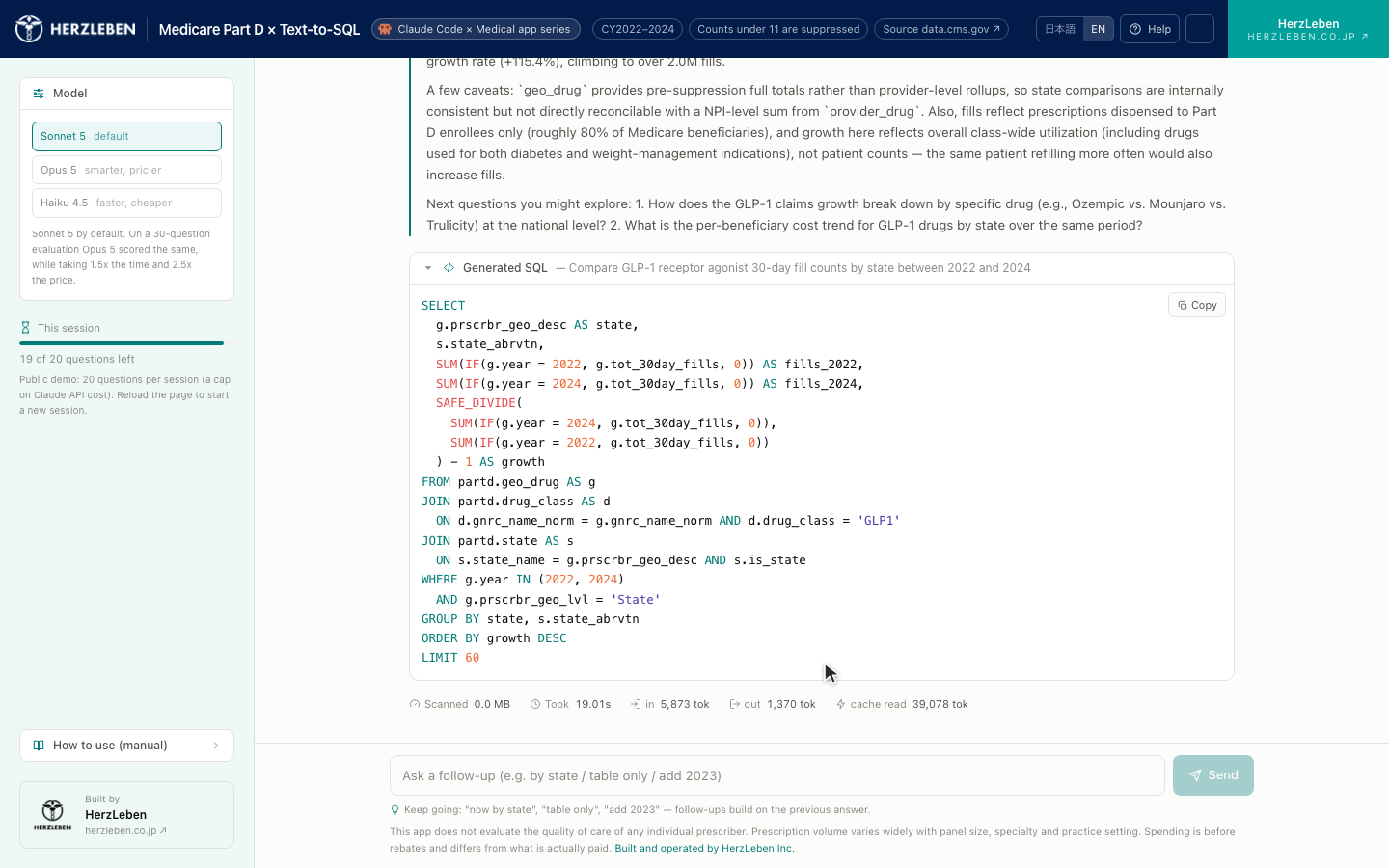
1-1. What the finished app looks like
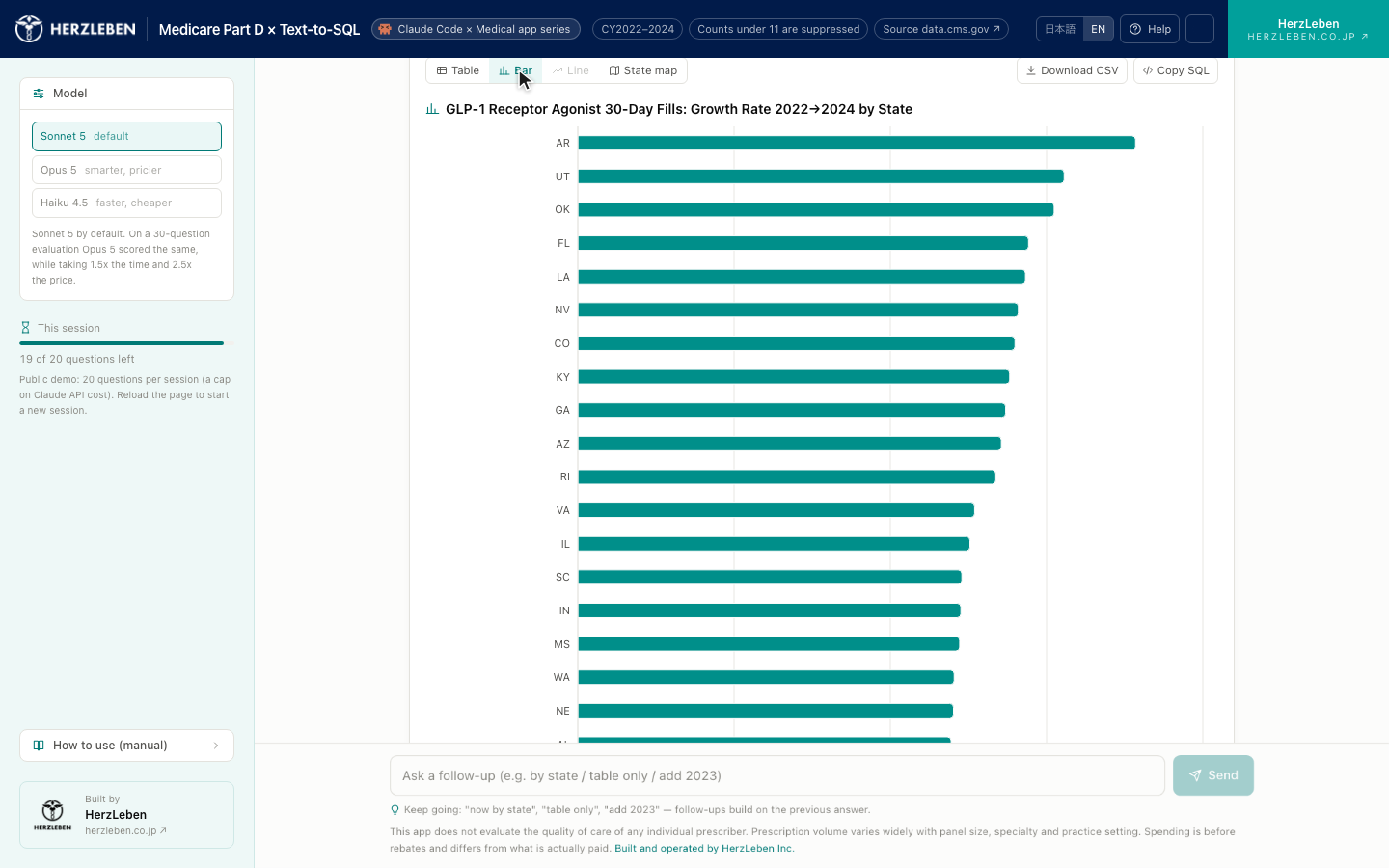
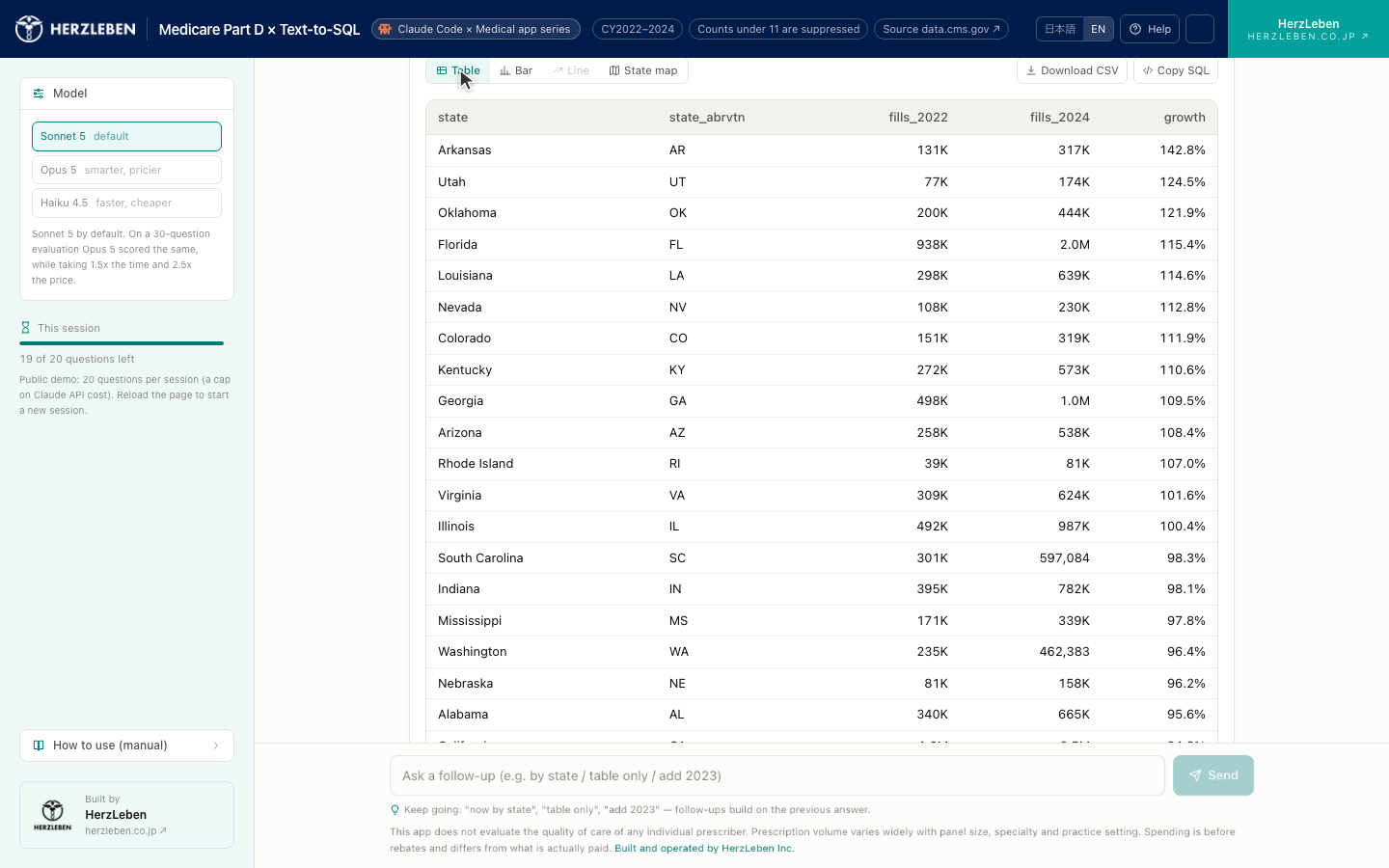
1-2. What you’ll learn in this series
| Part | Contents | Video |
|---|---|---|
| 0 | Overview and harness design (this post) | The series at a glance |
| 1 | Data acquisition and BigQuery loading — download, preprocess, load, and how to read suppressed blanks | The loading pipeline in figures |
| 2 | SQL generation — glossary and tool separation, and inspecting generated SQL before it runs | Tool separation and guards, in figures |
| 3 | UI implementation and model evaluation — screen layout, plus accuracy measured on 30 questions | Running the evaluation |
| 4 | Cloud Run deployment — publishing to your own GCP (optional) | The GCP setup steps |
This series is aimed at people in RWE, medical affairs, data science, and DX functions at pharma and medical device companies, as well as healthcare IT engineers.
It’s also written for anyone using Claude Code, or about to. The medical data is the subject matter; you’re welcome to follow only the harness-building thread.
Being able to read SQL is enough — you don’t need to write it — and I’ve written it so you can follow along with no prior Google Cloud experience.
2. Why US open health data?
2-1. Japan has no public “physician × drug” dataset
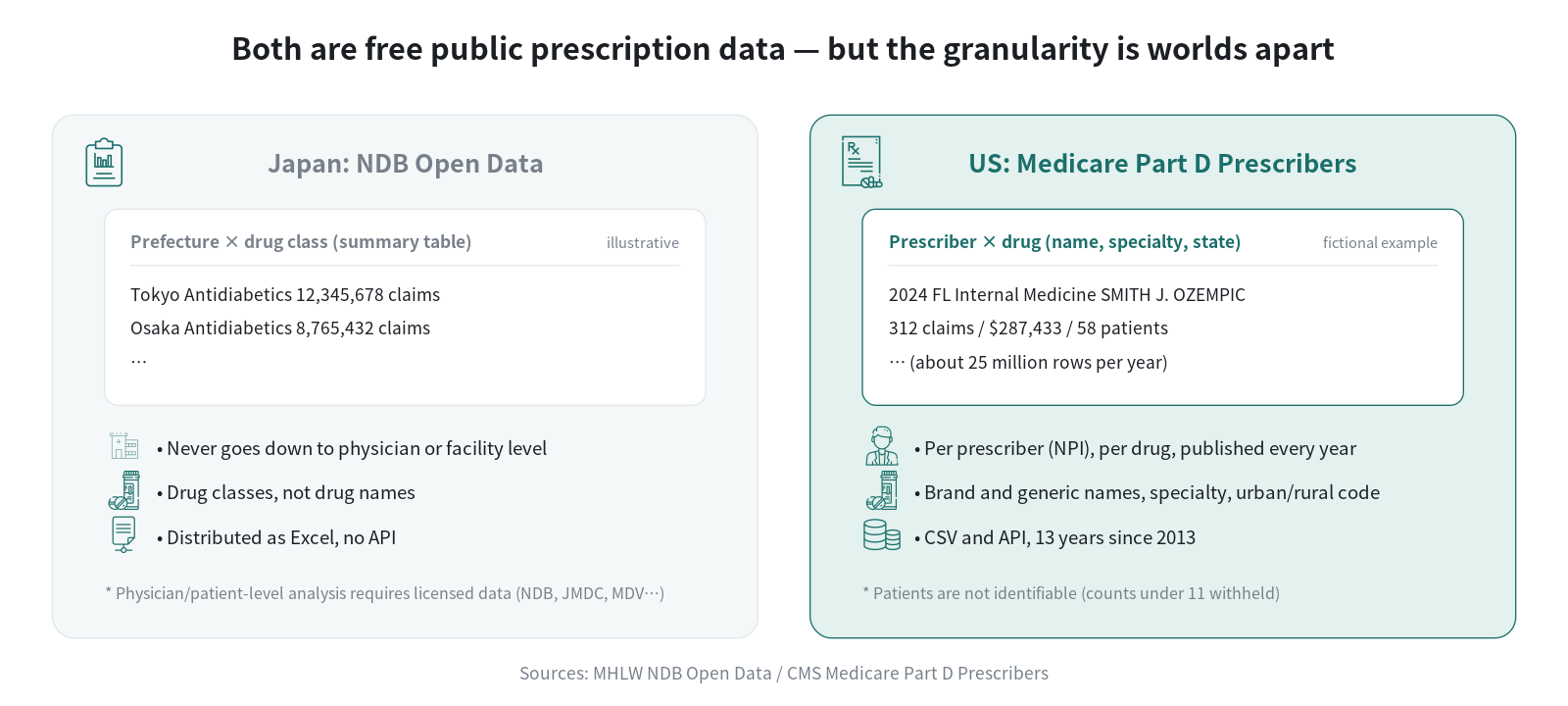
In Japan, analyzing down to the physician or patient level requires contracted datasets such as NDB, JMDC, or MDV — you can’t just try things out. The one dataset anyone can obtain, NDB Open Data (aggregate tables the Ministry of Health, Labour and Welfare compiles annually from the national claims and health checkup database), is distributed as Excel files aggregated by prefecture × drug class.
In the US, CMS (Centers for Medicare & Medicaid Services, roughly equivalent to the Health Insurance Bureau of Japan’s MHLW) aggregates Part D drug benefit claims under public Medicare annually by prescriber × drug and publishes them with physician names attached. It’s part of a transparency policy that began in 2015, and the CY2024 release came out in May 2026. Thirteen years of data going back to 2013 are available to anyone as CSV.
2-2. What this data can show you
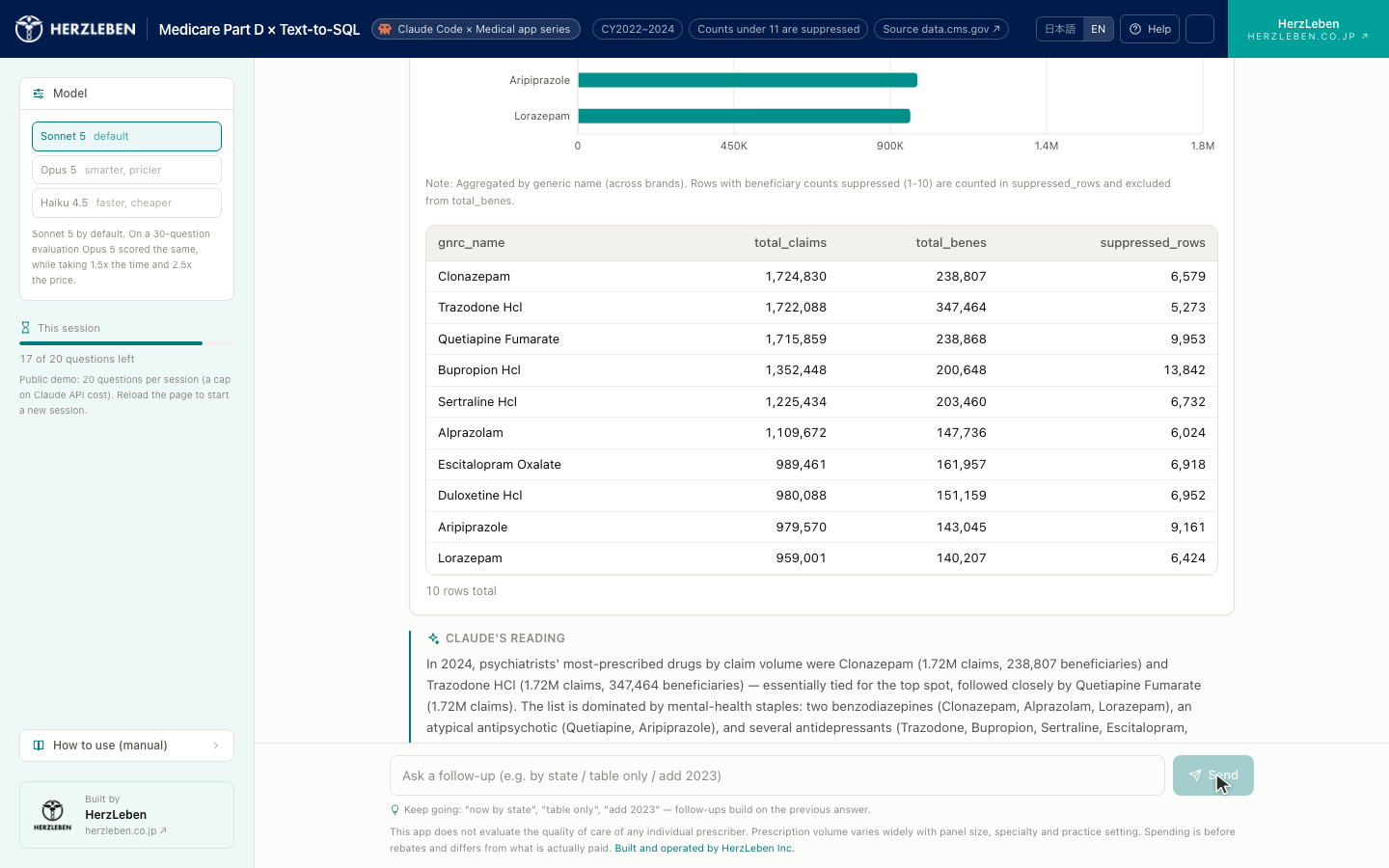
- Regional uptake of new drugs — where GLP-1 receptor agonist and DOAC prescribing grew, by state, by specialty, by year
- Cost structure — top drugs by total drug spend, brand-vs-generic ratios, per-capita drug spend by state
- Prescribing concentration — what share of a drug is written by the top X% of prescribers
- Prescribing patterns by specialty — the drugs psychiatrists prescribe most, the distribution of opioid prescribing rates among internists
- Urban vs. rural differences — generic rates and prescription volumes sliced by RUCA (urban/rural classification)
What you can’t do: follow individual patients (line-of-therapy switches, concomitant use, adherence), look at monthly seasonality, or analyze by indication (there’s no diagnosis information). Part 1 covers the details and the limitations.
2-3. Why use this dataset as the subject?
The core theme of this series is agentic coding: the agent plans, executes, checks the result and decides its next move, and the human’s job is to build the conditions in which that loop holds before setting it running. That is a different job from vibe coding — throwing instructions at a model and accepting whatever code comes back unread. What you hand over is not code. It is an environment, a set of criteria, and stopping conditions.
Throughout the series I’ll call the whole apparatus the human assembles the harness.
| Piece | What it does |
|---|---|
Project documents (CLAUDE.md, design doc, data dictionary) |
Order of work, constraints to honor, the source of truth for terminology |
| Permissions and stopping conditions | Which commands a human reviews, where the agent halts |
| Hooks | Run checks and record-keeping without the human remembering to |
| Skills | Give repeated procedures a reusable form |
| MCP | Connect external systems and vocabularies as tools the agent can use |
The first app starts with the thinnest possible harness: three documents and four boundary conditions, with no hooks, no skills and no MCP. The point is to feel how far that gets you and where it runs out.
From the second app onward, every piece shows the harness it ran with. Every app builds at least one skill — factoring a repeated procedure into something the next app can reuse as-is, because that accumulation is the most legible result agentic coding produces. MCP gets built from scratch in the third app (OMOP concept standardization).
The medical-data app is the subject matter that makes this concrete. I chose public data because it’s a safe place to practice: if you jump straight to trying Text-to-SQL on internal data, the data governance discussion comes first and nothing moves forward. With public data anyone can touch, you can settle what to hand the agent, where to stop it and how to verify it, then carry all of that over to internal data. In principle the subject could be anything; I chose this dataset because its structure is close to real-world medical work and because it’s free and fully reproducible by anyone.
As a bonus, the US data itself has practical uses. You can check US trends for global products against public data rather than relying on numbers passed down from headquarters or the US affiliate. And before you start experimenting on RWD that requires a contract, you can build a feel for the quirks of aggregation using data with the same structure (claims-based, pre-aggregated, with suppression rules).
3. What we’ll build in this series
3-1. What the app can do
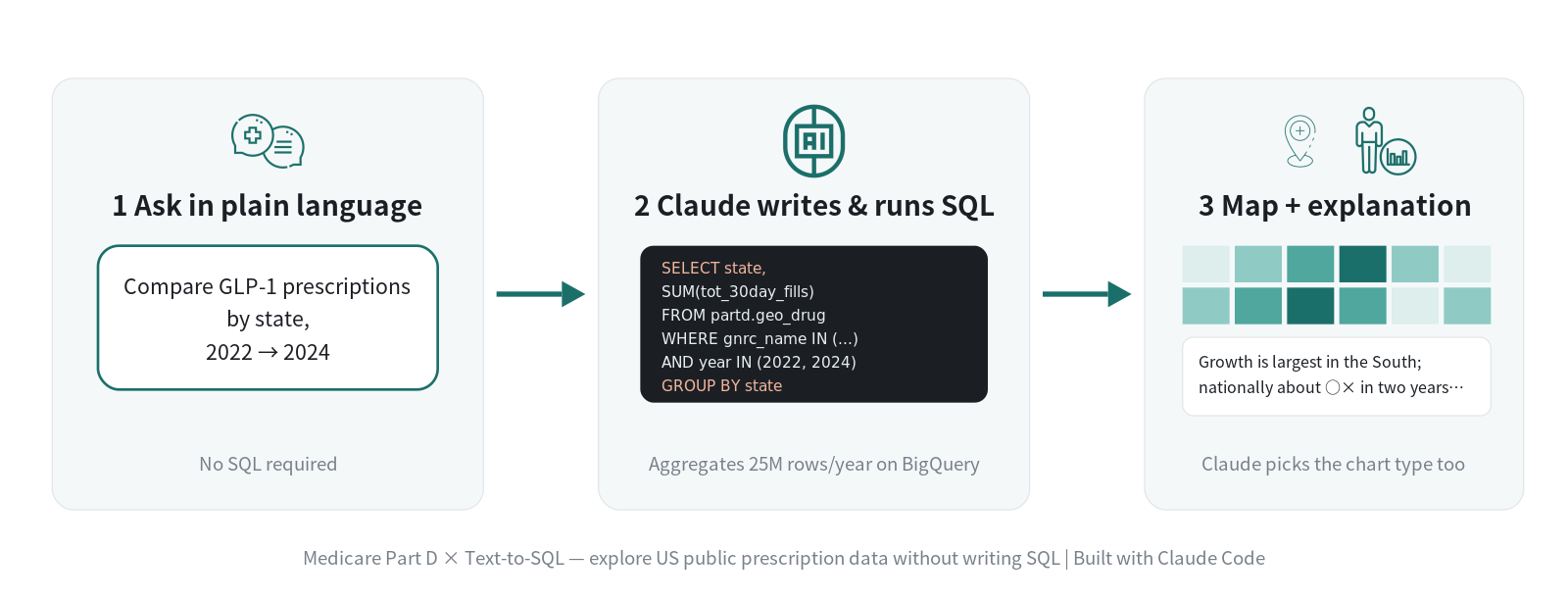
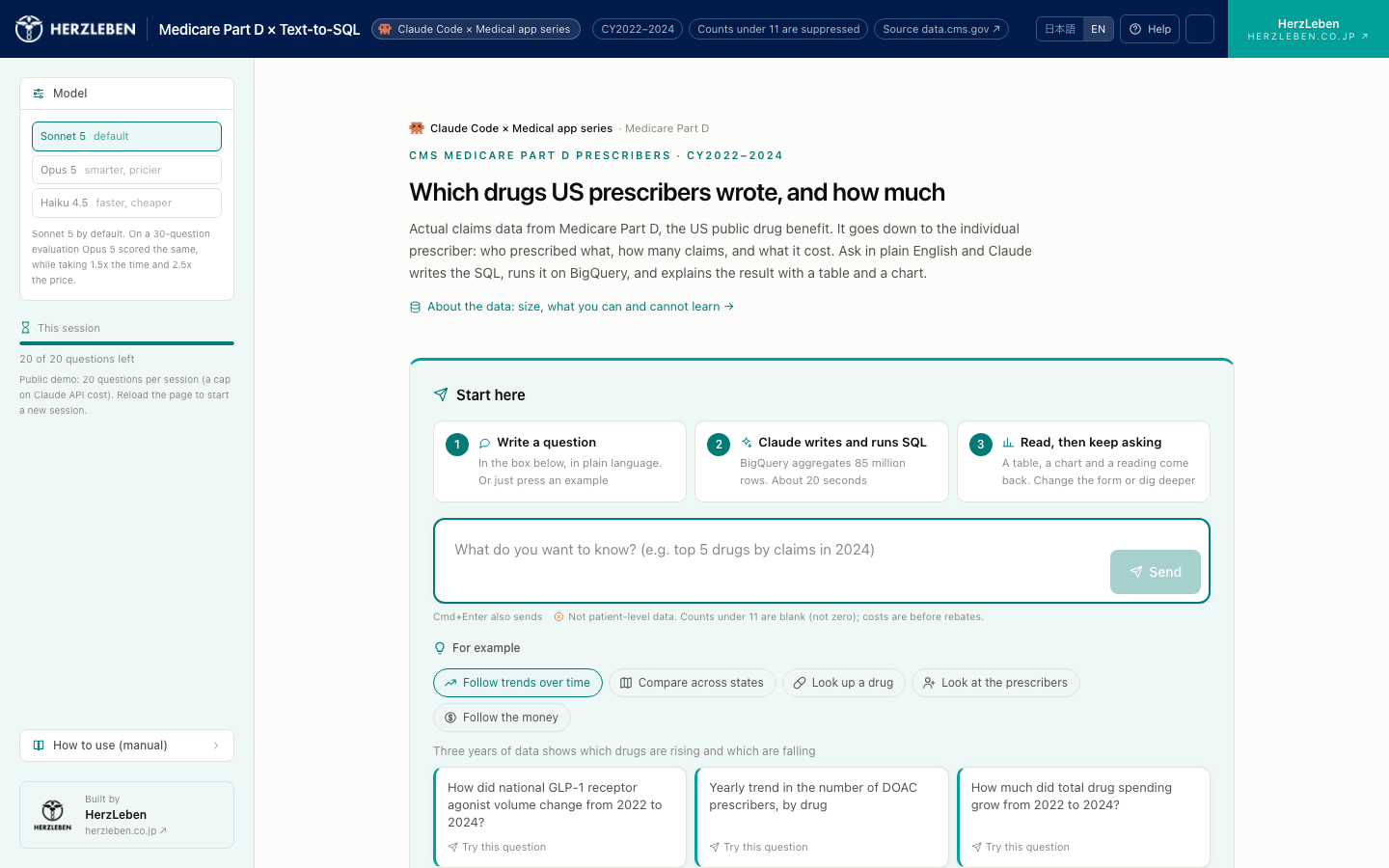
- Ask in Japanese, and Claude writes and runs the SQL, then returns results with an interpretation. You never write SQL. You can use it even if you can’t read SQL.
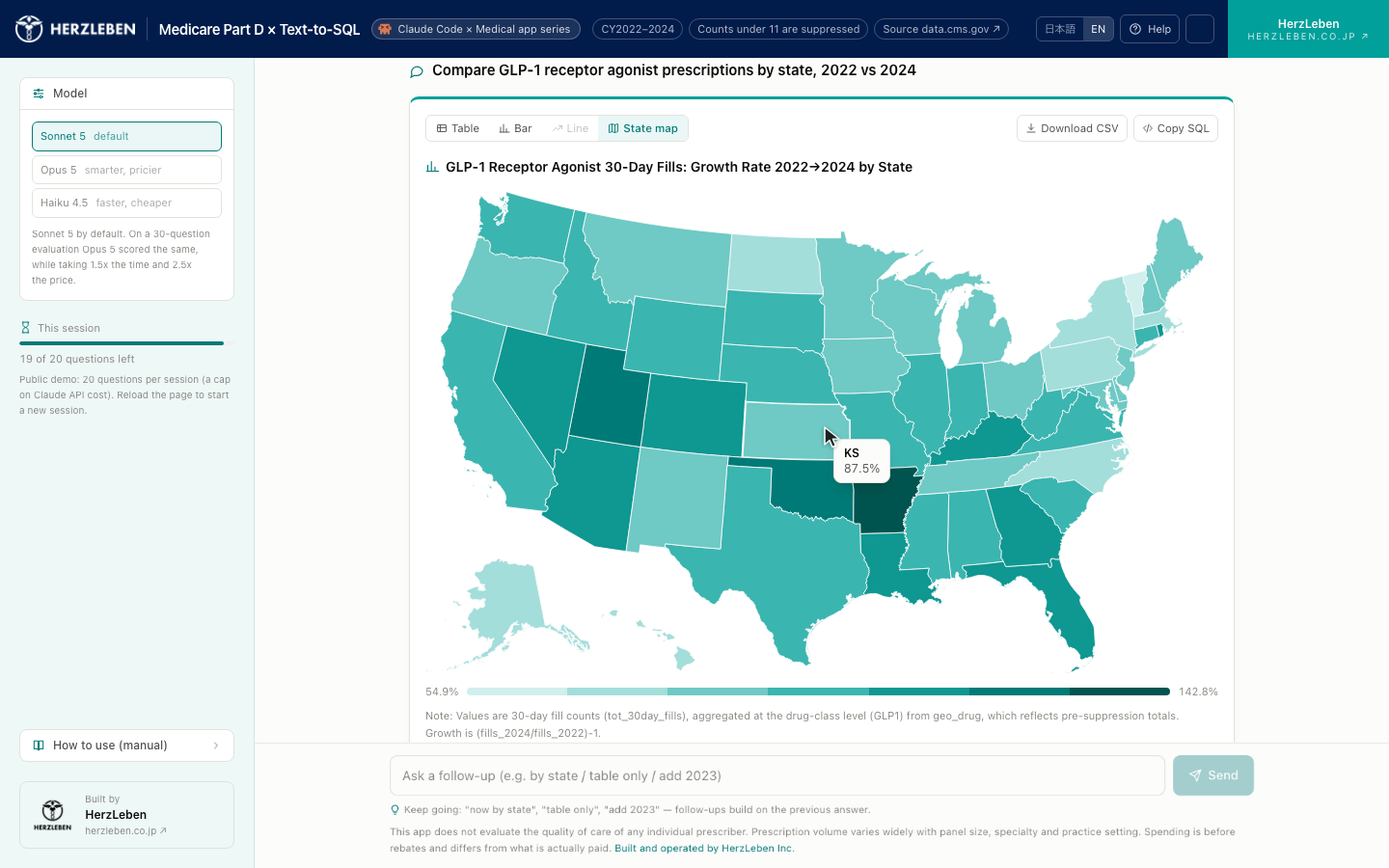
- You choose the output format conversationally. Switch between tables, bar charts, line charts, state-level maps, and CSV just by saying “show it as a map” or “make it a table.” From the same data, you can assemble the report that fits your purpose, interactively.
- You can inspect and copy the generated SQL at any time. Rather than taking the AI’s answer on faith, the design lets a human verify what was actually aggregated.
3-2. Technical stack
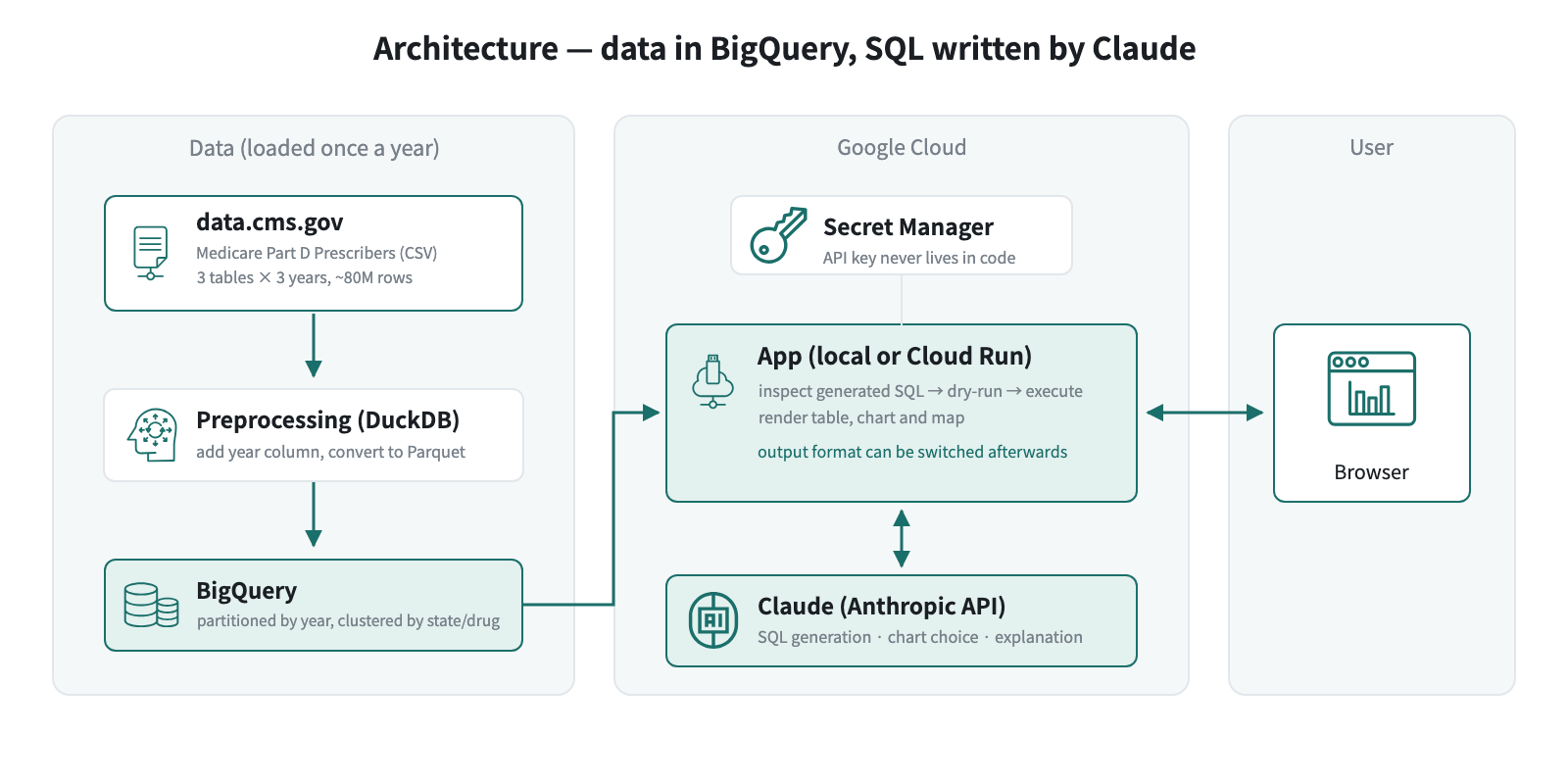
| Role | What we use | Why |
|---|---|---|
| Data storage and aggregation | BigQuery | Load a CSV and query it immediately. Aggregating 80 million rows returns in seconds |
| Running the app | Local, or Cloud Run | Running locally is the default. Cloud Run is only for those who want to publish it (Part 4) |
| SQL generation and interpretation | Claude (Anthropic API) | With tool use, “run SQL” and “visualization spec” are separate tools, so the app can inspect the generated SQL before executing it |
| Development | Claude Code | Hand it the design doc and data dictionary, then work conversationally from data loading through deployment |
3-3. The harness for the first app
This is where the theme from section 2 lands. What I handed Claude Code was not code — it was three documents.
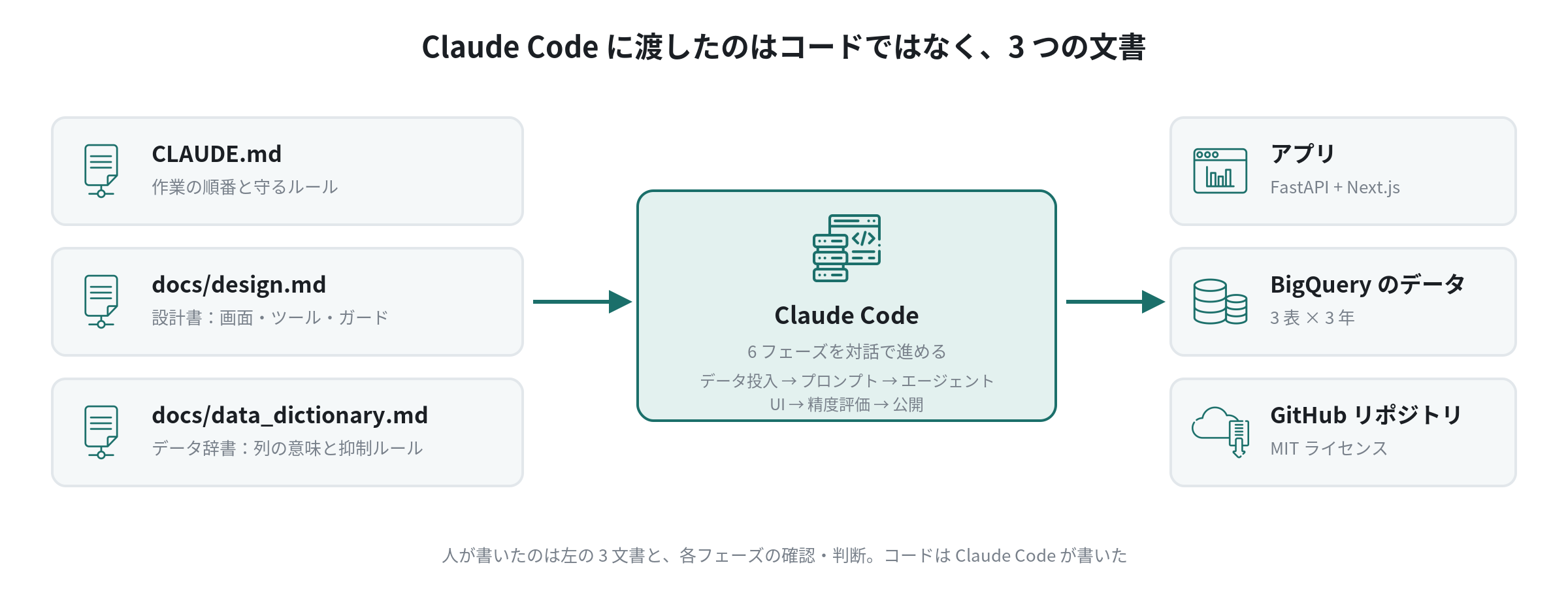
That was the entire initial instruction.
CLAUDE.md と docs/ 配下を読んでから始めてください。フェーズ1「データ」から着手します。
まず CY2024 の Geography and Drug(最小ファイル)だけで疎通確認してから、残りのファイル・年に広げてください。
外部に影響するコマンドは実行前に見せてください。詰まった点は docs/DEPLOY.md に日付付きで残してください。
It looks short, but it isn’t a hand-off into the void. Those three lines carry four boundary conditions: which documents to read first, prove the pipeline on the smallest file before widening, show me any command that touches something outside the repo before running it, and log what you got stuck on with a date. Writing the three documents and deciding those four things is the real work on the human side.
From there, I worked through six phases with Claude Code: data loading → prompt design → agent implementation → UI → accuracy evaluation → deployment. Each part shows the same three things: what the human prepared before the run, the boundary conditions in the instruction, and what the human decided versus what the run discovered — with actual screenshots.
What the first app lacked is what motivates the next one. Eyeballing every externally-visible command can move into a hook. Getting CSVs into BigQuery is the same procedure next time, so it can be factored into a skill. Vocabulary and external-system lookups belong behind MCP. You can only decide where to thicken the harness after running once with a thin one.
3-4. Distribution — the app is on GitHub; you run it in your own environment
Rather than hosting this app ourselves, we’re publishing the full codebase on GitHub for readers to run in their own environments. You use your own Claude API key.
- What you need: an Anthropic API key, a Google Cloud project, and Python
- Cloud Run isn’t required if you only run locally. Part 4 is written for those who want to deploy to their own GCP
- Licensed under MIT. Part 2 covers what to watch out for when swapping in your own internal data
4. Summary
The theme of this series is agentic coding: what you hand the agent, where you stop it, and how you verify it. The first app is a record of working that design all the way through in the safest place to practice — public data. The subject matter is medical data, but the method carries over to internal data unchanged. The code is on GitHub.
Next steps
Next we’ll pull the CMS CSVs down and load them into BigQuery. Fetching roughly 10.5 GB, pinning the types in preprocessing, loading five tables, and handling the one thing that trips people up most with this data — a blank is not a zero — all with the commands alongside. How Medicare and Part D themselves work is covered separately in the reference page “What Medicare Part D is”.
Sources
- CMS, Medicare Part D Prescribers (data.cms.gov)
- CMS, Medicare Part D Prescribers Datasets: A Methodological Overview
- Ministry of Health, Labour and Welfare, NDB Open Data
The code is available on GitHub: github.com/HerzLeben/medicare-partd-text-to-sql