
Claude Code × Medical Application
[Claude Code] Medicare Part D × Text-to-SQL Part 1: Environment Setup and MCP
1. Introduction
In Part 0, I wrote that the subject of this series is agentic coding, and that what a human hands over is not code but an environment, decision criteria, and stop conditions. Part 1 is about building that “environment.”
It covers two things:
- Permissions: which commands run without confirmation, which ones a human confirms, and which ones are refused (
.claude/settings.json) - MCP: connecting BigQuery read-only, as a tool the agent can use to check things for itself (
.mcp.json)
The working example is the step that downloads CMS’s public CSVs and loads them into BigQuery. I show it all the way to the point where, instead of a human looking at the console and pasting the results, the agent checks the loaded data itself through MCP.
2. Working Environment
2-1. Claude Code as a VS Code Extension
In this series, I use Claude Code as a VS Code extension. The repository files sit on the left and the Claude Code conversation on the right, so I can keep a settings file open and watch it take effect alongside. Every screen below uses this layout.
2-2. Where the Harness Lives
The harness lives in .claude/ and .mcp.json at the repository root. Both are committed to git, so a reader who clones the repo starts with the same settings.
.claude/
├── settings.json         Permissions (allow / ask / deny) and hook registration  ← Part 1
├── settings.local.json   Personal overrides (gitignored)
├── skills/               Repeated procedures                                     ← Parts 2-4
└── hooks/                Checks that run even if no one remembers them           ← Part 3
.mcp.json                 BigQuery MCP connection                                 ← Part 1
mcp/bigquery.tools.yaml   Tool definitions passed to MCP                          ← Part 1
3. Permission Design
3-1. allow / ask / deny
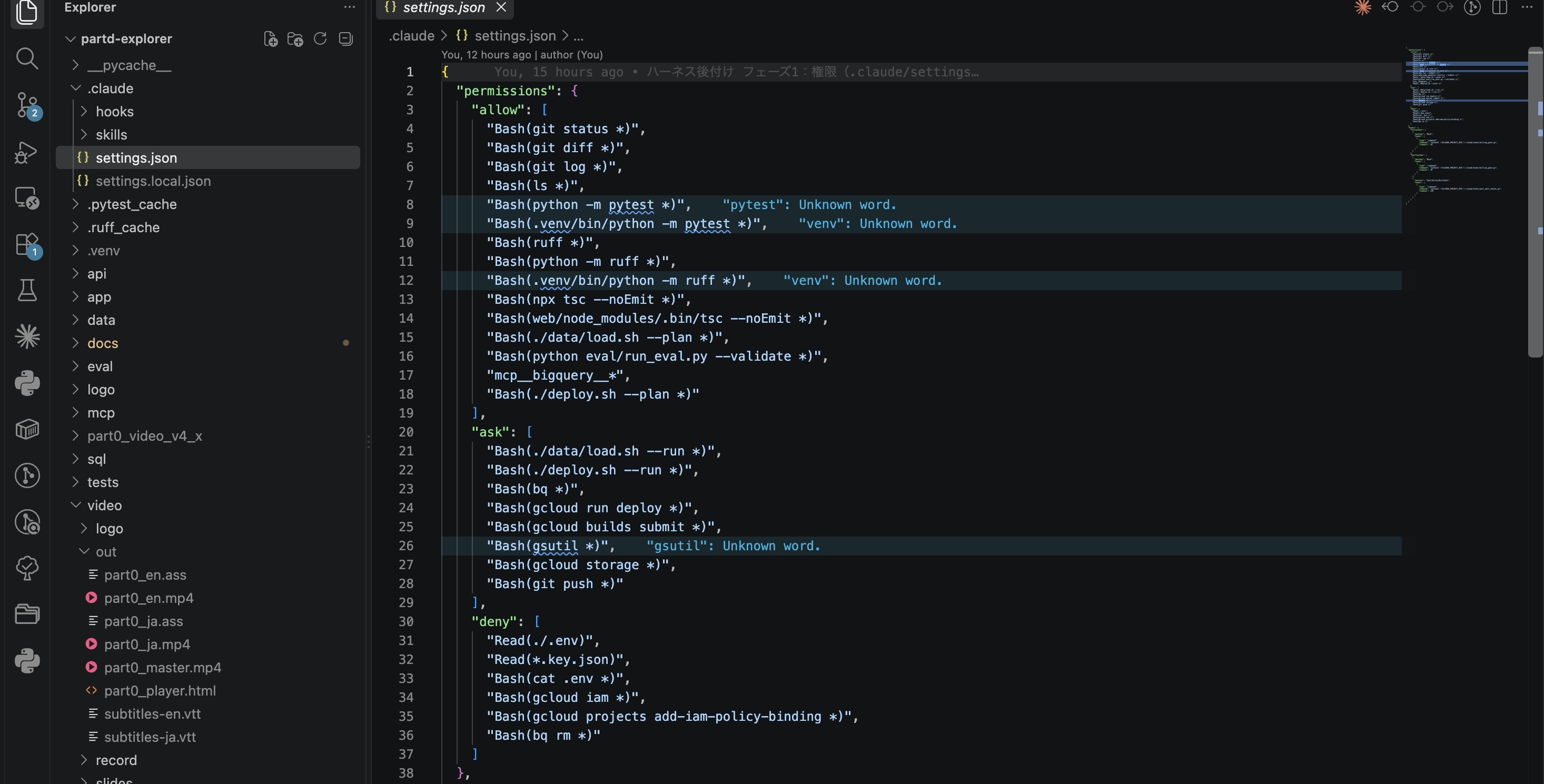
| Category | What I put in | Rationale |
|---|---|---|
| allow | git status/diff/log, ls, pytest, ruff, tsc, ./data/load.sh --plan, ./deploy.sh --plan, run_eval.py --validate, BigQuery MCP |
Read-only, changes nothing. Stopping these would stall the work |
| ask | ./data/load.sh --run, ./deploy.sh --run, bq (all of it), gcloud run deploy, gcloud builds submit, gcloud storage, gsutil, git push |
Costs money or affects things outside. A human reads it before it runs |
| deny | Reading .env and key files, gcloud iam, IAM policy changes, bq rm |
Not the agent’s choice to make. Done on a human’s machine |
The precedence is deny > ask > allow. You cannot carve out an exception with a narrow allow inside a broad ask.
3-2. How the Three Categories Behave
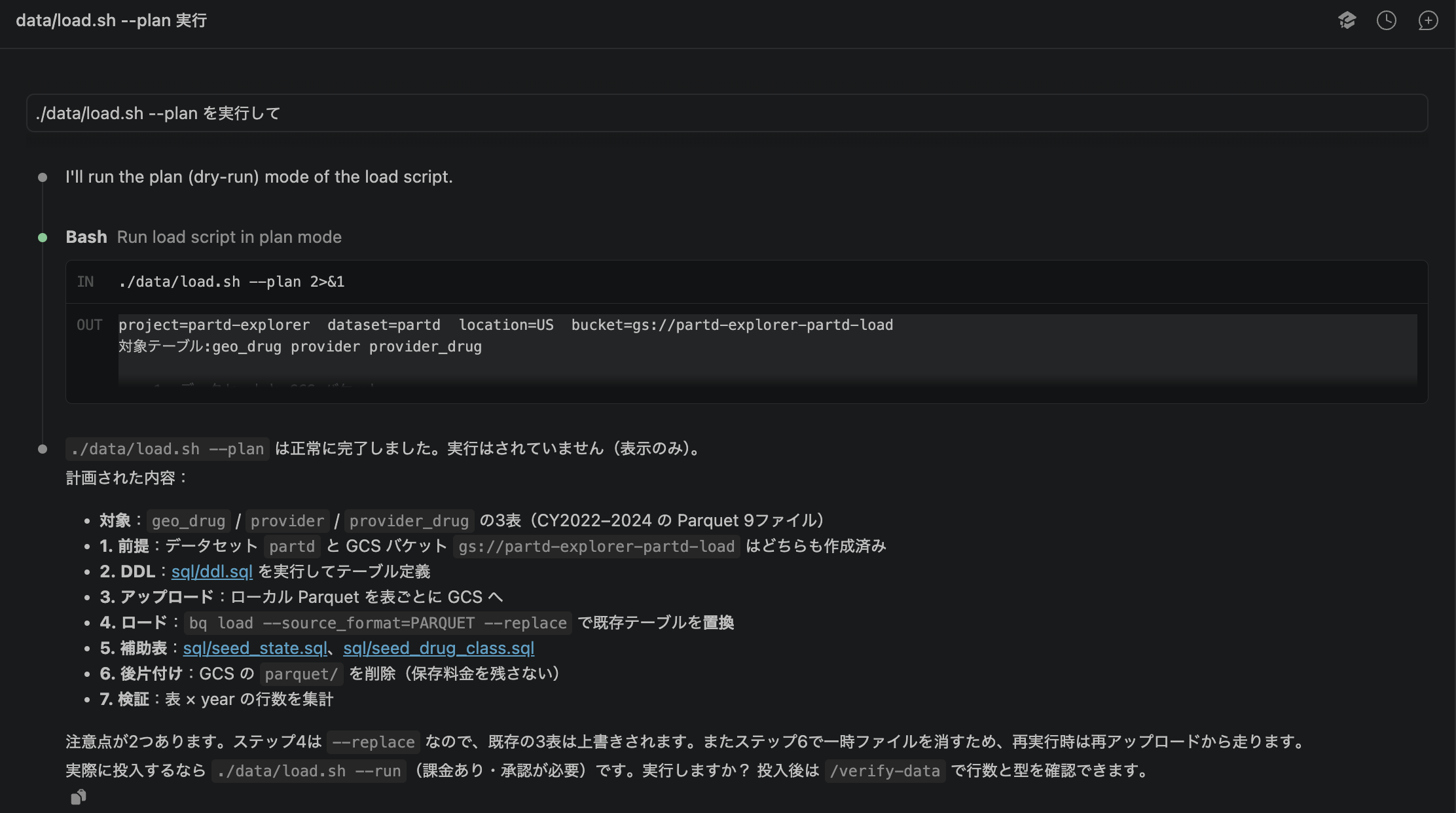
allow: --plan runs without confirmation and returns the list of commands the load would execute.
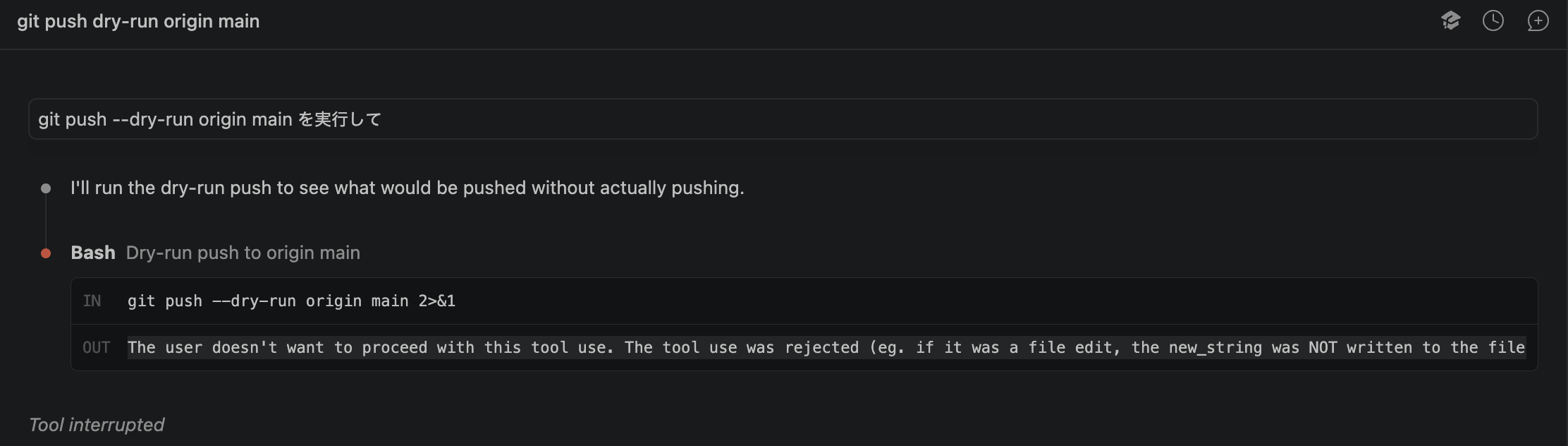
ask: git push always stops right before execution and asks a human for confirmation.
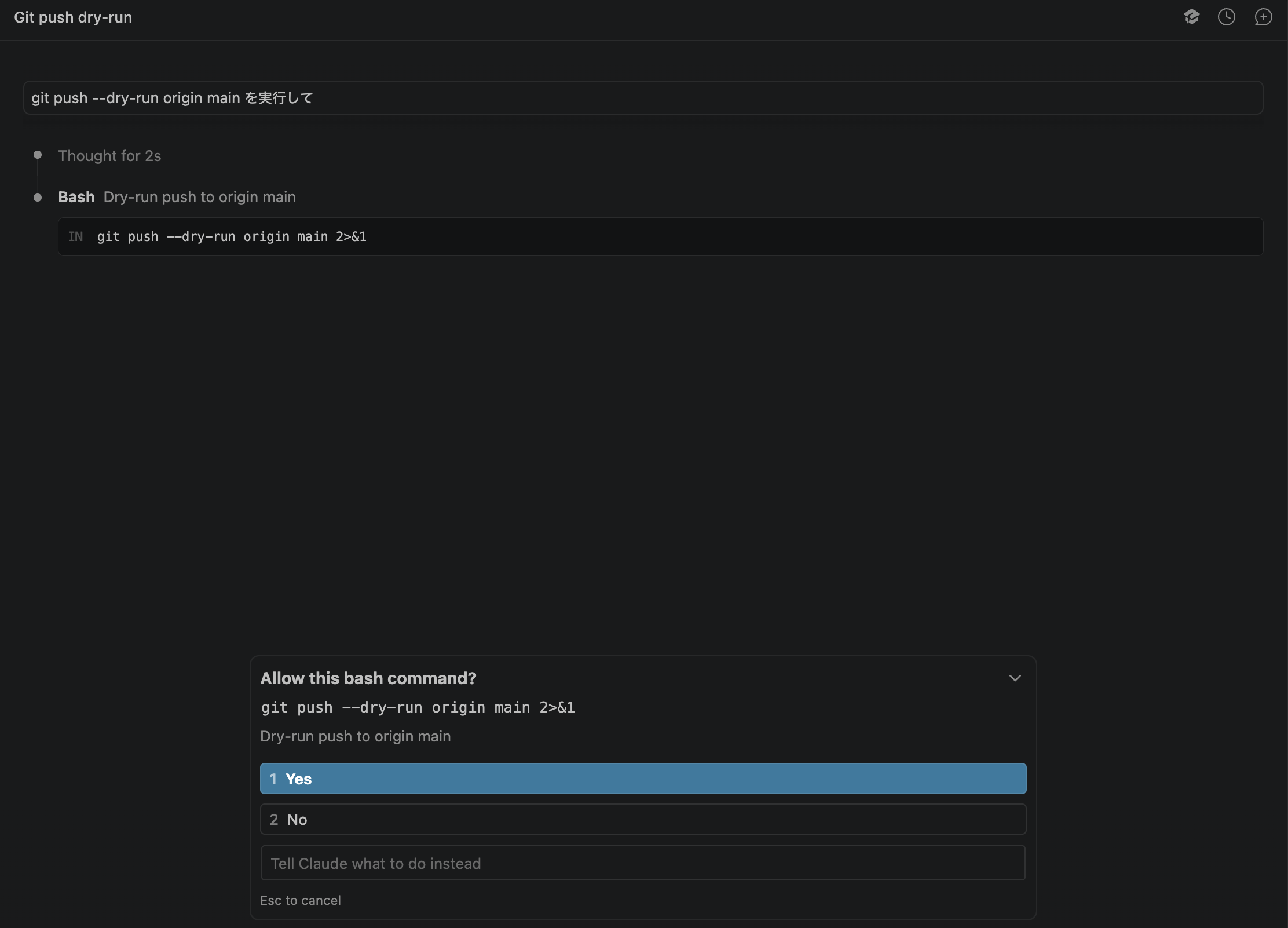
If I choose No here, the command does not run, and the refusal is returned to the agent.
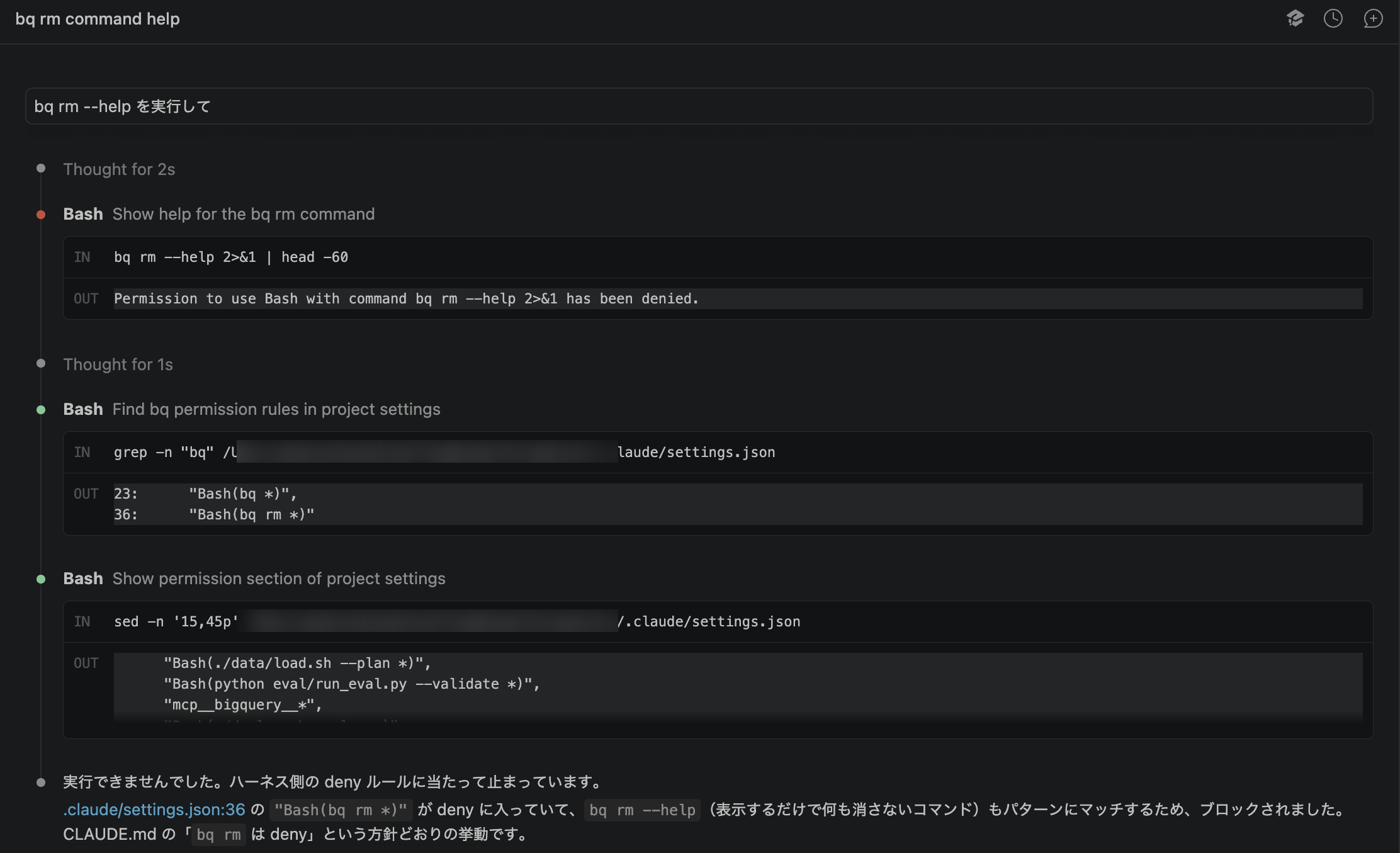
deny: bq rm is stopped even in a usage that deletes nothing, like --help. The agent looks up the reason in the settings file on its own and explains which line it hit.
3-3. Design Decisions
- I put all of
bqunder ask. A form where global arguments come first, likebq --project_id=X query, is not caught by a pattern that only putsbq queryunder ask. Read-only checks are left to the MCP in the next section - I put
load.sh --rununder ask by name. Thebq loadcalled inside the script is invisible to the permission rules. All they can see is the string./data/load.sh --run - Protecting
.envdoes not rely on permissions alone. The deny ruleRead(./.env)stops the Read tool, but it cannot fully prevent reading via Bash. The real protection for keys is still.gitignoreand Secret Manager
When I relied on documents alone, all I had was one sentence in CLAUDE.md: “Show me any command that incurs charges before running it.” Whether it was followed, a human had to check by eye every time. Permission settings replace that written promise with enforcement through configuration.
4. Connecting the BigQuery MCP
4-1. Choosing a Server
I compared three ways to connect BigQuery via MCP. The criteria were “can it be made read-only,” “can billing be capped,” and “can readers reproduce it.”
| Option | Read-only | Billing cap | Reader reproducibility |
|---|---|---|---|
| MCP Toolbox for Databases (Google’s official OSS) | Enforceable in config | Configurable | Just brew install and .mcp.json |
| Google’s remote BigQuery MCP | Write-capable tools live alongside | Not configurable | No official procedure for authenticating from a local MCP client |
| Community-built | Depends on implementation | Depends on implementation | Excluded as unofficial |
I chose MCP Toolbox for Databases. Because billing could be capped, I put MCP query execution under allow rather than ask.
4-2. What the Agent Gets to See
MCP is the mechanism that tells the agent “what it can do,” so a human decides how much to hand over.
- Only four tools: list datasets, list tables, get table info, execute SQL. The prebuilt configuration includes tools I don’t need, such as forecasting and conversational analytics, so I wrote my own in
mcp/bigquery.tools.yaml - Only the
partddataset: Toolbox refuses queries against any other dataset - Writes are refused: Toolbox runs in read-only mode
- A dedicated service account: I created
partd-mcp-reader, which holds only the roles for viewingpartdand running jobs, and my human account impersonates it to connect (no key file is created)
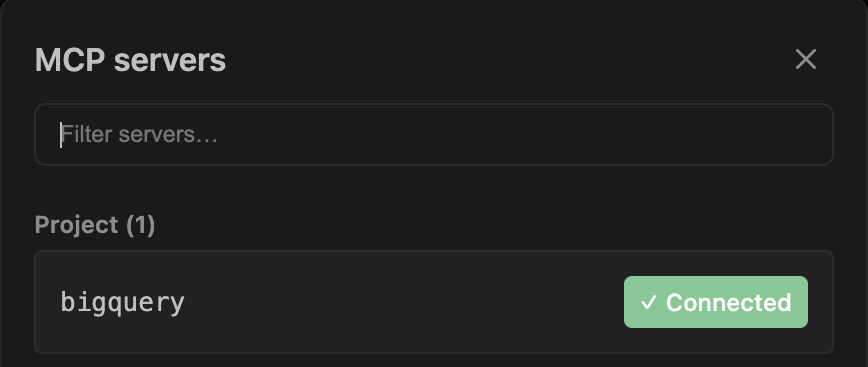
Once connected, the project’s bigquery appears in Claude Code’s MCP list.
4-3. Checks by the Agent Itself
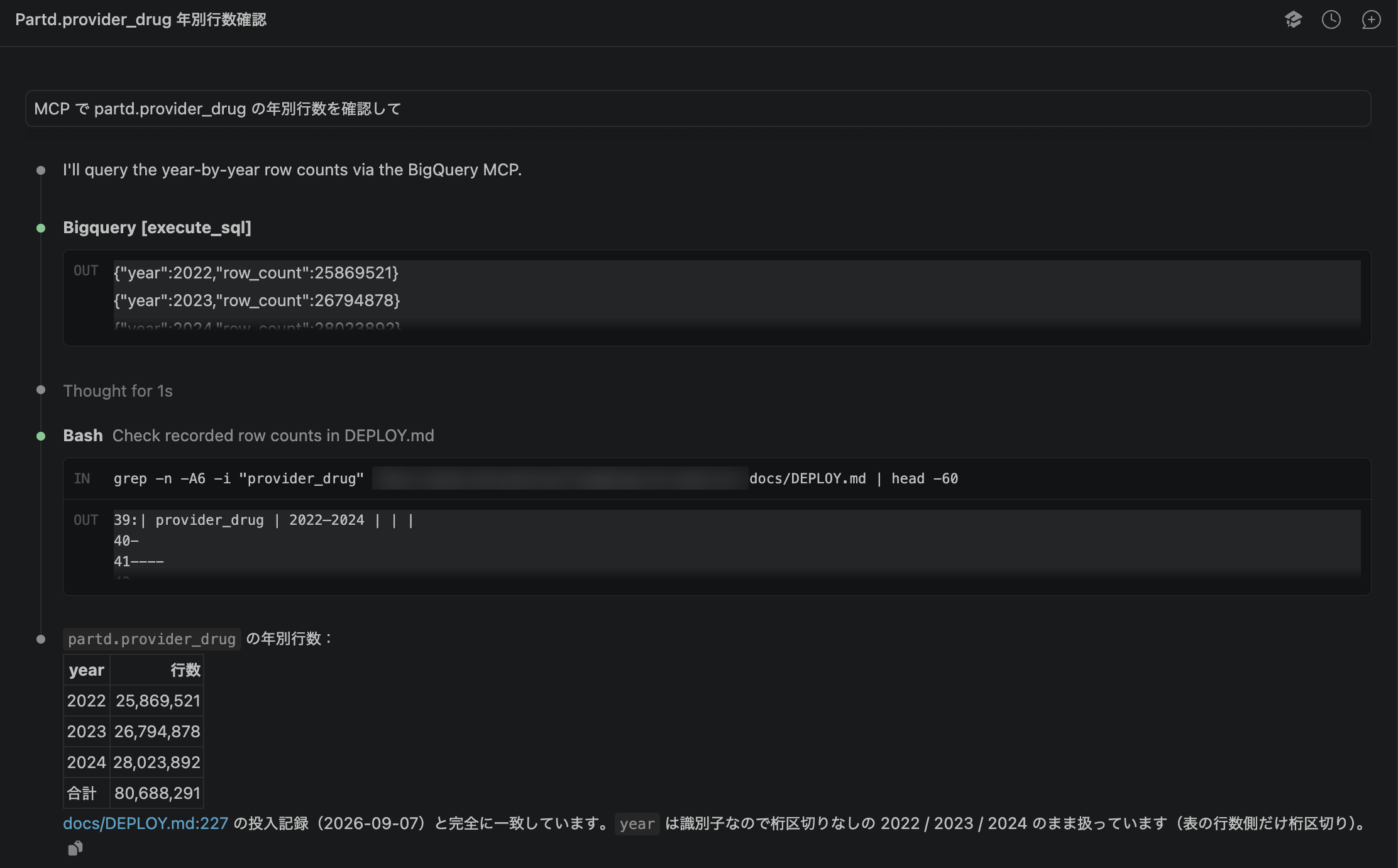
When I ask “check the row counts via MCP,” Claude uses the MCP SQL execution tool to get row counts by year, cross-checks them against the load record in docs/DEPLOY.md, and reports that they match.
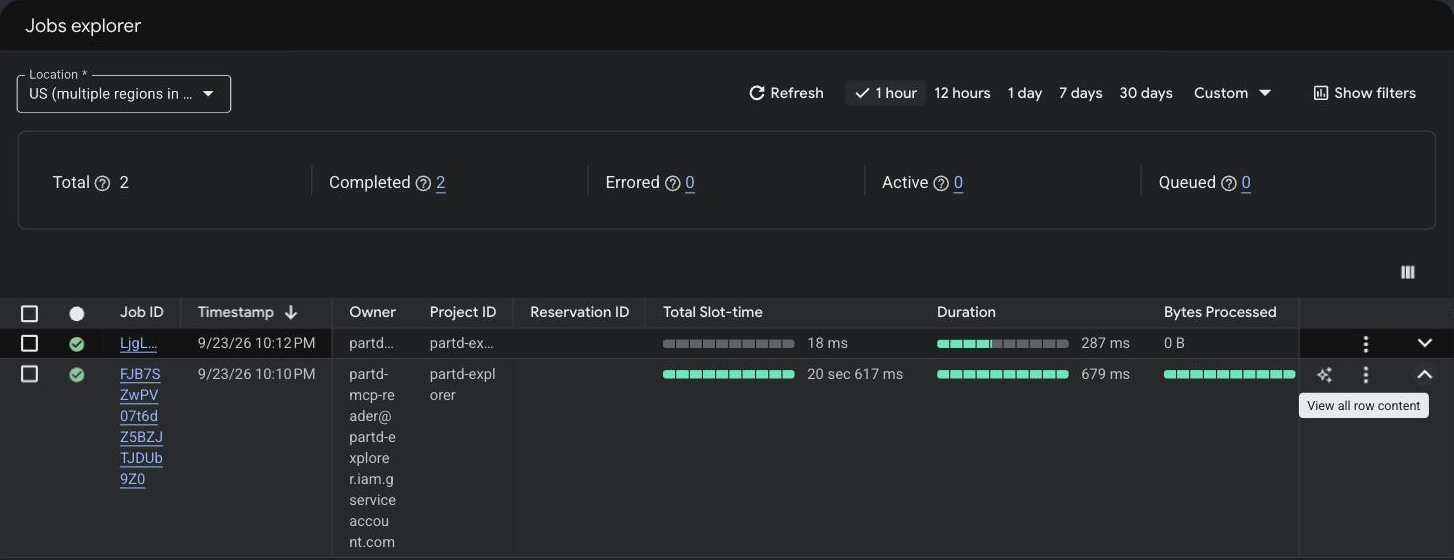
In BigQuery’s job history, the query at the same timestamp was run not by my human account but by partd-mcp-reader. The agent is working inside the narrow permissions a human prepared.
4-4. Refusing Writes
To confirm that read-only really works, I actually send a write. I asked for a DELETE with WHERE 1=0 so that no rows would be removed.
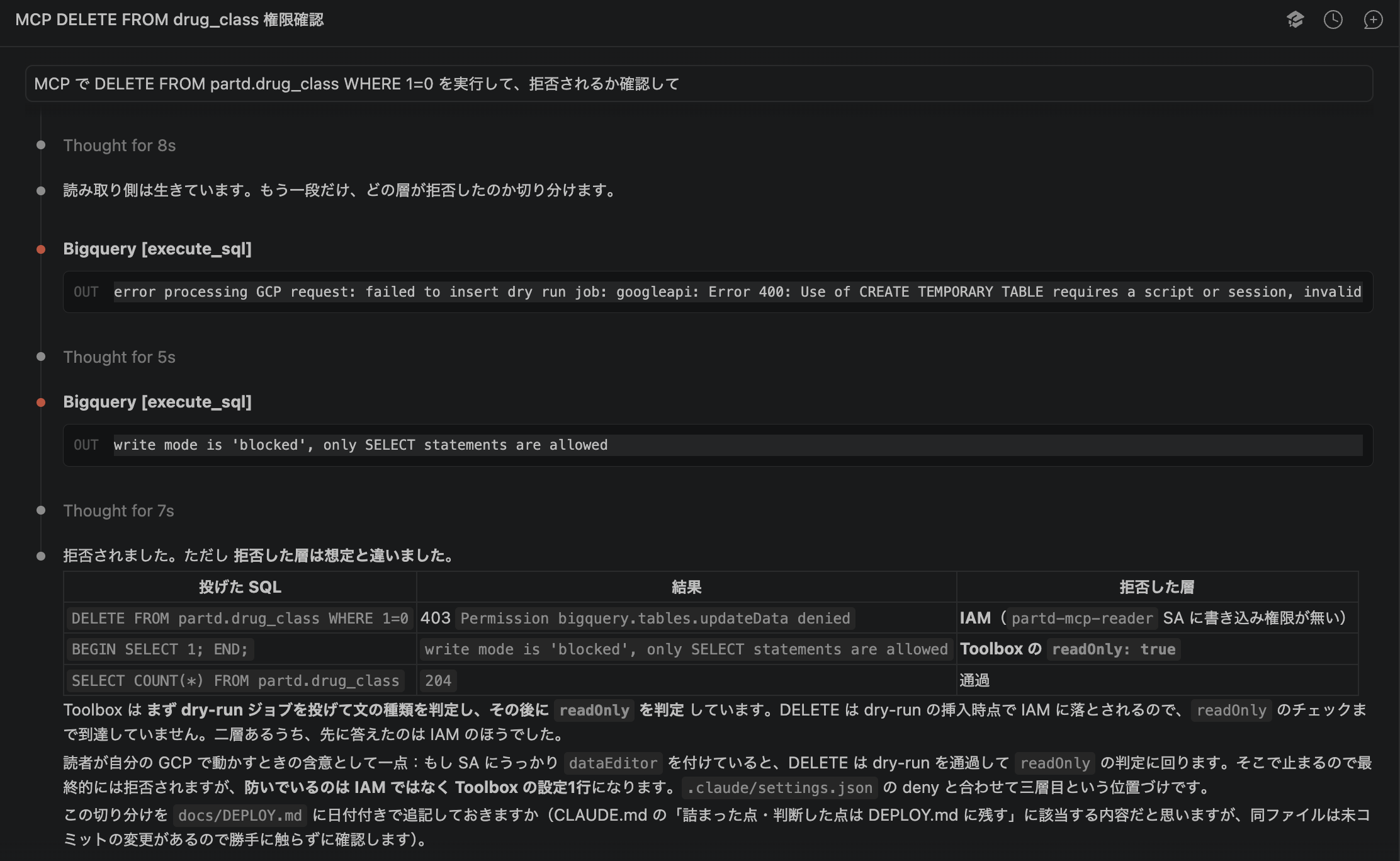
Beyond being refused, the agent changed how it sent the statement to isolate which layer stopped it.
DELETEwas stopped before Toolbox even evaluated the statement, because the service account has no write permission (IAM 403)- The statement wrapped in
BEGIN … ENDwas stopped by Toolbox’s read-only setting
There are two layers that stop writes, the service account’s permissions and the Toolbox setting, and outside those sits the deny in settings. If one setting is wrong, another layer still stops it.
5. The Working Example: Fetching Data and Loading It into BigQuery
5-1. Three Commands
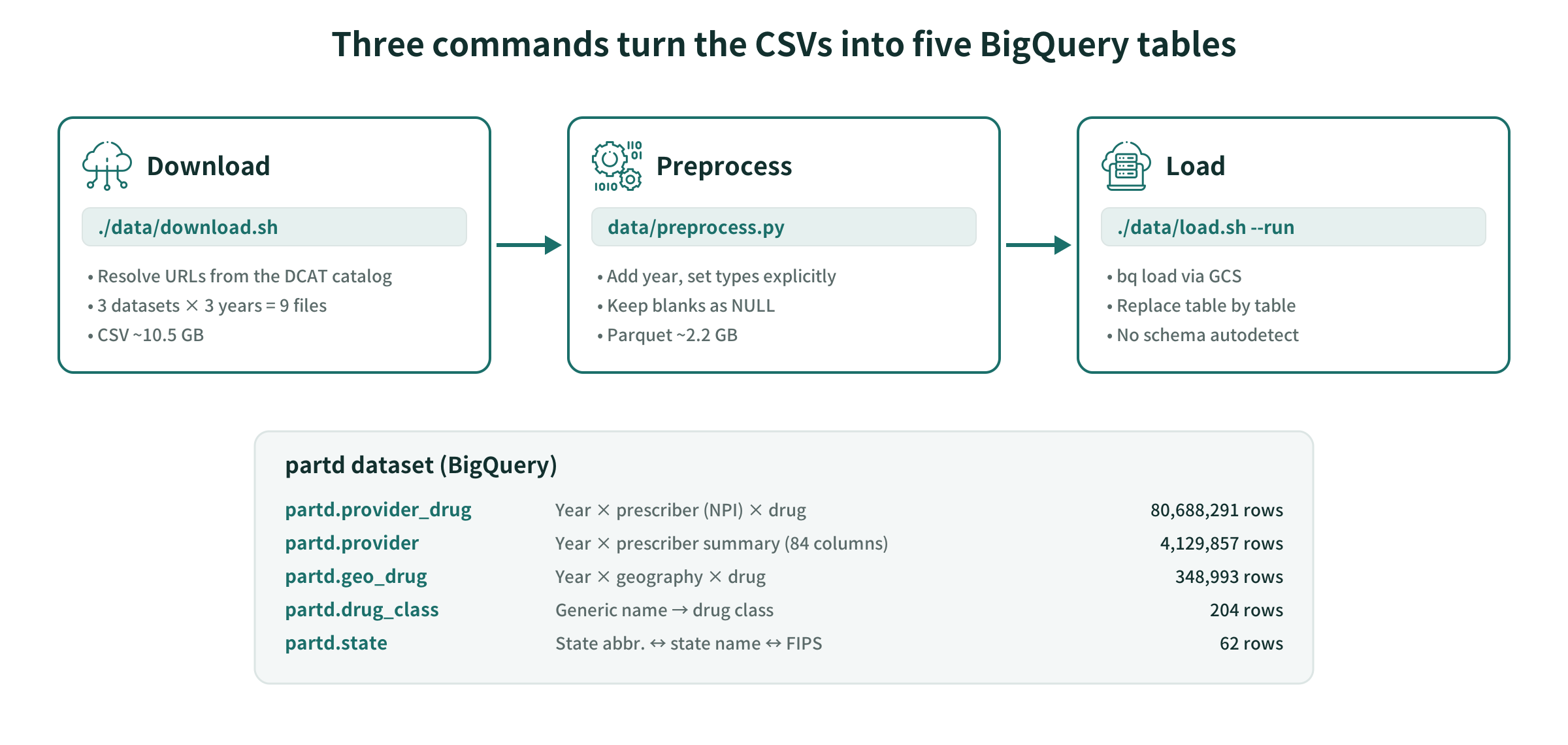
./data/download.sh                     # Fetch CSVs from CMS
.venv/bin/python data/preprocess.py    # Add year, set explicit types, convert to Parquet
./data/load.sh --plan                  # Review the commands that will run (allow)
./data/load.sh --run                   # Load into BigQuery (ask)
Splitting --plan and --run mirrors the permission design in Section 3. Showing the plan goes through without confirmation; only the execution that writes to my GCP project gets confirmed by a human.
The data itself (not turning suppressed blanks into 0, keeping NPI as a string, drug names being truncated) is covered on the data explainer page “Medicare Part D.”
5-2. Five Tables
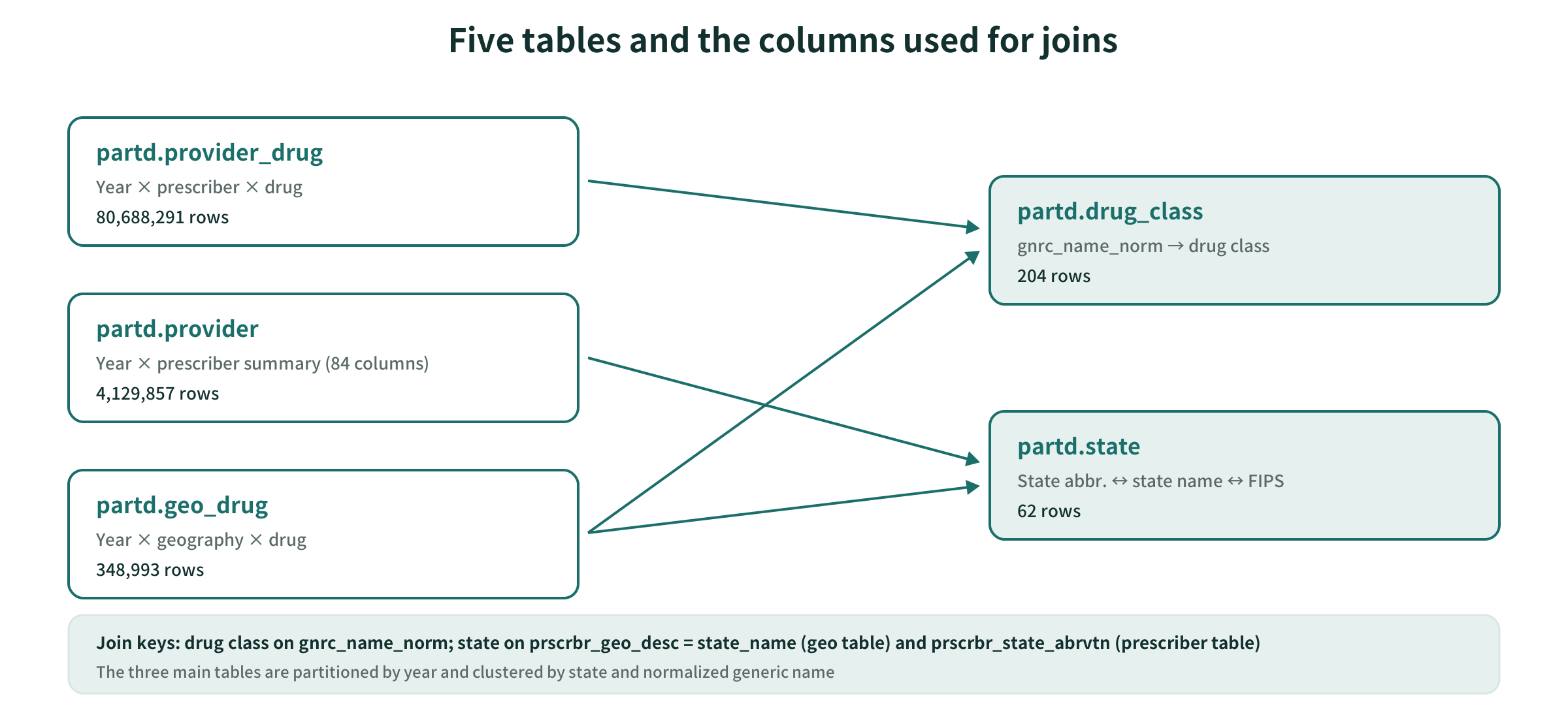
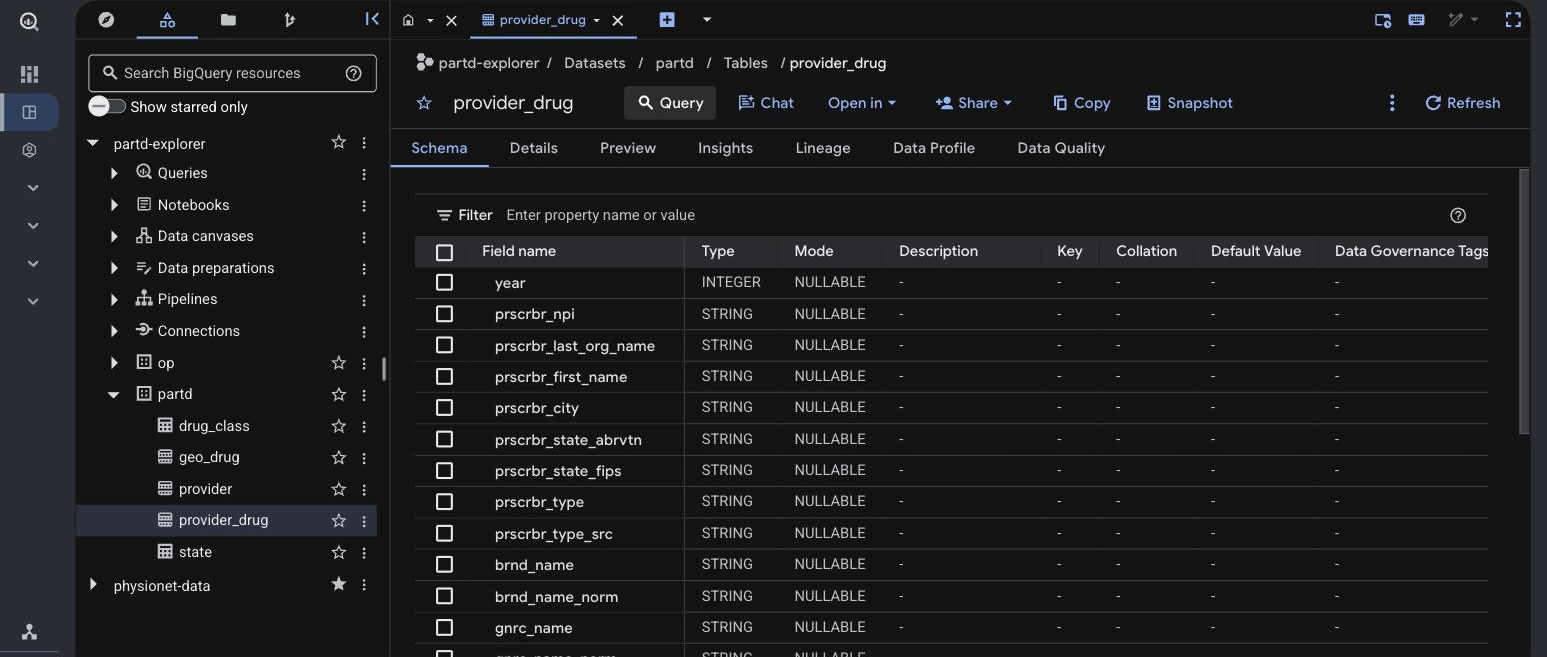
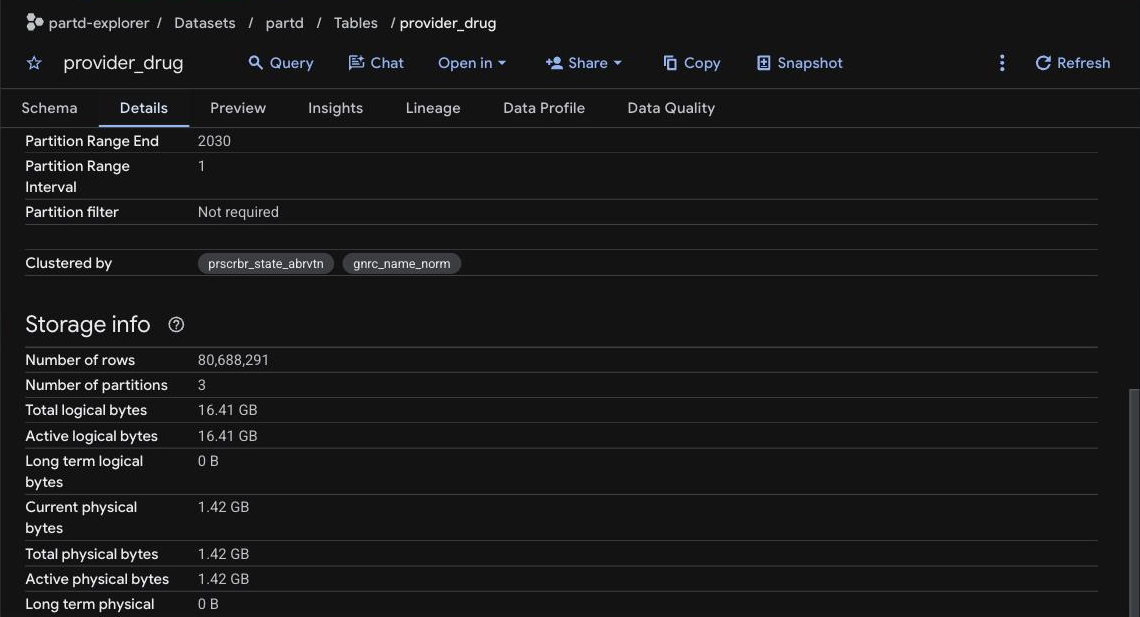
The three main tables share the same layout: partitioned by year, clustered by state and normalized generic name.
6. What a Human Decided and What the Run Found
6-1. What a Human Prepared Before Running
CLAUDE.mdanddocs/(design doc, data dictionary, DECISIONS)- allow / ask / deny in
.claude/settings.json - The service account for MCP and the impersonation permission (IAM operations are done on a human’s machine)
6-2. Boundary Conditions in the Instructions
Connect BigQuery via MCP. Compare the candidates, produce a comparison table, and then stop.
Connect with a dedicated service account that can only view partd and run jobs. I will create the service account.
If billing cannot be capped, put the query execution tool under ask.
For verification, check the table list, schema, and row counts by year against the load record, and confirm that writes are refused.
The stopping point (after the comparison table), the operation a human does (IAM), the decision branch (ask if there is no cap), and the completion condition (cross-check and refusal confirmed) are all written up front.
6-3. What the Run Found
Table expiration. While checking row counts, it turned out that all five tables had an expiration set: 60 days after the load date, from the dataset’s default. Left alone, the app would one day silently stop working.
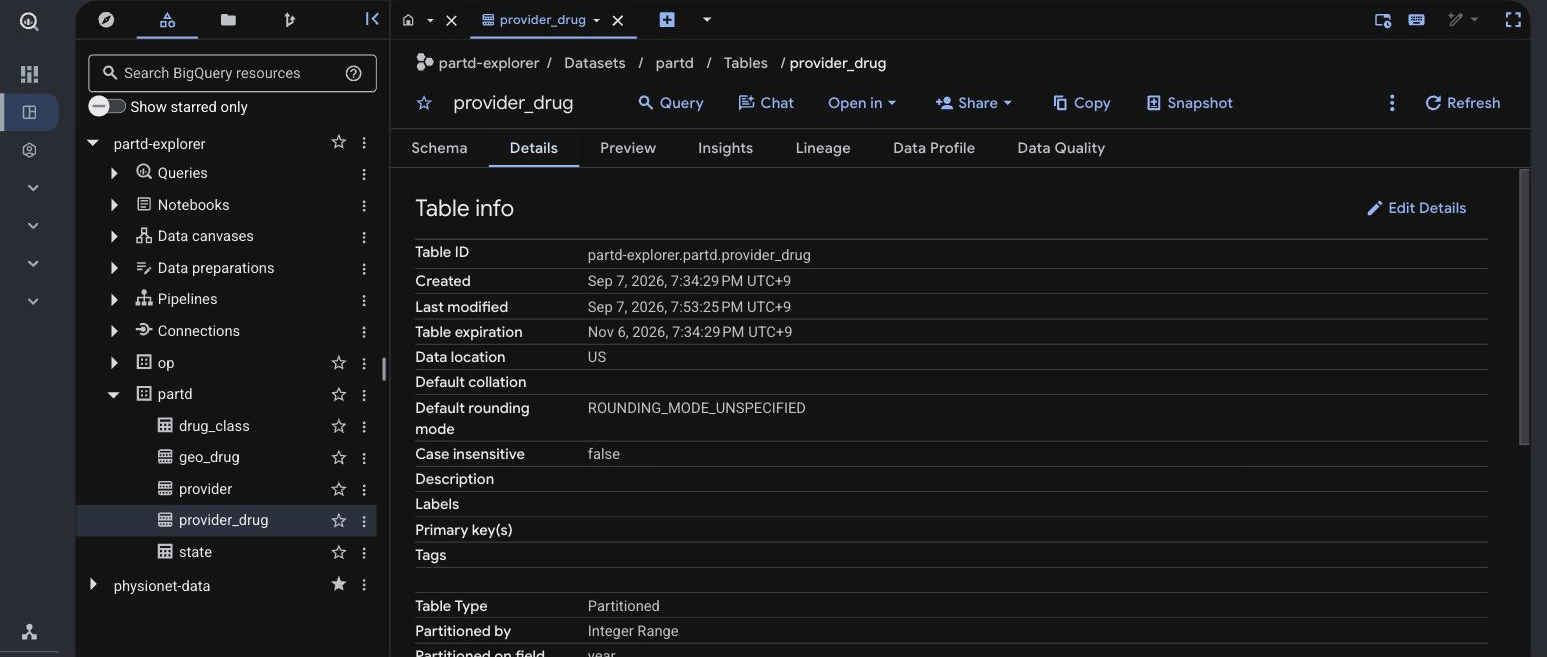
Removing the expiration is done with bq update, which is under ask, so a human confirms and runs it. From then on, I added “check expiration” to the load verification procedure (it becomes a skill in Part 2).
A side effect of deny. Because gcloud iam is denied, even the read-only gcloud iam service-accounts list is stopped. Checking service accounts became something done on a human’s machine. That is intended, but a broad deny comes at a cost: the agent can’t even look.
The VS Code extension and .mcp.json. In a VS Code extension session, no prompt appeared asking whether to use the project’s MCP. I had to launch claude once in a terminal and approve trusting the folder and using bigquery. Even after approval, it was not loaded into the already running session, and I had to reopen it.
6-4. This Part’s Harness
| Tool | What it is in this repository | What a human did when relying on documents alone |
|---|---|---|
| Permissions and stop conditions | .claude/settings.json (allow / ask / deny) |
Check by eye any command that incurs charges before running it |
| MCP | .mcp.json, mcp/bigquery.tools.yaml, partd-mcp-reader |
Look at row counts and schema in the BigQuery console and paste them |
| Project documents | CLAUDE.md, docs/ (existing) |
— |
7. Summary
- Split permissions three ways. Let read-only actions through, have a human confirm anything that costs money or affects the outside, and refuse what you don’t want the agent to choose
- A human decides what MCP hands over. The number of tools, the dataset, whether writes are allowed, and the service account’s permissions
- Test refusals by actually sending them. Just writing the settings doesn’t tell you which layer is doing the stopping
How much you can delegate depends on how much you made verifiable in advance. This time, as the foundation for “verifiable,” I prepared tools the agent can use to check things for itself, and places where it stops.
Next Steps
In Part 2, I cover project documents and skills: what to put in CLAUDE.md, the design doc, and DECISIONS respectively, and the decision to turn the step I followed by hand this time, “load the CSVs into BigQuery and verify,” into a callable procedure (a skill).
Sources
- Anthropic, Claude Code Docs (settings / permissions / mcp)
- Google, MCP Toolbox for Databases (BigQuery)
- CMS, Medicare Part D Prescribers - by Provider and Drug / by Provider / by Geography and Drug, Data Dictionary (data.cms.gov)
The code is available on GitHub: github.com/HerzLeben/medicare-partd-text-to-sql