
Claude Code × Medical Application
[Claude Code] Medicare Part D × Text-to-SQL Part 3: Prompt Design and Hooks
1. Introduction
In Part 2, I looked at how documents shape the agent’s work. Part 3 is about instructions and enforcement.
A promise written in a document is kept if the agent reads it. But the job of checking whether it was kept still falls to a person. In this part, I follow, in the order I built things, the process of taking that checking out of human hands.
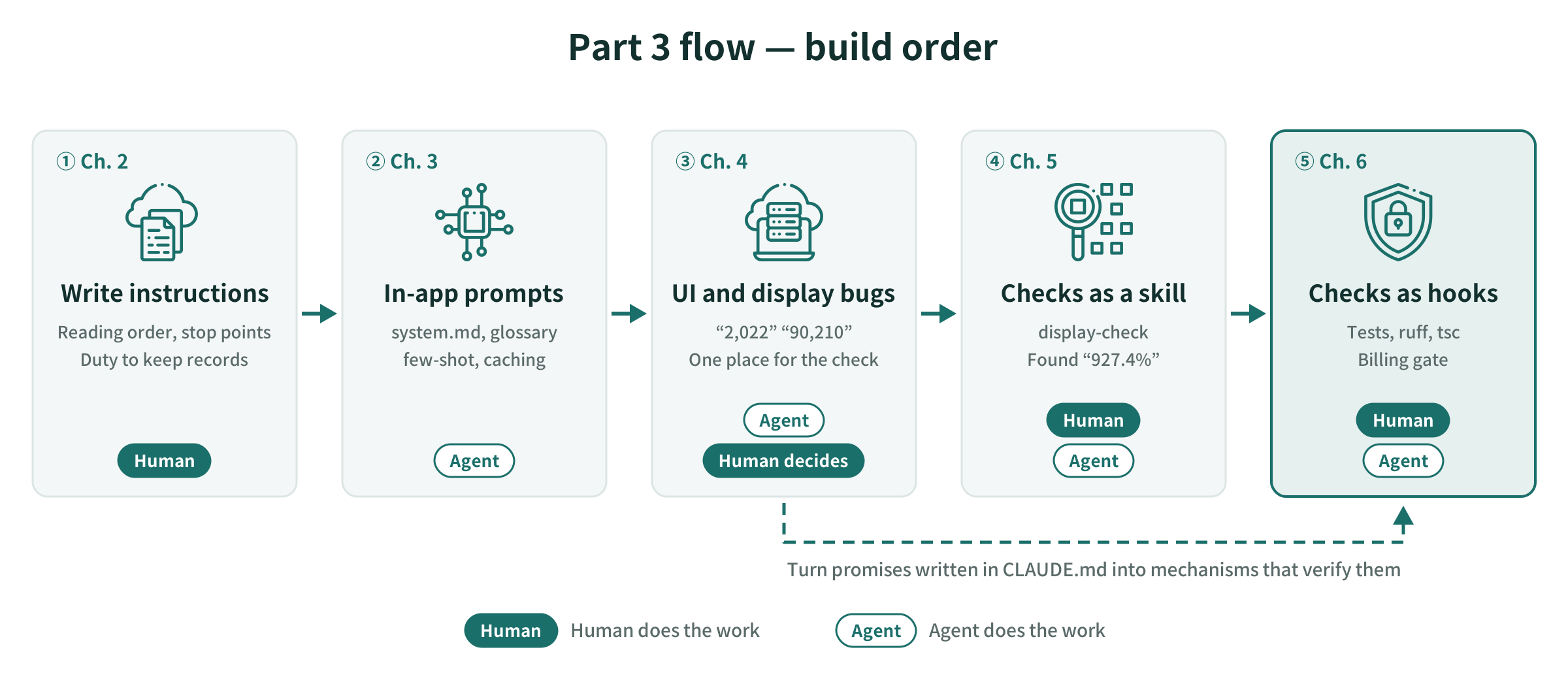
- Write instructions for handing off a long task
- Have the agent write the prompts the app passes to Claude
- Have it build the UI, and run into display bugs
- Split the display-bug check out into a skill
- Run tests, type checks, and the billing check automatically with hooks
2. Instruction Design
2-1. The Shape of a Single Instruction
In Part 1, I listed four conditions to put in a single instruction: where to stop, what the human does, decision branches, and the completion condition. When asking for one task in one instruction, these four are enough.
2-2. What to Add for Long Tasks
When handing off a task that spans several phases, I did not type the instructions into the conversation. I wrote them as a document, an instruction sheet. The first prompt said only “what to read, in what order” and “where to stop first”; all the conditions lived in the instruction sheet.
These are the conditions I wrote in the instruction sheet.
| Condition | What I wrote in the instruction sheet |
|---|---|
| Reading order | Read CLAUDE.md and docs/DECISIONS.md, then read the instruction sheet to the end |
| First stopping point | After reading, output only the work plan for the first phase and stop. Implement only after approval |
| Stop at each phase | At the end of each phase, report “what was built / results of the functional check / where it got stuck,” and wait for approval |
| External impact | For commands that incur charges, show the content before running and get confirmation. A human creates IAM roles and service accounts |
| Spec verification | Check the format of hooks, skills, and settings against the official docs rather than writing from memory, and record the URLs consulted in DECISIONS |
| When unsure | Don’t proceed with implementation; present the options and stop |
| Duty to record | For each tool, record “what a human did when there were only documents / what happens with the tool” |
Compared with the four conditions of a single instruction, two things were added: multiple stopping points and a duty to keep records. On a long task, without records a person can reread along the way, there is no basis for deciding whether to approve.
“Verify specs against the official docs” is essential for a topic like this series, where tool specs change often. In fact, the startup flag for the MCP server had already been renamed from what the docs I had said. The URLs I checked are kept in docs/DECISIONS.md.
2-3. Plan → Approve → Execute
Running the instruction sheet follows the same three steps in every phase.
- The agent presents a plan and stops
- A person reads the plan and either approves it or has it revised
- The agent executes, reports, and stops
The person steps in at only one place, step 2. Rather than giving instructions each time, deciding the stopping points in advance is what separates this from vibe coding.
2-4. Promises in Documents, and Mechanisms That Enforce Them
Still, what is written in the instruction sheet or CLAUDE.md is only a promise. Even if I write “get confirmation for commands that incur charges,” the only way to know whether it was kept is for a person to look.
| Promise (document) | Enforcing mechanism |
|---|---|
| Get confirmation for commands that incur charges | ask in settings (Part 1), the billing-gate hook (Section 6) |
| Don’t skip the guards | A hook that runs the guard tests on every edit (Section 6) |
| Actually look at the screen | The display-check skill (Section 5) |
Promises that a machine can verify can be moved into mechanisms. From Section 3 on, that is what I cover: how to move them.
3. In-App Prompts
I also had the agent write the prompts the app passes to Claude (app/prompts/). This corresponds to step 2 of the work phases.
| File | Contents |
|---|---|
system.md |
Schema and rules, such as “mention rank only for the metric that was sorted on” |
glossary.yaml |
Mapping from phrasings to columns, and a dictionary of drug classes (Part 2, 3-4) |
fewshot.yaml |
Example questions and SQL |
What the human decided was what to base them on. I specified in the documents that terms come from the data dictionary, and values are written only after checking them against real data in BigQuery. The wording of the prompts themselves is the agent’s output.
In the few-shot examples, I placed the cases I wanted told apart side by side as pairs: questions that change only the display form, like “make it a line chart,” and questions where the aggregation changes. For the former, the app does not rerun the SQL and returns only the chart spec. The sql_rerun field in the logs shows whether it actually behaved that way.
The system prompt combining these three is about 12,000 tokens, and the same content is sent every time. So I added cache_control so that from the second call on, it is read from the cache.
4. The Subject: UI Implementation and Display Bugs
4-1. “2,022”
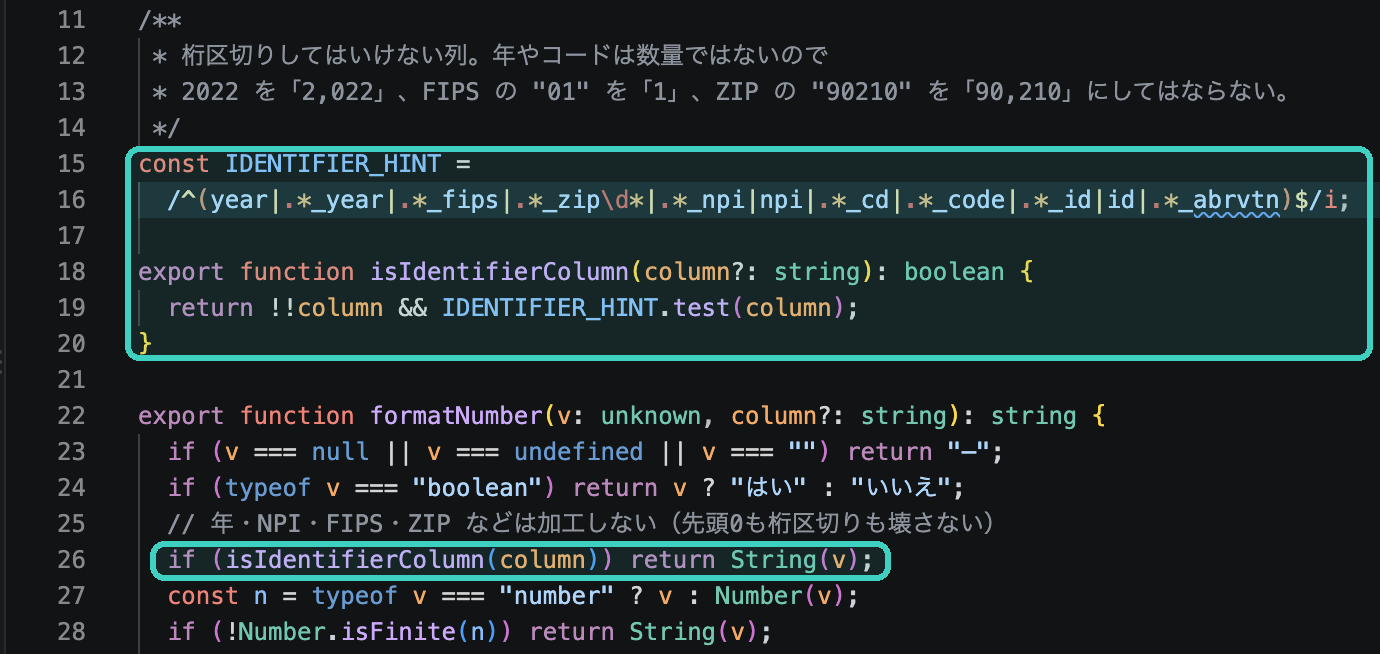
The first thing I ran into after having the UI built was a number display bug. Because every integer got thousands separators, even years and codes were formatted as quantities.
| Column | Original value | Displayed |
|---|---|---|
year |
2022 | 2,022 |
prscrbr_state_fips |
01 | 1 |
prscrbr_zip5 |
90210 | 90,210 |
Years, NPIs, FIPS codes, and ZIP codes are made of digits, but they are identifiers, not quantities. They must not get thousands separators, and their leading zeros must not be dropped.
4-2. Putting the Decision in One Place
The fix is to put the decision of whether a column is an identifier in one place, isIdentifierColumn in web/lib/format.ts, and to route every path (tables, chart axes, tooltips, and CSV export) through it. If you fix only the table, the same bug remains on chart axes and in CSV.
4-3. Writing Back to CLAUDE.md
At this point, I wrote two things back into the “Handling numbers” section of CLAUDE.md.
- Identifiers are not numbers. Gather the decision in one place and route every path through it. Attach “2,022” and “90,210” as real examples I ran into
- Actually look at the screen. Number display bugs slip past both type checks and tests
The second one leads into the latter half of this part. “Look at the screen” is an important promise, but just writing it in a document doesn’t tell you whether anyone looked.
5. Turning the Display-Bug Check into a Skill
5-1. display-check
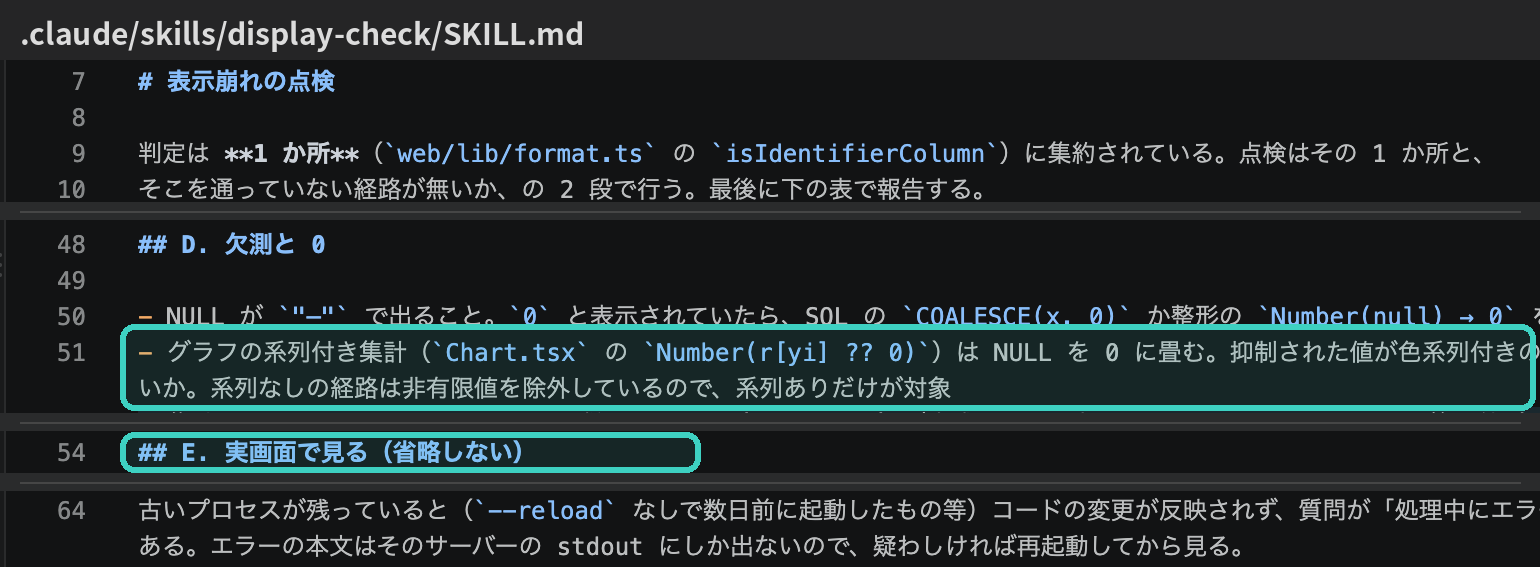
I split “actually look at the screen” out as a procedure, /display-check. At the top, the SKILL.md declares, “The decision is centralized in one place. The check has two stages: that one place, and whether any path bypasses it,” and then it verifies five items in order.
| Item | What to verify |
|---|---|
| A. Decision | Whether the regular expression in isIdentifierColumn actually matches the column names being checked |
| B. All paths | Whether tables, chart axes, tooltips, maps, and CSV all go through that decision |
| C. Type conversion at boundaries | Whether types change and break at each stage: BigQuery → Python → JSON → JavaScript |
| D. Missing values and 0 | Whether NULL shows as “—”, and isn’t turned into 0 |
| E. Real screen | Start the app, run questions, and look at the tables and charts with your own eyes (do not skip) |
It also says that fixes go into the one decision point or its callers, and do not add one-off exceptions to components.
5-2. What the Check Found
Running the skill once turned up two bugs in the app.
| What was found | Item that found it | Fix |
|---|---|---|
| In charts with series, suppressed values (NULL) were drawn as bars of 0 | D (code) | NULL leaves a gap in the points |
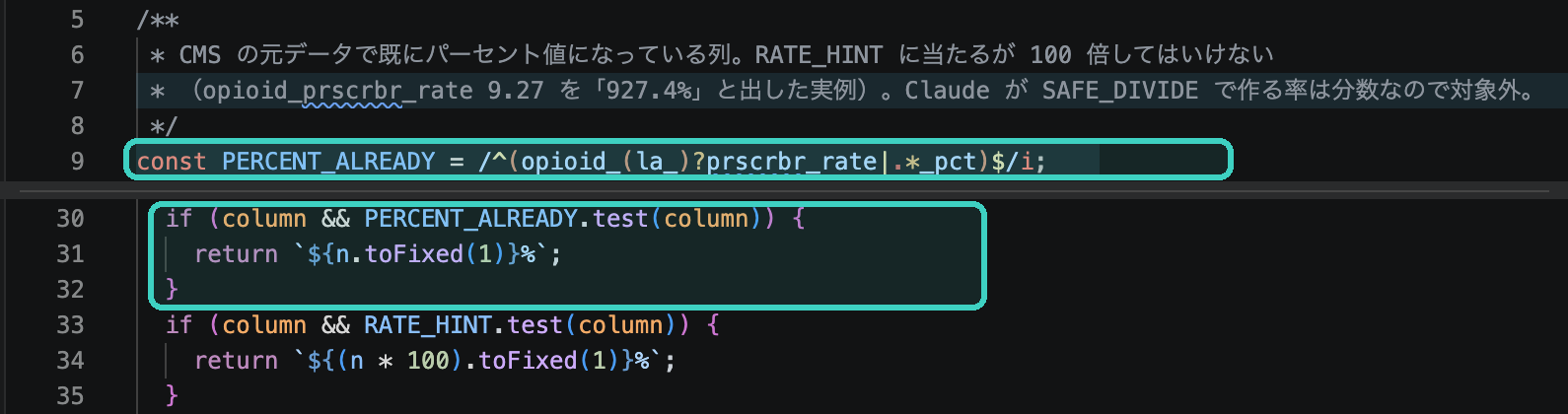
| The opioid prescribing rate was shown as “927.4%” | E (real screen) | Don’t multiply columns that are already % in the source data by 100 (PERCENT_ALREADY) |
The second was caused by multiplying every rate column by 100 for % display. CMS’s opioid_prscrbr_rate was already a percentage in the source data. Reading the code only tells you that “rate columns are shown as %”; only by seeing the number on screen can you notice something is wrong.
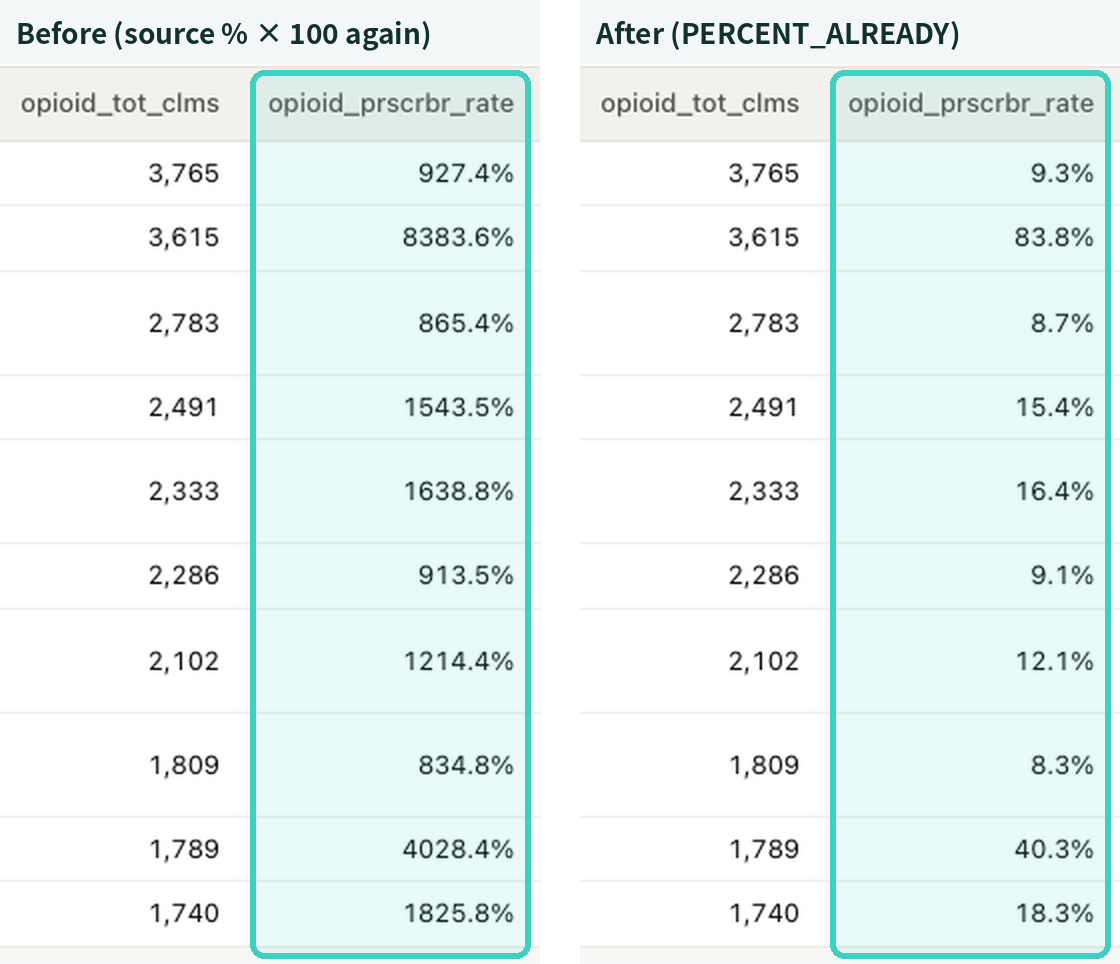
The fix, as in Section 4, adds to the single decision point. I listed the columns already in % in the source data in PERCENT_ALREADY and branched on it before the multiply-by-100 step.
5-3. What the Human Decided
Even after finding the bugs, the agent did not change the app’s behavior on its own; it reported and stopped. The check skill’s job is to find things, and a person decides how to fix the app. In both cases, a person made the call and fixed it.
The real-screen check failed at first. An old API server, started days earlier, was still running, and questions failed with errors. Because a person had started that process, the agent reported it rather than stopping it. I added the startup command and “suspect leftover old processes” to the SKILL.md. As in Part 2, I trust a skill only after running it once.
6. Hooks That Run Checks Automatically
6-1. With Only Documents
Without hooks, tests and type checks ran only when a person said “run the tests” or “make tsc pass” every time. Showing --plan before a billing command was also a practice that relied on a person remembering it.
A hook is a mechanism that runs a predefined script before or after Claude Code uses a tool. You write it under hooks in .claude/settings.json.
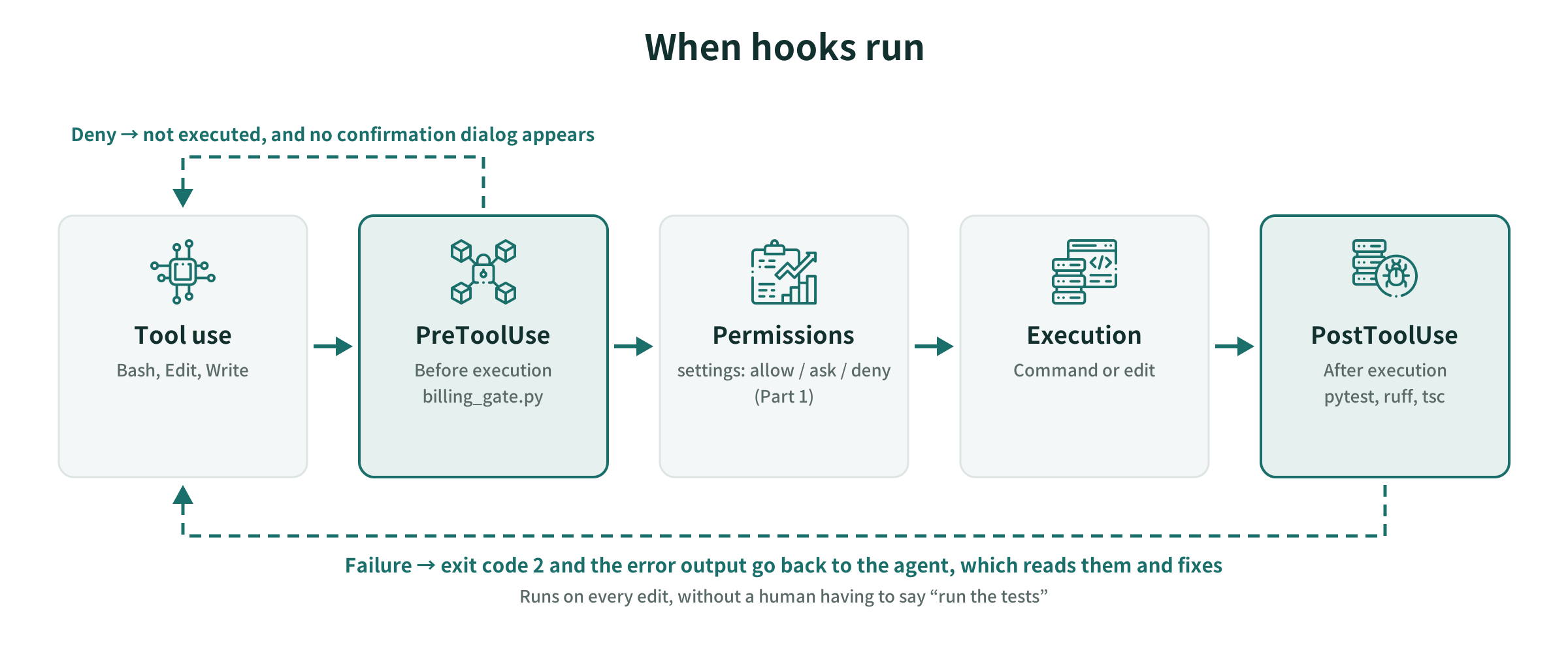
6-2. Three Hooks
| Hook | Timing | Behavior |
|---|---|---|
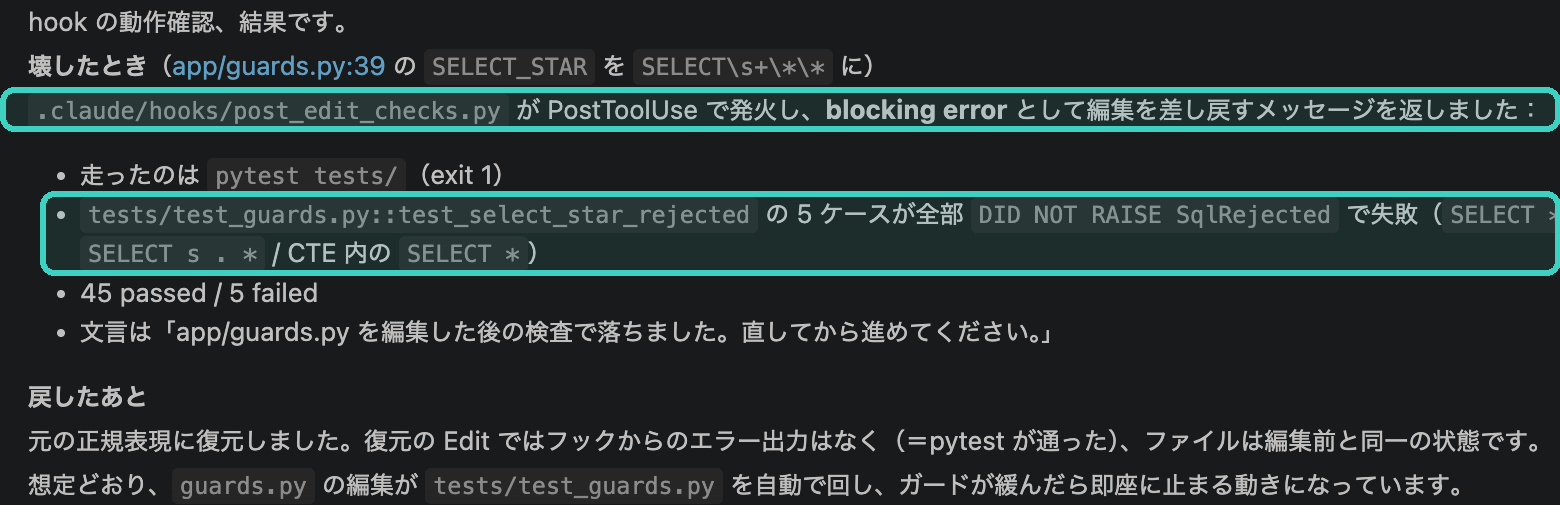
| Automatic guard tests | After editing (PostToolUse) | Editing app/guards.py, app/prompts/*, app/tools.py, or tests/* runs pytest tests/. On failure, the tail of the output is returned to the agent |
| Lint and type check | After editing (PostToolUse) | Editing a .py file runs ruff check; editing a .ts or .tsx file under web/ runs tsc --noEmit |
| Billing gate | Before execution (PreToolUse) | ./data/load.sh --run is stopped unless --plan was run for the same target within the last 30 minutes |
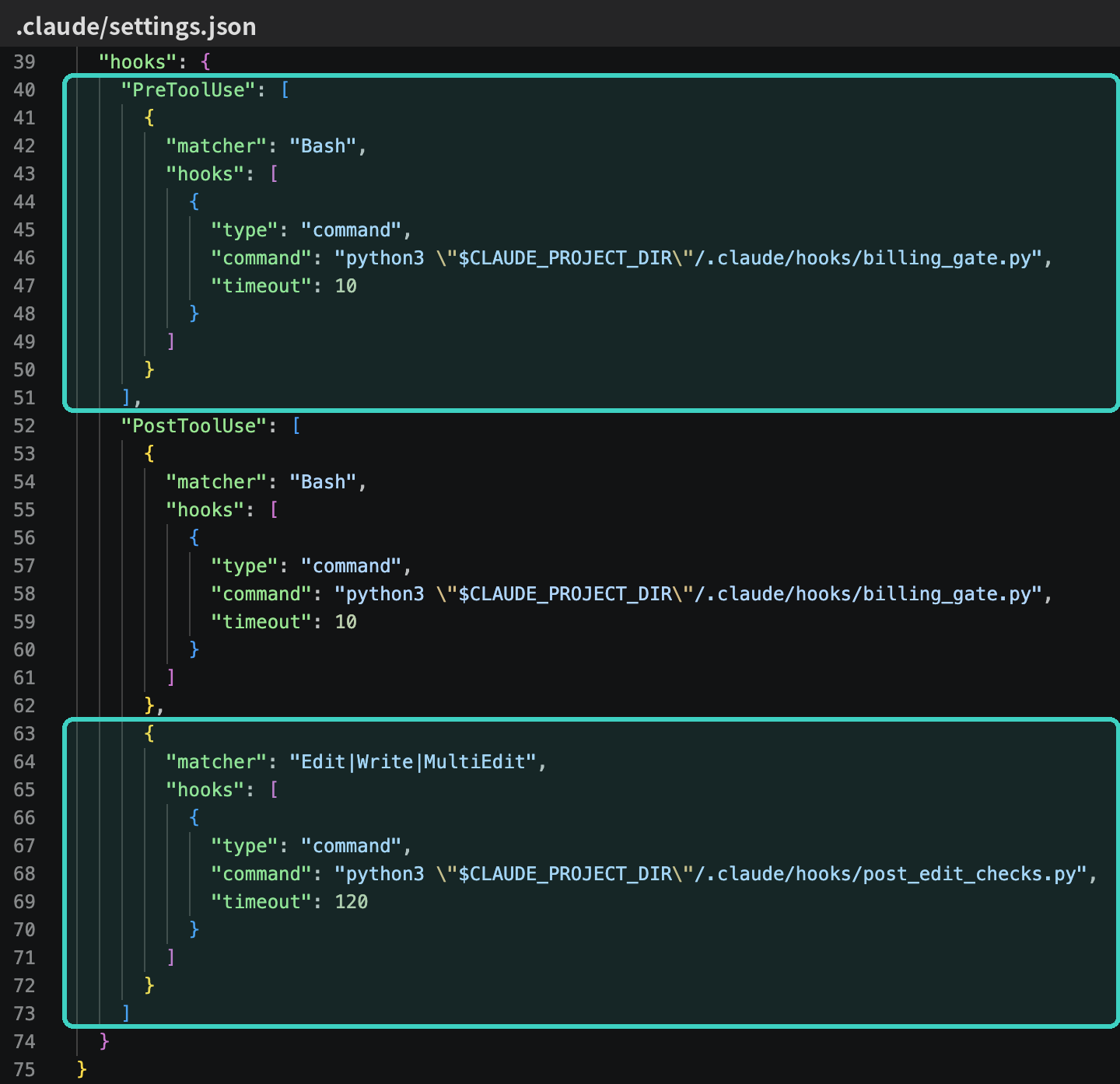
There are two ways to stop. To stop before execution, the hook returns a “deny” decision. To report a problem after an edit, it exits with code 2 and has the agent read the error output.
The billing gate acts before the ask in settings that I set up in Part 1. A --run without a preceding --plan is stopped before a confirmation dialog is ever shown to the person.

6-3. Tests Come First
To put a guard hook in place, you need tests for it to run. Until then there were no guard tests; the only functional check was a script that ran a single question. So I created tests/test_guards.py first: 50 test cases that don’t connect to BigQuery.
One failed as soon as it was written. When two or more CTEs are chained, as in WITH a AS (...), b AS (...), the guard failed to recognize the second and later ones as CTEs and rejected valid SQL with “dataset name missing: b”. The cause was the regular expression \b(?:WITH|,): \b could not find a word boundary before the comma. I changed it to (?:\bWITH|,).
In the 30 evaluation questions, not a single SQL query used two or more CTEs, so this bug had gone unnoticed. Passing the evaluation and the guard being correct are two different things.
6-4. Breaking Things on Purpose to Verify
I verified that the hooks worked by deliberately doing things that should trip them.
| Action | Hook’s response |
|---|---|
Break the regular expression in guards.py that detects SELECT * and save |
pytest ran, and the 5 cases of test_select_star_rejected came back as “was not rejected.” After reverting, it passed silently |
Add an unused import to a .py file |
ruff stopped it |
Put a type-mismatched assignment in a .ts file |
tsc stopped it |
./data/load.sh --run geo_drug without --plan |
Stopped because there was no --plan record within 30 minutes; no confirmation dialog appeared |
6-5. Where I Got Stuck
- Hooks see the full command. When I wrote a test for the billing gate as a one-line command, the string contained
./data/load.sh --run, so the hook itself blocked it. I accepted this as an error on the safe side, and wrote the test to a file and ran it from there - The type check runs every time.
tscchecks all ofweb/, so each run takes about 10 seconds. Editing.tsxfiles in a row means waiting each time, but I accept that for now - Hooks apply only to the tools you specify. The post-edit checks are attached to Claude Code’s edit tools (Edit, Write). Once, when I asked for an edit that broke a guard, the agent rewrote the file with a Bash command, and the hook did not run (the agent ran the tests itself and reported). The billing gate also only watches
load.sh, so the path of typingbq loaddirectly is covered by the ask in the Part 1 settings. Knowing which paths are not covered is part of the design - A failed
--planis also recorded. I record--planafter it runs, but I can’t reliably tell whether that--plansucceeded. Putting an expiry on the record and letting it through only when the target matches limits the actual harm
7. This Part’s Harness
| Tool | What it is in this repository | What a human did when there were only documents |
|---|---|---|
| Instruction sheet | Stopping points per phase, external impact, spec verification, duty to record | Restate the conditions in every conversation |
| Skill | display-check |
Remember “actually look at the screen” and check with your own eyes |
| Hook | Automatic guard tests, ruff and tsc, billing gate |
Say “run the tests” and “make tsc pass” every time. Remember whether --plan was shown |
| Tests | tests/test_guards.py (50 cases) |
Run one question and confirm it worked |
| Permissions and stop conditions | Part 1 settings (--run is ask) |
Check commands that incur charges by eye |
8. Summary
- For long tasks, put the instructions in a document. If you write down the reading order, where to stop in each phase, external impact, spec verification, and the duty to record, the person only needs to step in at one point: approval
- Turn promises into something verifiable and move them into mechanisms. “Look at the screen” goes into the check skill; “run the tests” and “show
--planbefore charging” go into hooks - Verify mechanisms by breaking things on purpose. The tests found a real bug as soon as they were written, and the check skill found “927.4%” on screen
How much you can hand off is determined by how much you made verifiable in advance. Hooks are the mechanism that runs that verification even when no one remembers to.
Next Steps
Part 4 covers evaluation and operations. I measure the app the agent built with 30 questions that have correct answers, and look at the improvement loop of writing failed questions back into the glossary and guards and re-evaluating, along with how to keep records of it.
Sources
- Anthropic, Claude Code Docs (hooks / skills / settings)
- Anthropic, Prompt caching (Claude API Docs)
- CMS, Medicare Part D Prescribers Data Dictionary (data.cms.gov)
The code is available on GitHub: github.com/HerzLeben/medicare-partd-text-to-sql