
Claude Code × Medical Application
[Claude Code] Medicare Part D × Text-to-SQL Part 2: Project Documents and Skills
1. Introduction
In Part 1, I built the environment the agent works in (permissions and MCP). Part 2 is about documents.
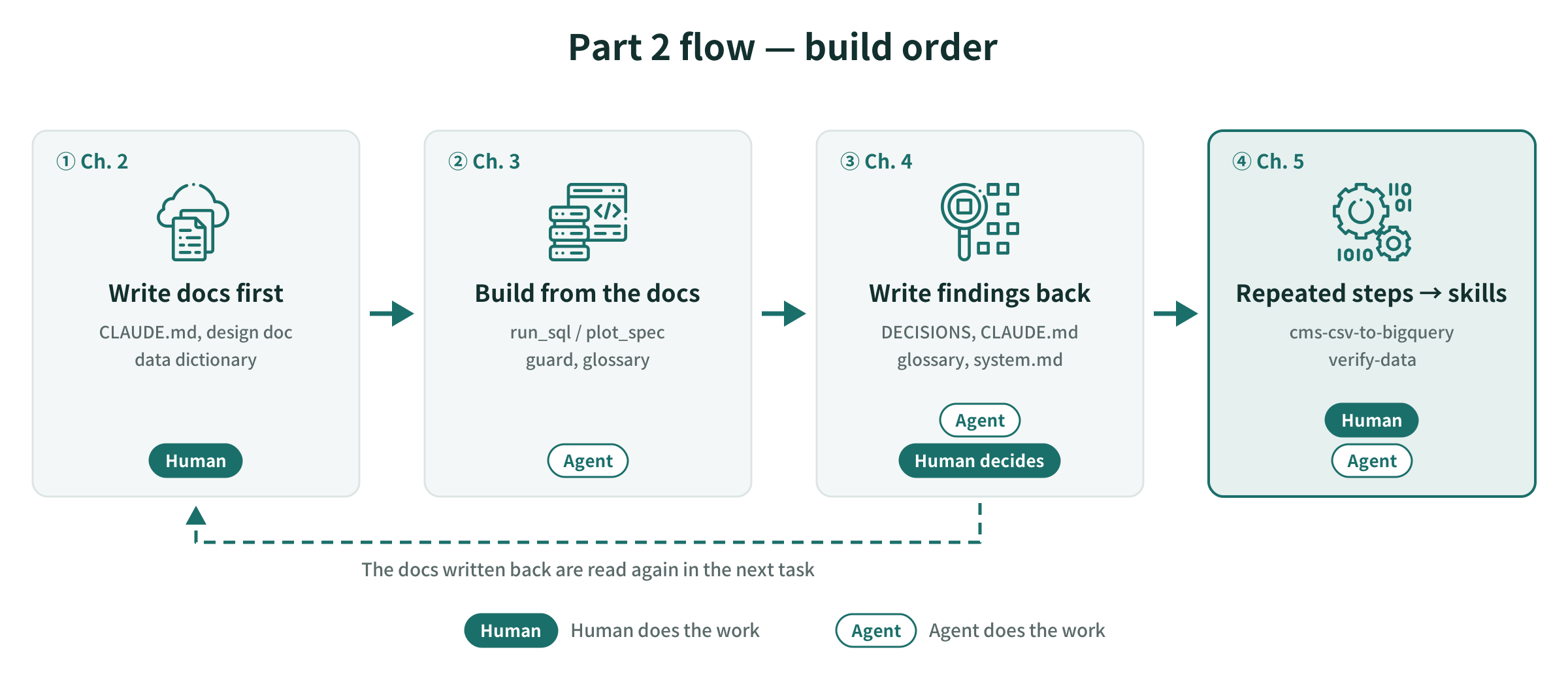
This part follows the order in which I actually built things:
- Before starting, a human writes the documents
- The agent reads the documents and builds the SQL generation part
- What the run reveals gets written back into the documents
- Steps that repeat get extracted into skills
2. Documents Written Before Starting
2-1. How the Three Documents Divide the Work
Before letting the agent write a single line of code, I prepared three documents. The fourth, DECISIONS.md, starts empty and gets filled in as the build goes on.
| Document | What goes in it | How it is read |
|---|---|---|
CLAUDE.md |
Order of work, rules to follow, things not to do | Read first, every time |
docs/design.md |
What to build (architecture, DDL, tool definitions, execution loop, guards, screens) | CLAUDE.md instructs the agent to read it before working |
docs/data_dictionary.md |
Japanese translation of CMS’s official data dictionary. Column names, types, suppression rules | The reference when deciding column names and types |
docs/DECISIONS.md |
What was decided, and why | Read so the same mistake isn’t repeated |
What matters is writing down in advance which document wins when two of them disagree. In CLAUDE.md I wrote, “The DDL in the design doc is an excerpt, so the data dictionary takes precedence.” Without this, the agent may notice a discrepancy but has no choice except to decide on its own.
2-2. Structure of CLAUDE.md
| Section | Role |
|---|---|
| Required reading | Files to read before working, and in what order |
| Tech stack (fixed) | Things the agent doesn’t get to choose. The model name is passed via an environment variable, never hard-coded |
| Repository layout | The file layout to “build exactly like this” |
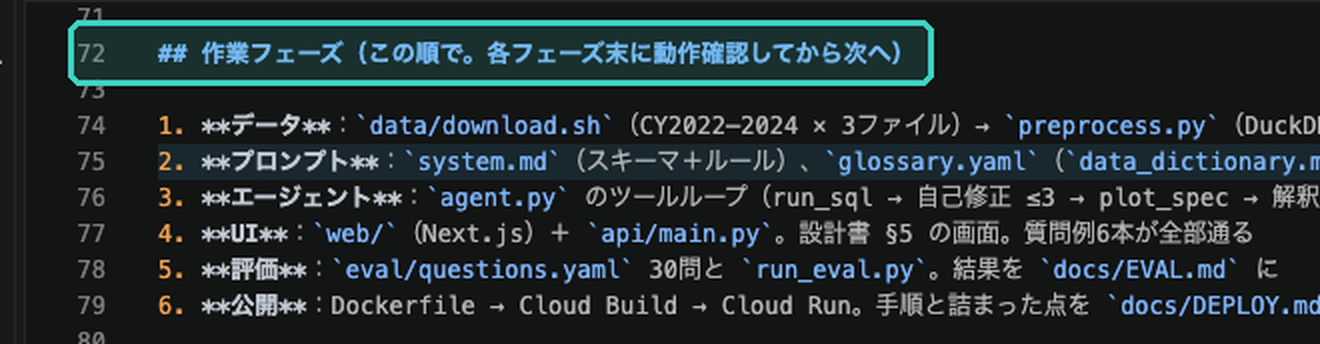
| Work phases | Data → prompts → agent → UI → evaluation → release. At the end of each phase, run the checks before moving on |
| Implementation rules | Handling numbers, guards, how to call Claude, how to record things |
| Things not to do | Authentication, features that lead to evaluating individual physicians, etc. |
| Check commands | Run one question through the CLI, start the API and UI, run the evaluation |
The work phases define where to stop, the things-not-to-do define the scope of work, and the check commands define the completion condition. Of what I said in Part 0, that a human hands over “an environment, decision criteria, and stop conditions,” this document covers the decision criteria and stop conditions.
3. SQL Generation from the Documents
3-1. Boundary Conditions
SQL generation corresponds to phase 2 (prompts) and phase 3 (agent) of the work phases. The boundary conditions were written into the documents so I didn’t have to repeat them in every instruction.
- Only two tools:
run_sqlandplot_spec. To add one, fix the design doc first - The completion condition for phase 3 is “run one question through the CLI.” Once it passes, stop
- Guards are “never skip.” Generated SQL goes through the guard before being sent to BigQuery
3-2. Splitting into Two Tools
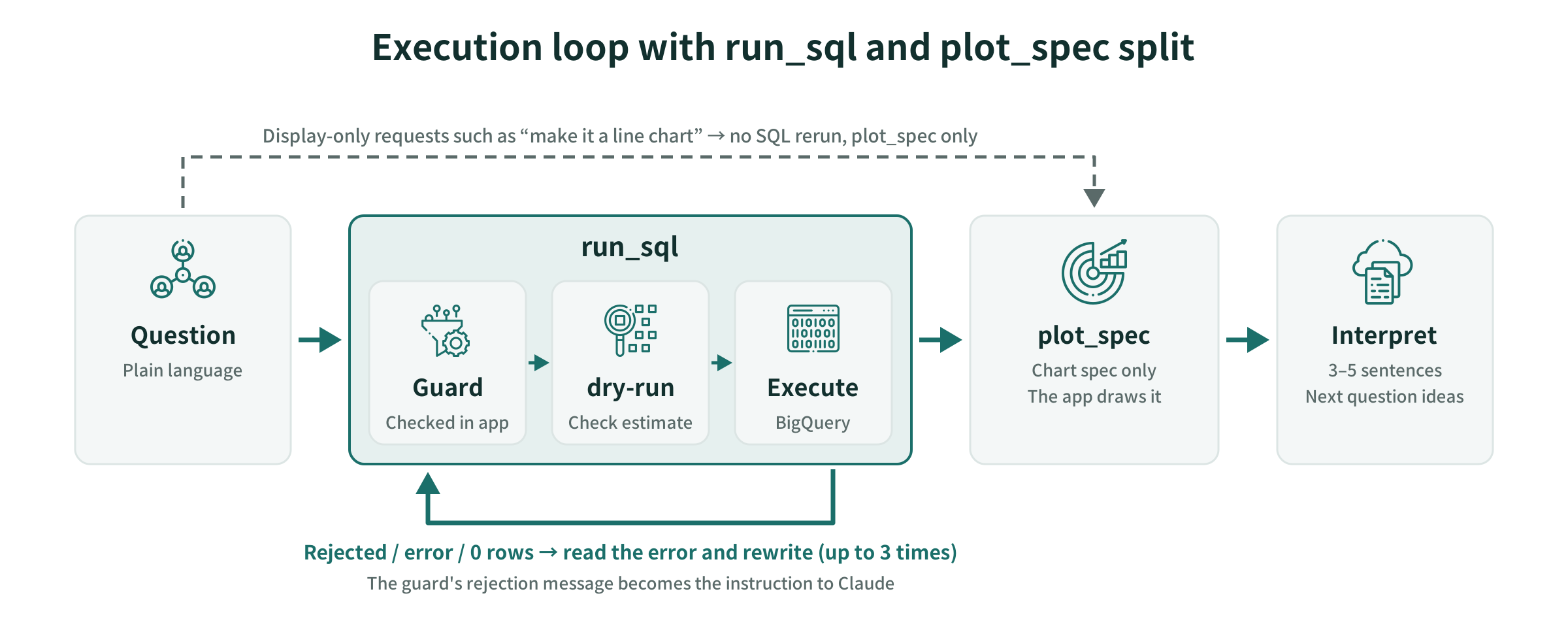
I made executing SQL and deciding the chart spec into separate tools, for two reasons:
- The app can inspect the SQL before running it. SQL written by Claude always passes through the guard before it reaches BigQuery
- The output format is decided independently of the SQL. For an instruction that only changes how things are displayed, like “make it a line chart,” the agent returns only
plot_specwithout rerunning the SQL
3-3. Guards
app/guards.py refuses SQL like the following:
- Anything that doesn’t start with
SELECTorWITH, or that chains multiple statements with; - Anything that references tables other than the five in
partd - Anything containing write commands (
DELETE,UPDATE, etc.) SELECT *
When it refuses, the error message doubles as the instruction to Claude. It is worded so that it’s clear how to rewrite next, e.g. “Always write it in the form partd.<table name>.” Claude reads it, rewrites the SQL, and corrects itself up to three times.
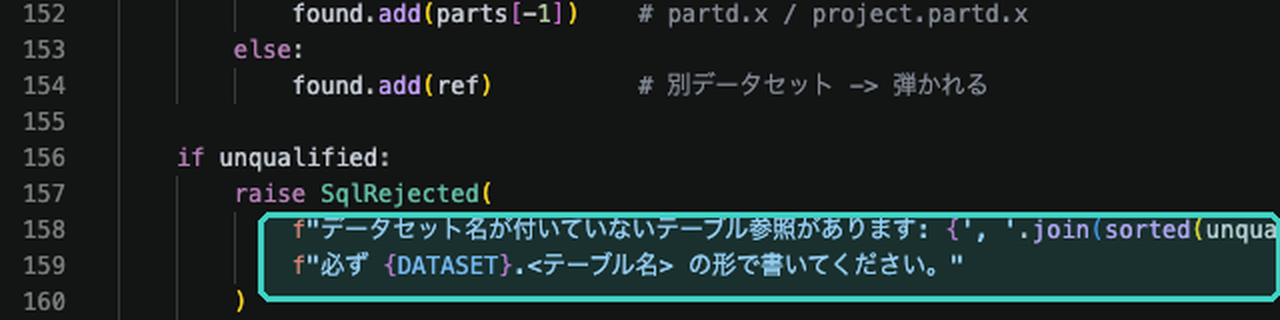
The mechanisms that automatically check whether the guard works correctly (tests and hooks) are covered in Part 3.
3-4. Glossary
The mapping between users’ words and columns lives in app/prompts/glossary.yaml and is embedded in the system prompt. At the top I wrote, “Everything has been verified against actual BigQuery data. Do not write anything based on guesses.”
| Section | Example |
|---|---|
| Phrasing → column | “number of prescriptions” → tot_clms, “prescription volume” → tot_30day_fills |
| Which table to use | Lightweight geo_drug for state-level aggregates; heavy provider_drug for physician × drug detail |
| Drug class | Classes like “GLP-1” are filtered by joining the drug_class table |
4. What the Run Found and Writing It Back into the Documents
4-1. What Running Real Data Revealed
Even when you build exactly to the design doc, running real data produces things you didn’t expect. I never let what we found end in the conversation of the moment; it always got written back into one of the documents.
| What was found | Where it was written back |
|---|---|
The billing cap applies not to the actual bytes at runtime but to the dry-run estimate. The estimate comes out tens of times higher than actual, so a strict cap refused almost every query against provider_drug |
Guard section of the design doc, CLAUDE.md, DECISIONS |
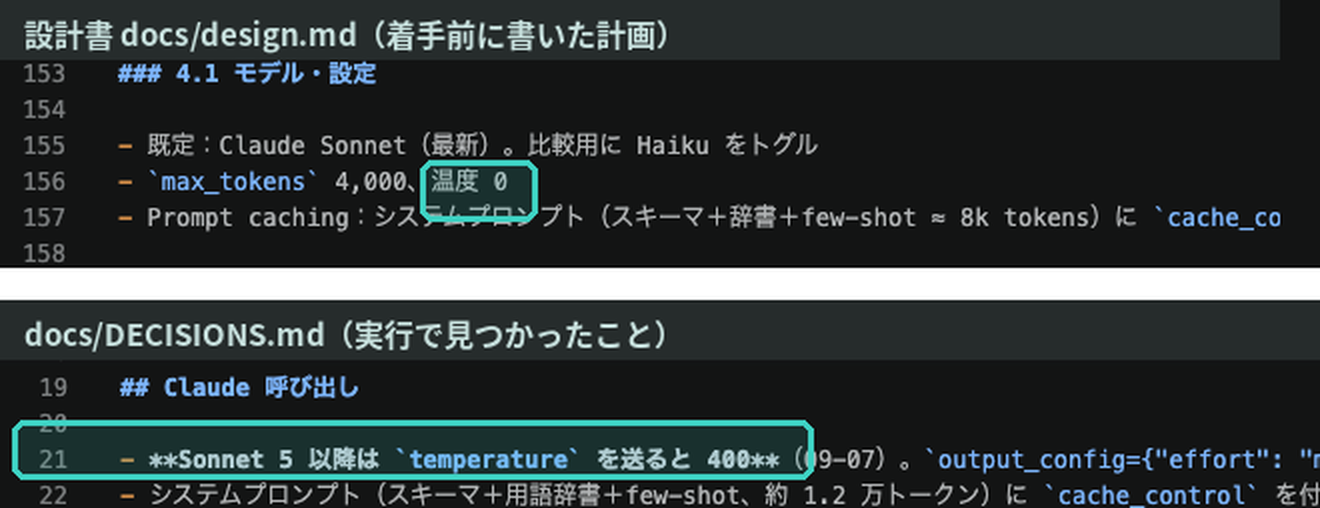
The design doc said “temperature 0,” but from Sonnet 5 onward, sending temperature causes an error |
CLAUDE.md (changed to “do not specify temperature”), DECISIONS |
Generic names are truncated by column width (Empaglifloz/Linaglip/Metformin). Listing the full names in IN returns 0 rows |
Glossary, DECISIONS |
| Combination drugs belong to multiple drug classes. Summing across classes double-counts | Glossary |
| Summing “number of prescribers” per drug-name row produces duplicates. For semaglutide, the sum is 453,256, while the actual count is 174,885 | Glossary |
| Stating rankings by a metric not used for sorting gets the ranking wrong | system.md |
“temperature 0” in the design doc was the right call when it was written. The design doc is the plan; CLAUDE.md holds the rules after actually hitting the problem. I didn’t erase the gap between them, and recorded the reason in DECISIONS.
4-2. Deciding Where to Write Things Back
| Destination | What goes there |
|---|---|
DECISIONS.md |
What was decided and why. 1-3 lines with a date |
CLAUDE.md |
Rules the next agent to work here must follow, with the actual case that was hit |
Glossary, system.md |
What the app’s Claude refers to when answering questions |
The implementation rules in CLAUDE.md say, “When you change the design, add 1-3 lines to DECISIONS.” So writing back happens as part of the agent’s work, without a human having to remember it.
4-3. What a Human Decided and What the Run Found
| What a human decided (before starting) | What the run found (by running real data) |
|---|---|
| Two tools. Never skip the guard | The billing cap applies to the estimate |
| Don’t turn suppressed blanks into 0 | Truncated generic names, double-counting of combination drugs |
| When in doubt, the data dictionary wins | Summing the number of prescribers produces duplicates |
| When the design changes, write it in DECISIONS | API spec changes across model generations |
The left column holds decisions about how things break. The right column holds what only became clear once real data ran. You can’t write the right column into the design doc ahead of time, but you can write the rule always write back what you find in advance.
5. Turning Repeated Steps into Skills
5-1. A Step That Documents Alone Left in Human Hands
Looking back once the app was working end to end, there was a step the documents alone couldn’t fully handle: “load the CMS CSVs into BigQuery and verify,” which I followed by hand in Part 1.
- Work phase 1 in CLAUDE.md is a single line
- The pitfalls (don’t hard-code URLs, don’t let the schema be auto-detected, leading zeros in NPI) are scattered across DECISIONS
- Checking the load results was done by a human in the console
The next subject (Open Payments) also starts by loading CMS CSVs into BigQuery. Since I knew I would do the same step again, I extracted it into a procedure here.
5-2. CLAUDE.md vs. Skills
| CLAUDE.md | skill (.claude/skills/<name>/SKILL.md) |
|
|---|---|---|
| When it is read | First, every time | When invoked, or when Claude judges the content fits |
| What goes in it | Rules to follow at all times | Procedures with an order and stopping points |
| Example | Don’t treat identifiers as numbers | Loading CSV → BigQuery and verifying |
I use two rules of thumb for whether to make something a skill: did I think “this again?” the second time, and does the procedure have an order and stopping points.
5-3. cms-csv-to-bigquery
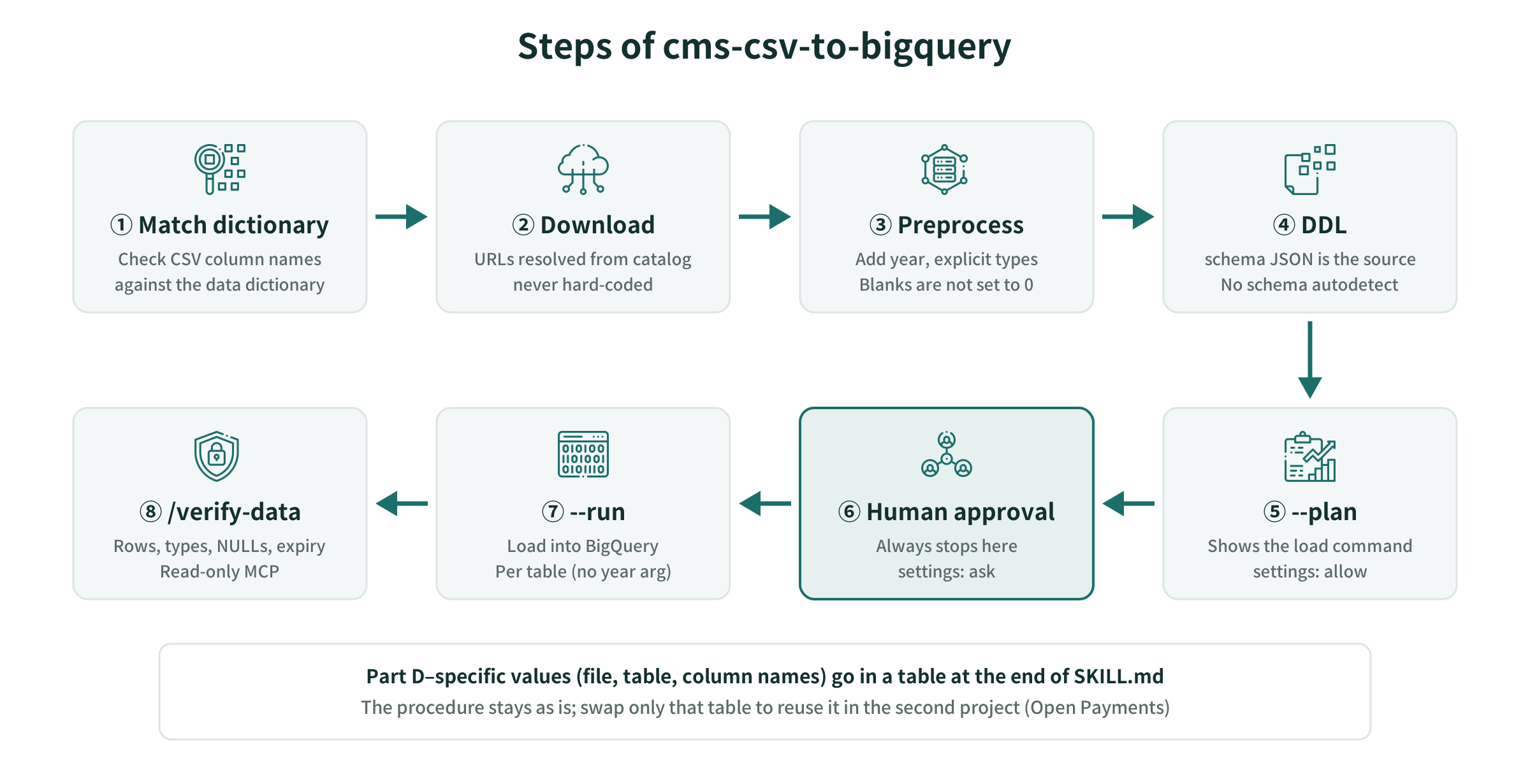
I wrote three things in SKILL.md:
- Procedure: from matching the data dictionary against the actual CSV column names, through verification after loading. Pitfalls such as not hard-coding URLs, not letting the schema be auto-detected, and not turning blanks into 0 are written inside the relevant steps
- Rules: things to always follow across steps
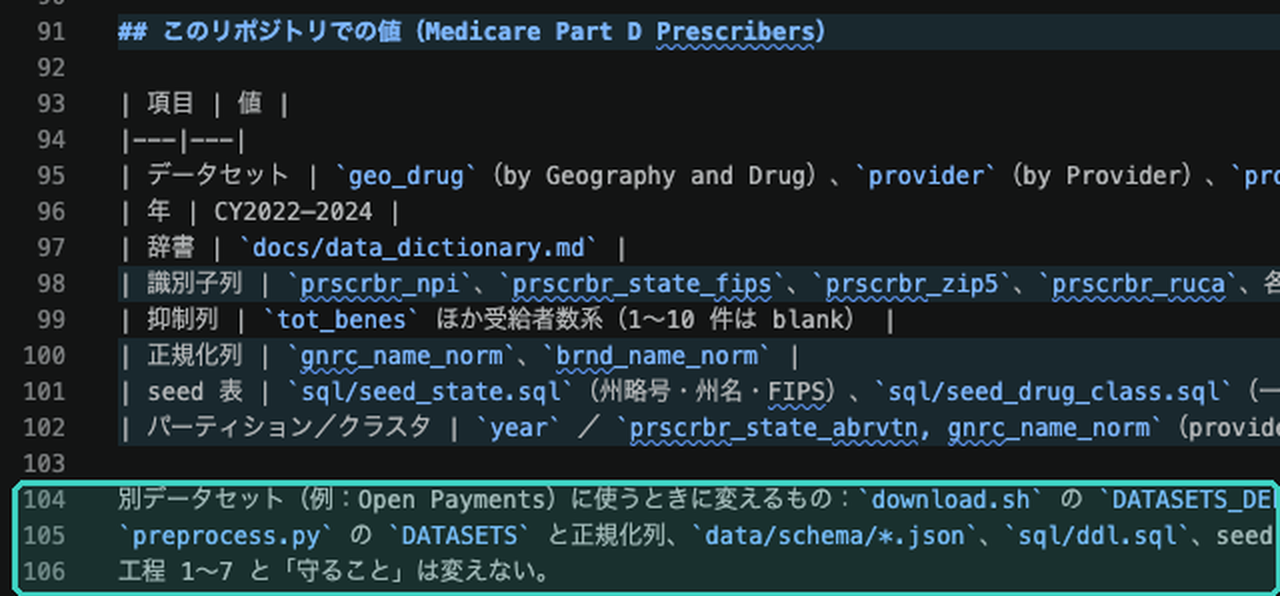
- Values for this repository: values specific to Part D (dataset, years, identifier columns, etc.)
At the top, it declares up front which steps the year affects and where it stops.
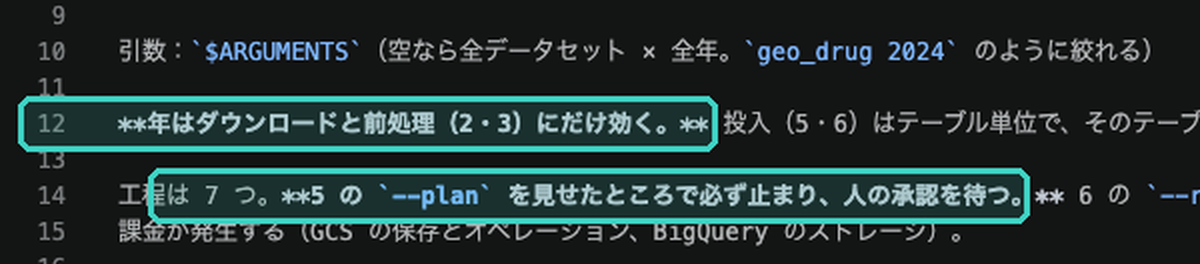
The first line of “Rules” is the stopping point.

I separated the Part D-specific values into a table at the end. In the second project, I can reuse it by swapping just the table, without rewriting the body of the procedure.
5-4. Where It Stops
I deliberately left the load execution (--run) out of the list of commands the skill may use (allowed-tools). Since --run was put under ask (requires human confirmation) in Part 1, even when called from the skill it always stops before execution and waits for human approval. Allowing it in a skill cannot bypass the ask in settings, so the stopping point is managed in one place.
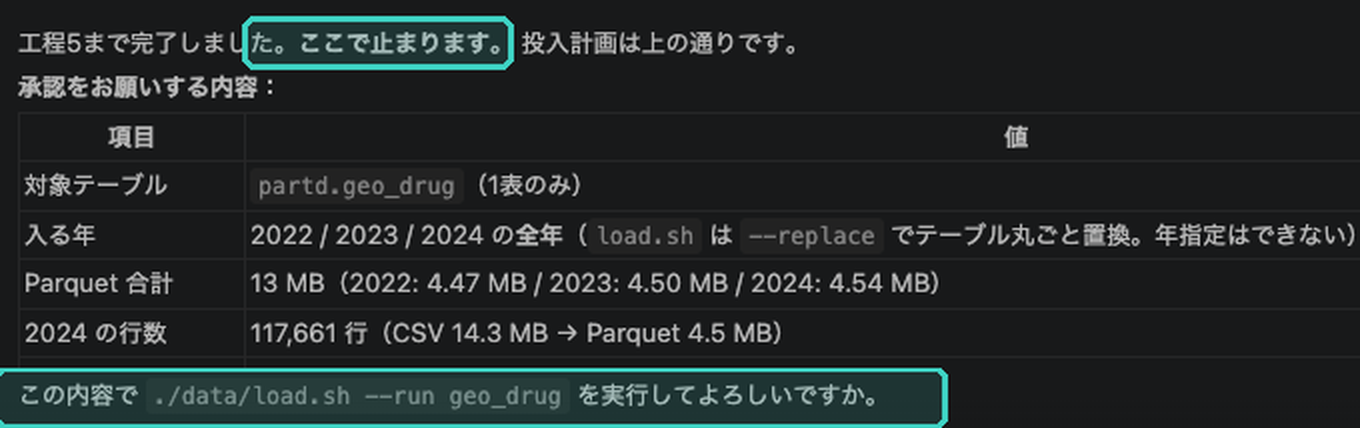
Post-load verification is split into a separate skill, /verify-data. The “table expiration” check found in Part 1 is added there as a step too.
5-5. Running the Written Procedure Once and Fixing It
The agent wrote SKILL.md by reading the code, but running it as written failed. The procedure passed the year as --plan geo_drug 2024, but load.sh doesn’t accept a year and stopped with “unknown argument.” Only fetching and preprocessing use the year; loading is done per table. I fixed SKILL.md accordingly.
Trust a skill only after running it once. Reading the code alone isn’t enough to get the argument spec exactly right.
5-6. Who Can Invoke It
| skill | Invokable by | Reason |
|---|---|---|
cms-csv-to-bigquery |
Human and Claude | --run, which incurs charges, is stopped by ask in settings |
verify-data |
Human and Claude | Runs only on the read-only MCP |
eval, deploy |
Human only | Involves API charges or public release (Part 4) |
To prevent Claude from invoking a skill on its own, set disable-model-invocation: true in SKILL.md.
6. This Part’s Harness
| Tool | What it is in this repository | What a human did when relying on documents alone |
|---|---|---|
| Project documents | CLAUDE.md, docs/ (design doc, data dictionary, DECISIONS), glossary |
— |
| skill | cms-csv-to-bigquery, verify-data |
Remember the procedure and pitfalls, and check load results in the console |
| Permissions and stop conditions | Part 1’s settings (--run is ask) |
Check by eye any command that incurs charges |
| MCP | Part 1’s BigQuery MCP (used by verify-data) |
Look at row counts and schema and paste them |
7. Summary
- Split documents by role. Rules to follow every time go in CLAUDE.md, what to build goes in the design doc, names and types go in the dictionary. Also write down which one wins when they disagree
- Always write back what the run finds into the documents. Don’t erase the gap between the design doc (the plan) and CLAUDE.md (the rules after hitting problems); record the reason in DECISIONS
- Turn repeated steps into skills. Decide stopping points in settings, not inside the skill, and trust a written procedure only after running it once
How much you can delegate depends on how much you made verifiable in advance. Documents are that “in advance” given shape.
Next Steps
In Part 3, I cover prompt design and hooks: the boundary conditions and stopping points to put into instructions to Claude Code, and hooks that run guard tests and type checks on every edit without a human asking. The working example is UI implementation and broken layouts.
Sources
- Anthropic, Claude Code Docs (memory / skills / settings)
- CMS, Medicare Part D Prescribers Data Dictionary (data.cms.gov)
The code is available on GitHub: github.com/HerzLeben/medicare-partd-text-to-sql