
Claude Code × Medical Application
[Claude Code] Turning an In-House BI Dashboard into an AI Dashboard, Part 4: Publishing and Running It — Managing Cost and Security
1. Introduction — decide on cost and safety first
When you let people use an AI dashboard, the concerns are cost and safety. The AI is called for every question, so the more it is used, the more it costs. If someone hammered it with a script, how far would the cost grow?
By the end of Part 3, we had screens that respond when you talk to them. Part 4 is about publishing and running them. This time it is a public demo that anyone can use, so the conditions are stricter than for in-house use. We cannot choose who views it, and we have to assume malicious use.
Here is how this post is organized.
- Introduction (this section)
- Protecting costs — three limits
- A bot check, only once at the entrance
- Measure, then fix — first load on phones
- Publish in two stages, and decide what people do
- How in-house use differs
- The harness this time / Summary
2. Protecting costs — three limits
2-1. Set the ceiling first
Because this is a public demo, we decided before building that costs must not grow no matter who presses the button or how often. There are three limits.
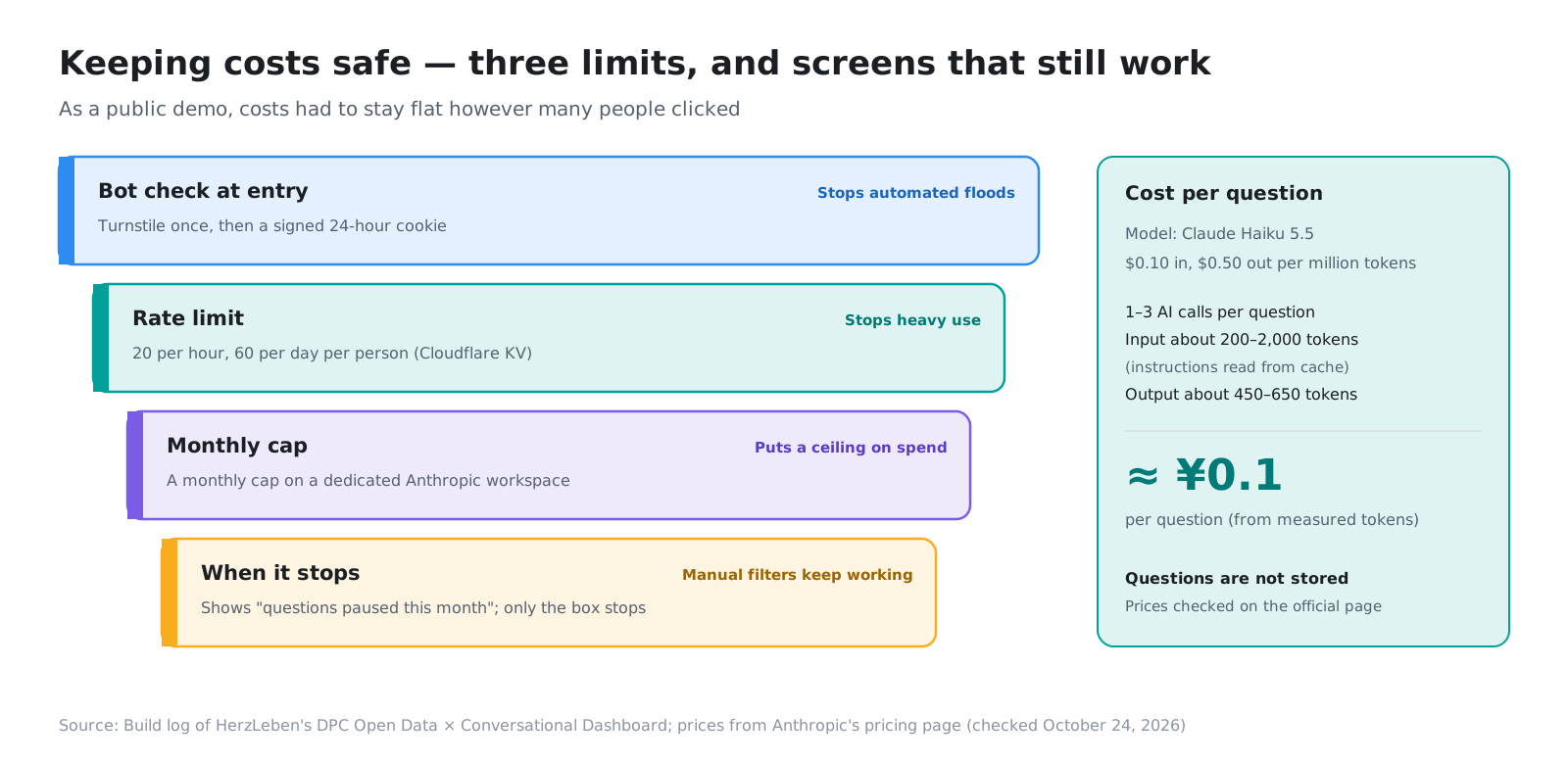
- Bot check at the entrance: Cloudflare Turnstile, passed only once at the entrance (Section 3)
- Rate limits: 20 questions per hour and 60 per day for each person, recorded in Cloudflare KV (a key-value store)
- Monthly cap: a dedicated workspace in Anthropic, with a monthly cap set on it
Question text is not stored. Because we do not record what was asked, we take on no responsibility for holding viewers’ input.
2-2. About 0.1 yen per question
The model is Claude Haiku 5.5. It costs $0.10 per million input tokens and $0.50 per million output tokens (we checked the official pricing page). One question calls the AI one to three times, with about 200–2,000 input tokens (few, because the instructions are read from the cache) and about 450–650 output tokens. Even calculated at the high end, that is about $0.0005 per question, or about 0.1 yen.
- ≈0.1yenAI cost per question (from measured token counts)
- 20questions per hour per person under the rate limits (60 per day)
2-3. Even when stopped, the screens still work
When the monthly cap is reached and the API stops, the app tells usage-limit and insufficient-balance errors apart, shows “The question feature is paused this month. You can still choose conditions below to view the screens,” and stops only the question box. The part for choosing conditions by hand and the other screens keep working as they are.
We checked this message without touching the production settings. We put a setting for stopping it by hand (ASK_PAUSED=1) into the preview environment only, deployed to a separate branch, checked the message, and then removed it. How it looks when stopped is part of what you build.
3. A bot check, only once at the entrance
3-1. No check for every question
In the first version, the Turnstile (bot check) widget sat below the question box. That put the widget in front of the viewer on every question, which made the app awkward to use.
So we changed it to pass Turnstile only once, when the viewer reads and agrees to the “Before you use this” notice on the entrance page. A viewer who passes gets a 24-hour signed cookie from the server. The question endpoint (/api/ask) checks this cookie every time.
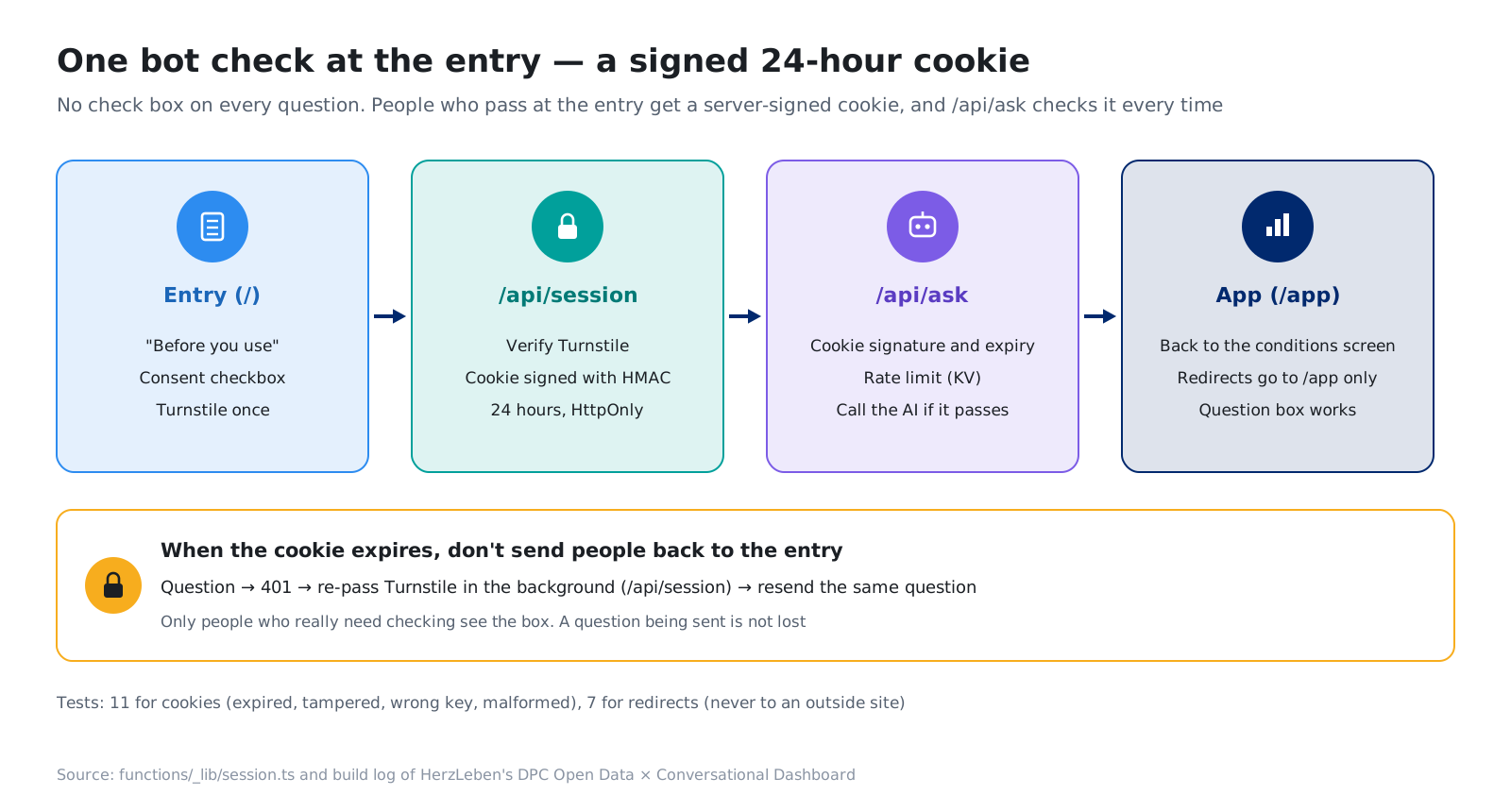
- The cookie joins three parts: expiry, a random value and a signature (HMAC-SHA256). It is HttpOnly, Secure and SameSite=Lax, and is sent only to
/api - The signature comparison takes the same time either way (so the key cannot be guessed from differences in how the comparison runs)
- 11 tests. We confirmed that expired, tampered, wrongly keyed and malformed values are all rejected
3-2. Separate the entrance from the app
At first, we layered the consent screen on top of the current page, but we changed it to separate the entrance page (/) from the app screens (/app). A viewer who arrives directly at /app?… from a shared URL is also sent to the entrance first, and after agreeing is returned to the screen with the original conditions.
The return destination is limited to paths that start with /app. If the destination could be anything, the page could be used as a stepping stone to redirect people to outside sites. We wrote 7 tests for this check too.
3-3. When it expires, pass again in the background
Consent stays in the browser for 30 days, but the cookie expires after 24 hours. Sending the viewer back to the entrance when it expires would lose the question they were about to send. So when sending a question returns a 401, the app passes Turnstile again in the background, gets a new cookie and resends the same question. The check widget appears only for people who really need to be checked.
We also found a weak spot: when Turnstile could not issue a token, the question box stayed stuck. Now, on an error or after 20 seconds, the app sends the request with an empty token. The server replies “The bot check could not be completed,” and the screen does not freeze.
4. Measure, then fix — first load on phones
4-1. Measure first
With in-house BI too, people often say they want to view it on a phone when out of the office. After the preview went live, we measured first load on phones. The conditions were slow 4G (1.6 Mbps, 150 ms) and 4G (9 Mbps, 60 ms), CPU slowed down 4x, no cache, median of three runs.
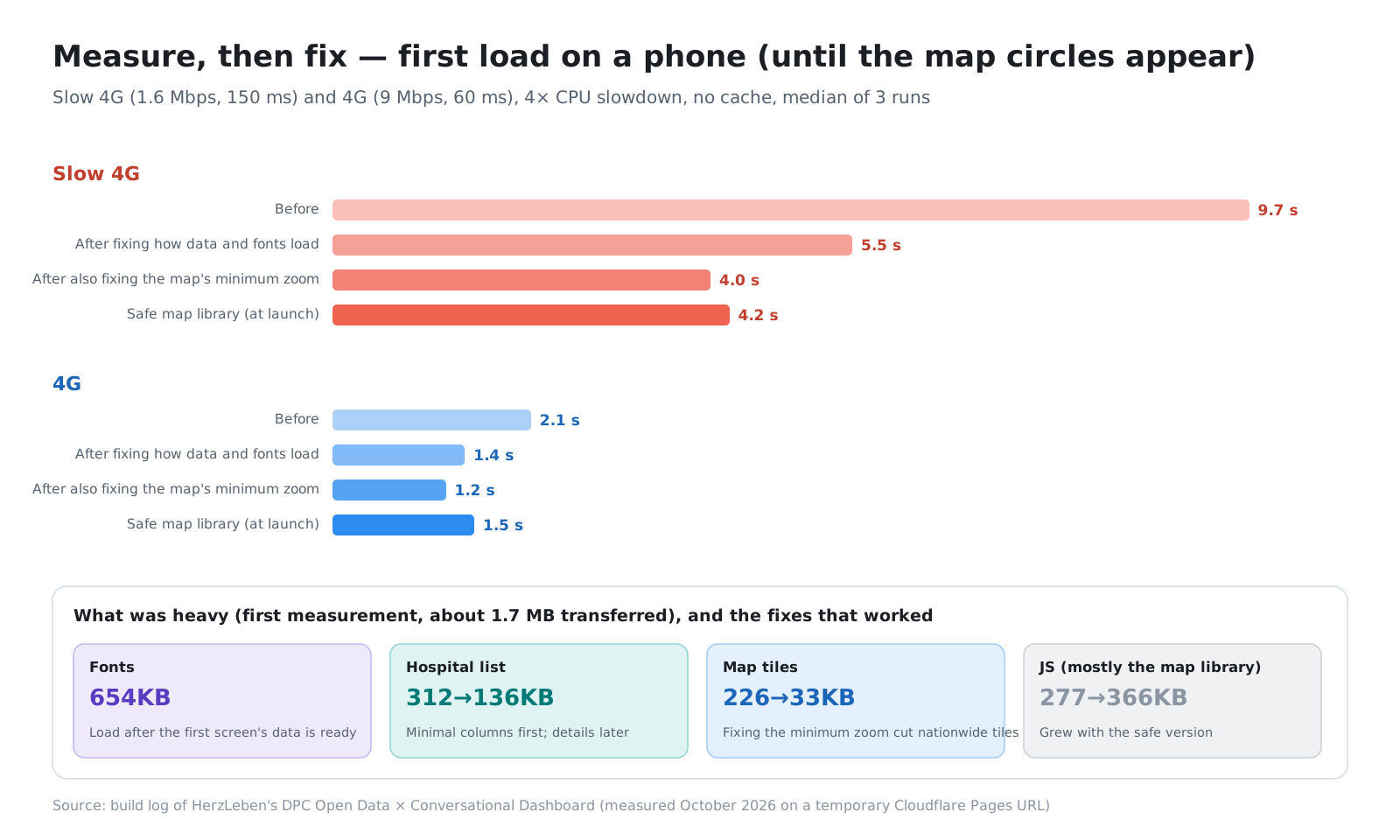
In the first measurement, about 1.7 MB was transferred: fonts 654 KB, the hospital list 312 KB, JS 277 KB (mostly the map library) and map tiles 226 KB. We had Claude Code produce the breakdown and “fixes in order of effect” first; then a person chose “lighter fonts and a minimal hospital list” and asked for those.
4-2. What worked was “when to load”
- Split the hospital list in two: the first load has only the minimum columns (id, short name, prefecture, medical area, coordinates, category). With gzip, 312 KB → 136 KB. Official names, beds and links load after the map settles
- Load fonts later: cutting the weights used from three to two barely changed the transfer size. What worked was loading fonts only after the data the first screen needs has arrived. Until then, the device’s default font is used
- Preloading: the data JSON is preloaded from the HTML, and connections to the map tile server and the Turnstile server are opened in advance
4-3. We also fixed how measurements are reported
Measuring again after the fixes, the time to the map circles on 4G went from 2.1 s to 1.4 s. At this point we found that our target, “within 4 seconds on 4G,” had been met even before the fixes. The 9.5 s first reported was the slow 4G value; the conditions had not been stated clearly enough. Whenever we ask for numbers to be reported now, we always have the conditions they were measured under written alongside.
During the fixes, we also noticed that on phones the map could not fit all of Japan: eastern Hokkaido and the Sakishima Islands were cut off. Reading the map’s internal state showed the minimum zoom stuck at 4. When we swapped map libraries partway through, a value chosen with the old library in mind had stayed behind. Changing the minimum zoom to 3 also cut the nationwide map tiles from 226 KB to 33 KB, bringing load time to 4.0 s on slow 4G and 1.2 s on 4G.
4-4. A security update made it a little slower
In the full review before launch, we found a known vulnerability in the map library (MapLibre) and upgraded to a fixed version (4 → 6). JS grew from 286 KB to 366 KB, and measuring again, the time to the map circles became about 1.5 s on 4G and about 4.2 s on slow 4G. Since the first screen is the map, loading the map library later would barely make it faster. We judged that not worth the effort and launched with these numbers.
5. Publish in two stages, and decide what people do
5-1. Check on a temporary URL that search engines do not show
We split the launch into two stages.
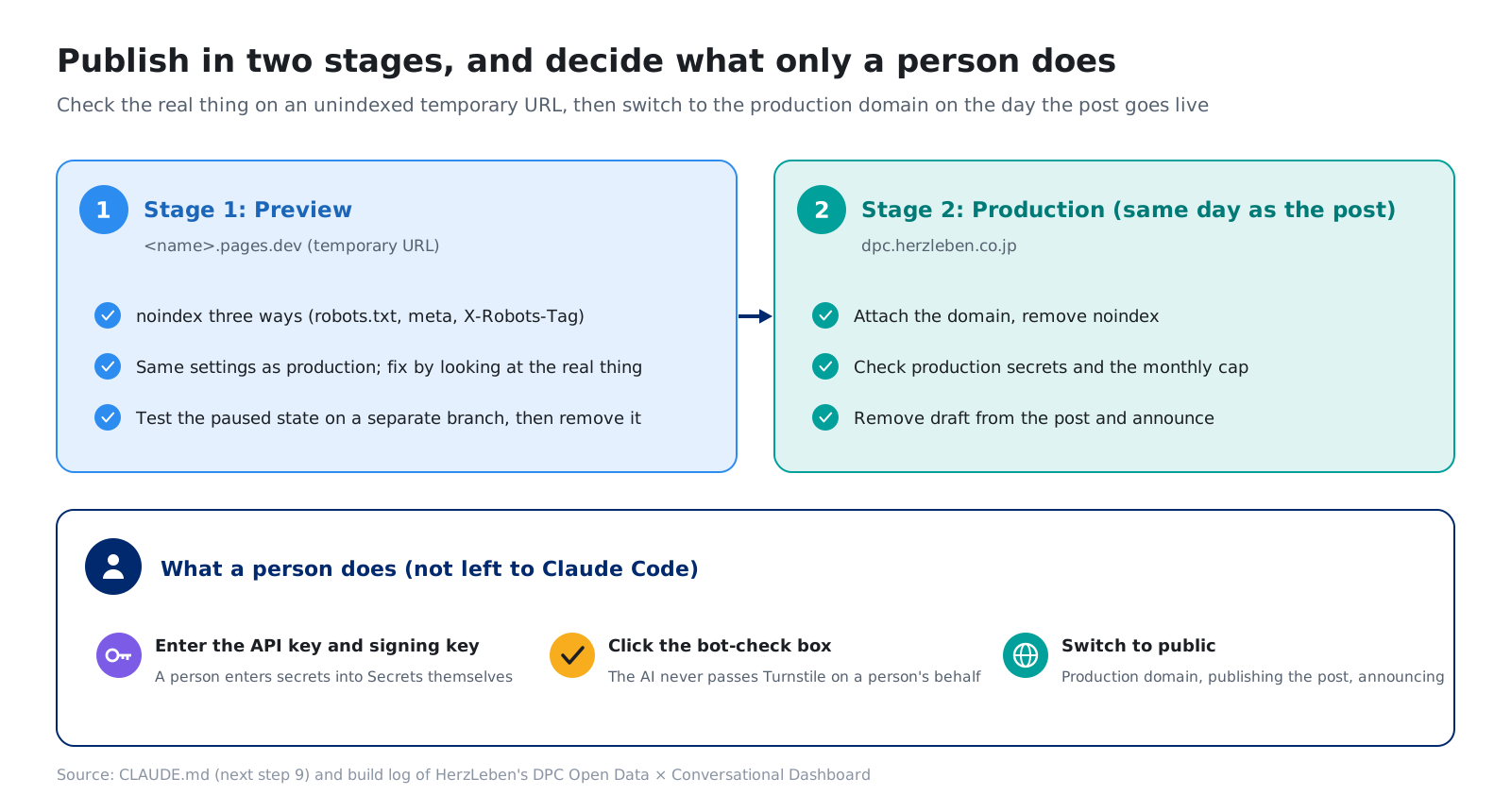
Stage 1 was publishing to a temporary Cloudflare Pages URL (<name>.pages.dev). We kept it out of search in three ways: robots.txt, a meta robots tag on the pages, and an X-Robots-Tag header on every file, including the data JSON. After deploying, we confirmed that all three were in effect. We ran it with the same settings as production and did all the checks from the earlier sections (cost, bot check, phones) on the real thing.
Stage 2 was on the same day as the post’s publication. We attached the production domain (dpc.herzleben.co.jp), removed the settings that kept it out of search, and published the post. The app’s entrance and footer state prominently that this is a demo to show what it can do, and that totals and hospital matching may contain errors.
5-2. What only a person does
We left it to Claude Code to run deploy commands and even to create the Pages project and the KV namespace. On the other hand, we had decided that a person would do these three things:
- Enter secrets: the API key, the cookie signing key and the production Turnstile keys are entered into Cloudflare Secrets by a person. They appear neither in the Claude Code conversation nor in the build log
- Click the bot check box: as in Section 3, the AI does not pass it on anyone’s behalf
- Switch to public: the production domain, removing the settings that keep it out of search, and publishing the post
Each of these either cannot be undone if done wrong, or would lose its meaning if the AI did it.
5-3. Stumbles in running it
Local work had its small stumbles too. The moment we added KV to the config file, two local dev servers reloaded the config at the same time, fought over the mock KV file, and one crashed (SQLITE_BUSY). Another time, six old dev servers were still running and a new server returned 404. We now check what is running locally at each milestone and stop it.
6. How in-house use differs
This time it is a public demo, so the assumptions differ from in-house use. Here are the differences.
| This time (public demo) | In-house use | |
|---|---|---|
| Who views it | Anyone | Employees and partners |
| Check at the entrance | Turnstile and a signed cookie | In-house authentication (single sign-on and so on) |
| Rate limits and monthly cap | Required | Safer to have (costs become predictable) |
| Data | Published figures only | What each person sees depends on their permissions |
| Keeping it out of search | Only during the preview | Always (it sits inside the company network) |
The way costs are protected, and screens that still work when stopped, carry over to in-house use as they are. The check at the entrance is replaced by in-house authentication.
7. The harness this time
| Tool | What it is in this app | Role |
|---|---|---|
| Cost limits | Rate limits (KV) and the monthly cap on a dedicated workspace | Costs have a ceiling no matter who presses the button or how often |
| Check at the entrance | Turnstile, a signed cookie and 18 tests | Protects without a check on every question |
| Paused message | ASK_PAUSED, telling errors apart |
The screens work even when stopped |
| Measurement | Slow 4G and 4G, CPU 4x, median of three runs | Measure before fixing, and state the conditions |
| Two-stage launch | Preview with noindex three ways → production | Open only after checking the real thing |
| Human hands | Secrets, the bot check and switching to public | Things that cannot be undone, or that lose their meaning if the AI does them |
8. Summary
- For cost, we set the ceiling before building: three limits (a bot check, rate limits and a monthly cap), and about 0.1 yen per question
- The bot check runs only once at the entrance. A 24-hour signed cookie means no check on every question
- For first load on phones, we measured, then fixed. What worked was “when to load” rather than size. We also fixed how measurement conditions are stated
- Launch in two stages. We decided in advance that secrets, the bot check and switching to public are done by a person
The more you leave to the AI, the more clearly you need to decide what people do.
Wrapping up the series
In Parts 0 to 4, we used Japan’s DPC open data to show how an in-house BI dashboard can become “an AI dashboard that responds when you talk to it.”
- Part 0: Overview and Design — what changes and what the screens look like
- Part 1: Preparing the Data — Reconciling Years, Hospitals and Regions
- Part 2: Checking the Numbers — Keeping Them Correct with Checks and Reviews
- Part 3: Adding Generative AI — Deciding What to Leave to the AI
- Part 4: Publishing and Running It — Managing Cost and Security (this post)
The app is live at dpc.herzleben.co.jp. Try asking it something, and check which conditions the AI chose.
Sources
- Anthropic, Pricing (Claude Haiku 5.5, checked October 24, 2026). https://www.anthropic.com/pricing
- Cloudflare, documentation for Pages Functions, Workers KV and Turnstile
- Map: Geospatial Information Authority of Japan, GSI Tiles (pale map)
- The figures and tables in this post were prepared by HerzLeben Inc. from the sources above; they were not produced by the Japanese government