
Claude Code × Medical Application
[Claude Code] Turning Visual Checks into Automated Checks, Part 4: Publishing and Operation — A Design That Never Receives Your TLFs
1. Introduction — TLFs cannot leave the company
Pre-submission TLFs are among the hardest documents in a company to share outside. They contain the trial results themselves, and whether they may be uploaded to an external service is usually governed strictly by internal procedures.
However useful a checking tool may be, one that says “please send your PDF to this site” will not be used in pharma. So from the start, TLF Visual QC was designed as follows.
- It never receives your TLFs: every calculation runs inside the user’s browser
- The server only serves the screens: it has no mechanism for receiving anything at all
- Outbound traffic is blocked: nothing, including the parts of the screen, is fetched from outside the site
This post looks at how we built this and how we verified it.
- Architecture — no server-side processing
- How outbound traffic is blocked, and how to verify it
- A bug that occurred only in production
- Making it work with the network disconnected
- What the hosting provider adds — network error reports and an analytics script
- Position as a tool that has not been validated
- Why the example TLFs are not bundled
- 0requests to outside the site while a PDF is loaded and analysed
- about 200files loaded when the screen opens (all from the same site)
- 0programs running on the server side (it only serves the screen’s files)
- 3things that happened only in production (a font mismatch, network error reports and an analytics script)
2. Architecture — no server-side processing
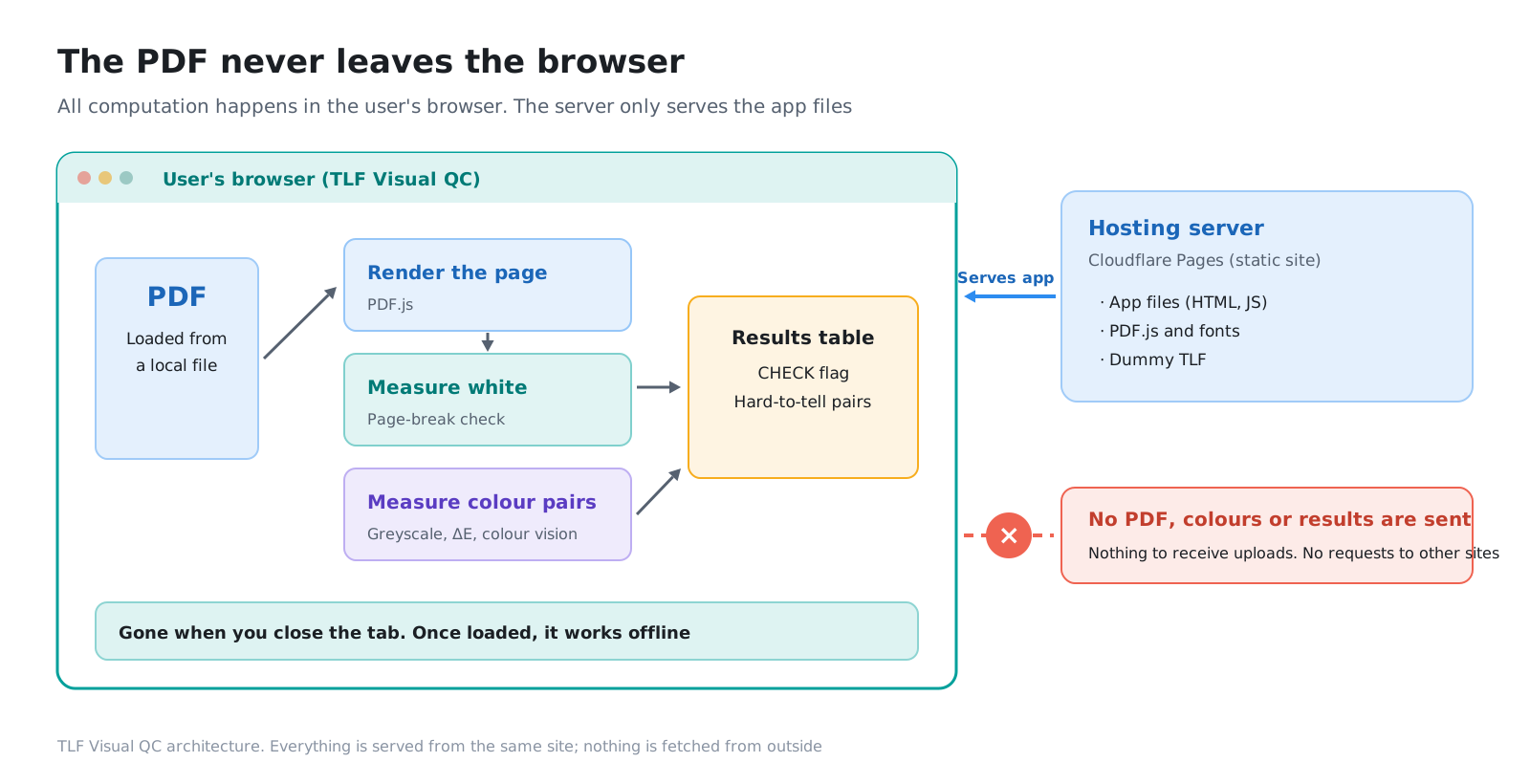
TLF Visual QC is a static site made only of HTML, JavaScript and PDF.js data files. It is hosted on Cloudflare Pages, and no program runs on the server side.
| DPC dashboard | TLF Visual QC | |
|---|---|---|
| Hosting | Cloudflare Pages | Cloudflare Pages |
| Server-side processing | Yes (relays queries to the AI and checks its replies) | None |
| External services | Generative AI (Claude) | None |
| User data | The question text passes through the server and the AI | The PDF never leaves the browser |
| Cost | AI usage fees (about 0.1 yen per question) | Hosting only |
The dashboard in the series “From In-House BI to an AI Dashboard” had server-side processing in order to send questions to the AI. This tool has neither AI nor server-side processing, so there is no need to design protections for data it has received in the first place. Not receiving data is the most reliable protection.
When a PDF is loaded, it is processed inside the browser in this order.
- PDF.js renders each page as an image (the steps in Part 1)
- A separate worker thread (Worker) converts to greyscale, downsizes and calculates the white ratios
- The results table and page images are shown on screen
The page images and results exist only in the browser’s memory. Close the screen and they are gone.
3. How outbound traffic is blocked, and how to verify it
3-1. CSP — telling the browser not to go outside
“We did not write any code that sends data out” is not enough on its own. Someday someone may add a component, and that component may communicate with the outside.
So the site’s responses carry a CSP (Content Security Policy). It tells the browser, “this page loads files only from the same site and communicates only with the same site,” and the browser enforces it. Even if a script on the page tries to contact an outside server, the browser blocks it.
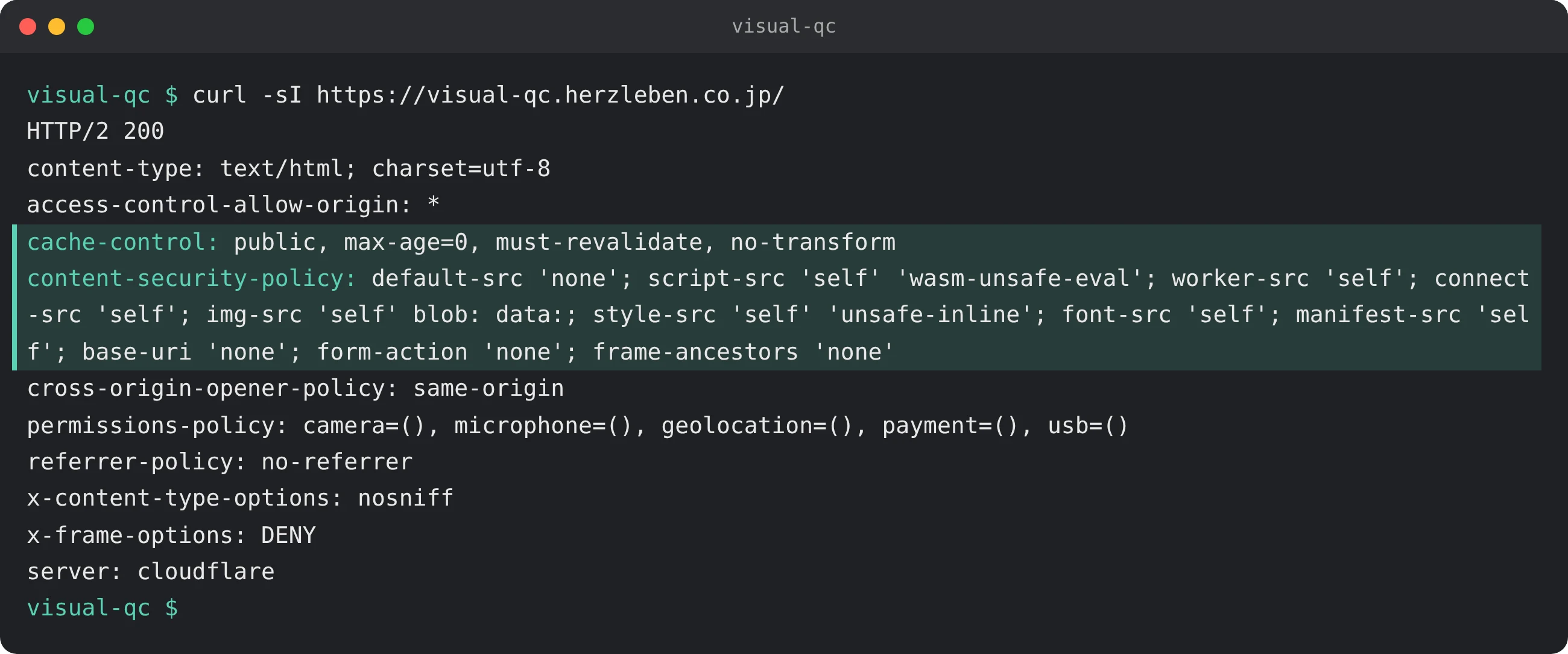
The tool also uses no analytics tags, ads, external fonts or components from CDNs. Everything it needs is bundled with the site.
3-2. How to verify it — look at the network log
You can check whether there is really no outbound traffic by looking at the network log in the browser’s developer tools.
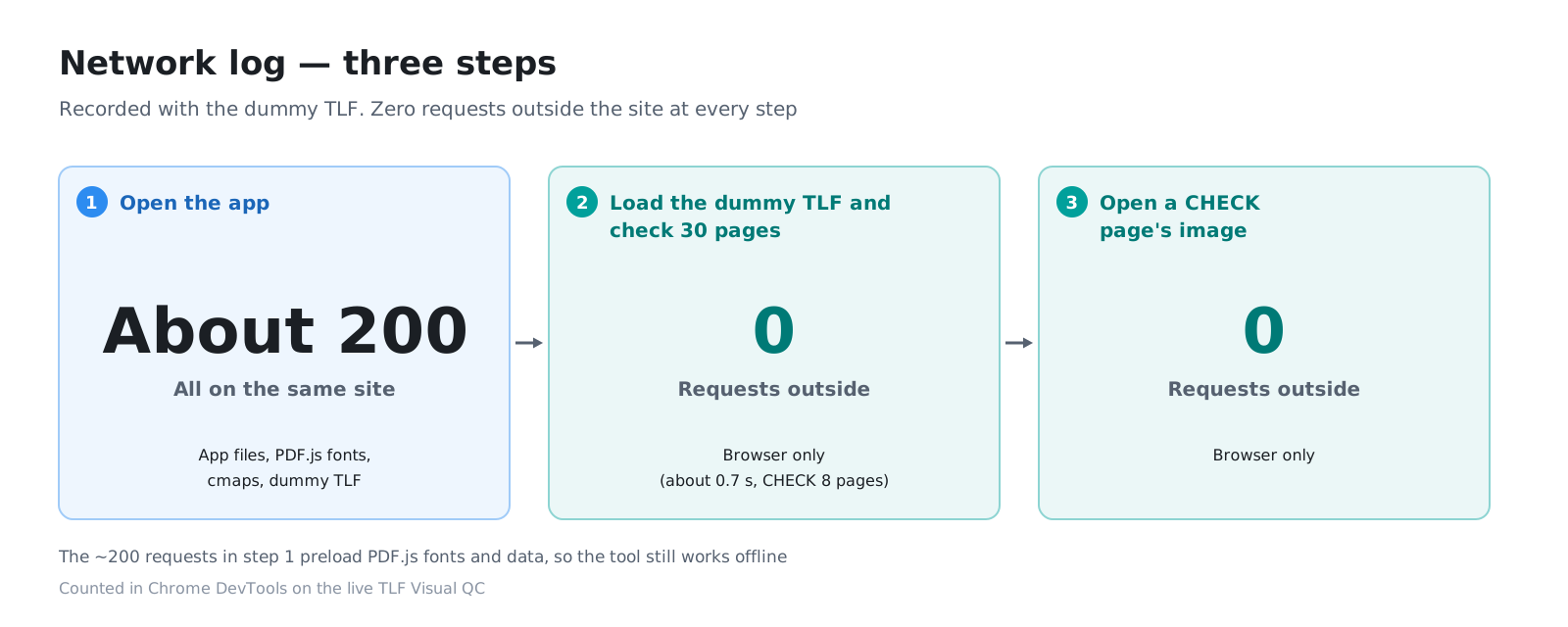
We recorded the browser’s network log in three stages.
| Stage | Requests | Destination |
|---|---|---|
| Open the screen | About 200 | All within the same site (the screen’s files, PDF.js fonts and character maps, the dummy TLF) |
| Load the dummy TLF and analyse 30 pages | 0 outbound | Inside the browser only (30 pages in about 0.7 seconds; 8 CHECK pages) |
| Open the image of a CHECK page | 0 outbound | Inside the browser only |
The roughly 200 requests when the screen opens come from loading PDF.js data such as fonts in advance (section 5). No outbound requests are added while a PDF is loaded and analysed.
4. A bug that occurred only in production
In the local development environment, all the tests passed. But when we loaded the same dummy TLF into the build made for publishing, the page break values were off.
The cause was fonts. To draw fonts that are not embedded in a PDF, PDF.js fetches font data files. In the build, PDF.js got the location of those files wrong and drew with substitute fonts instead. Substitute fonts have different character widths and shapes, so the number of white pixels changes and the white ratios shift. No error appeared on screen, and the results table looked normal.
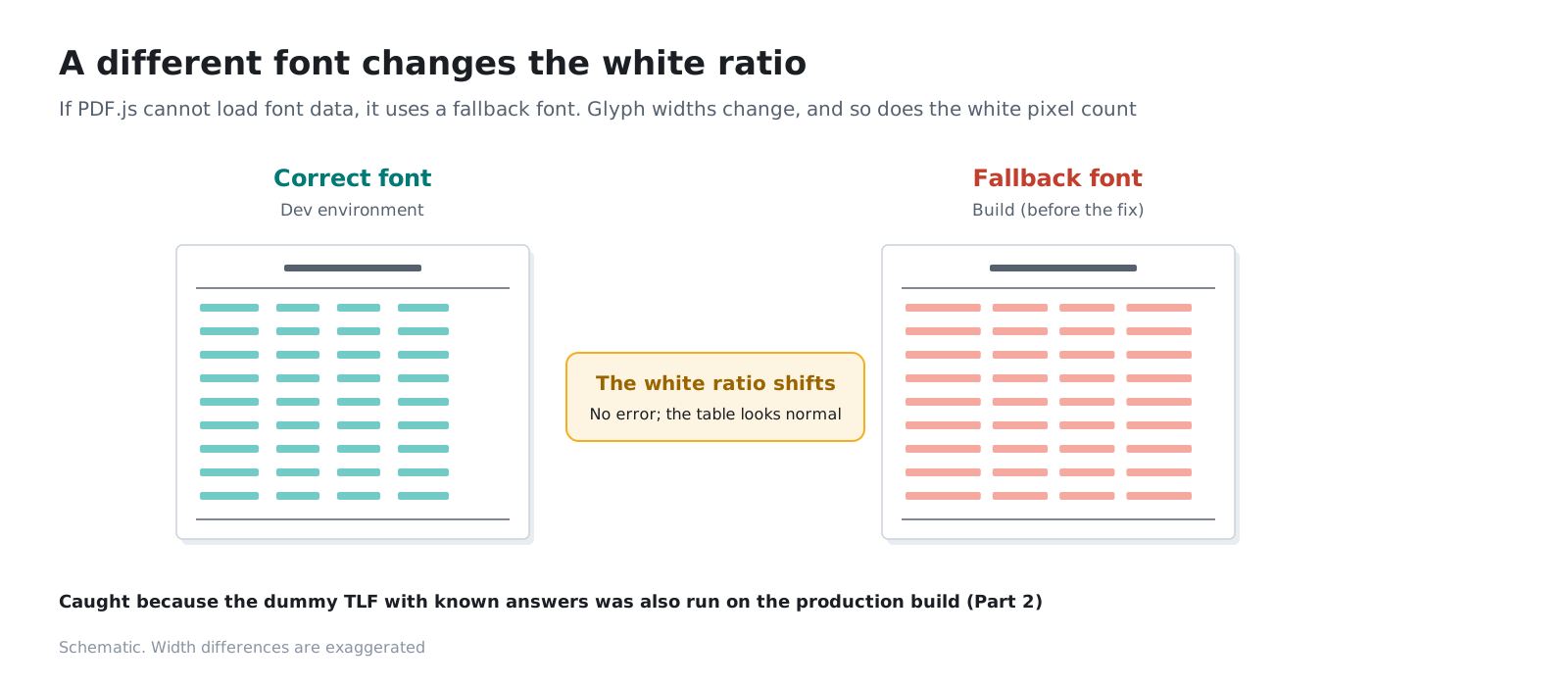
After fixing it, we added a test (check:build) that runs a build made exactly as for production in a real browser. If you check only in the development environment, you miss differences that occur only at build time. Every release now has to pass this test first.
5. Making it work with the network disconnected
5-1. The first version did not work
If the PDF is handled only inside the browser, the tool should keep working after the network is disconnected once the screen is open. That is also the clearest evidence that nothing is sent out.
In the first published version, however, disconnecting the network led to “This PDF could not be opened.” The PDF.js Worker and font data were fetched again from the site every time a PDF was opened, and they were served with a setting that said “check with the server every time you use this.”
5-2. The fix
- Load what is needed in advance, when the screen opens: start the PDF.js Worker and the calculation Worker, and load the font and other data (about 2.4 MB) and the dummy TLF into memory. PDF.js receives them from memory rather than from the site
- Tell the browser it may keep files whose names are determined by their contents: files that get a content hash in their names at build time, and PDF.js data placed in a folder with a version number, never change, so we set them as safe for the browser to keep for a long time (immutable)
If you disconnect the network after the screen has opened and finished loading, both the dummy TLF and your own PDFs are analysed with the same results as when connected.
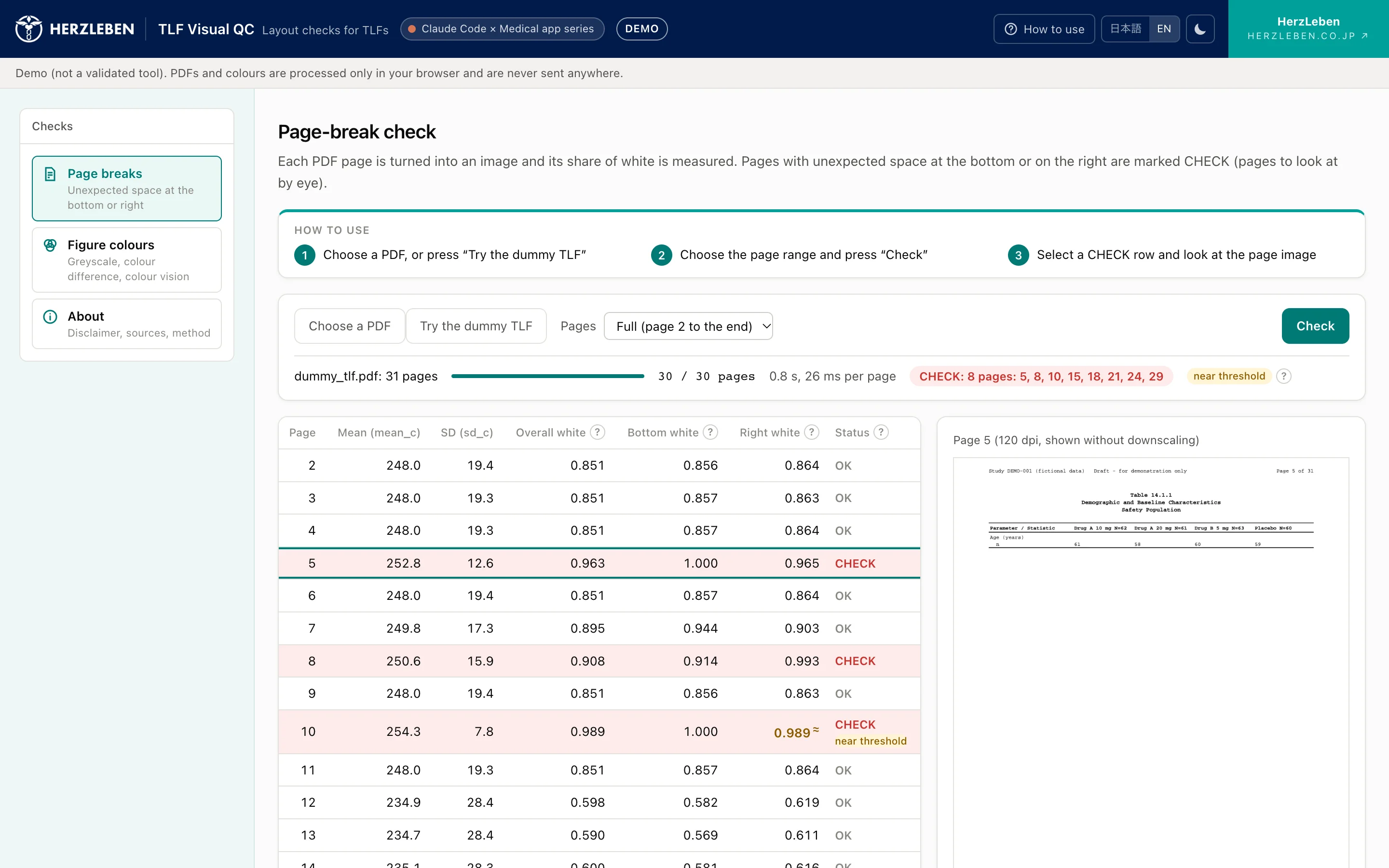
This check is also part of the production-style test (check:build).
6. What the hosting provider adds — network error reports and an analytics script
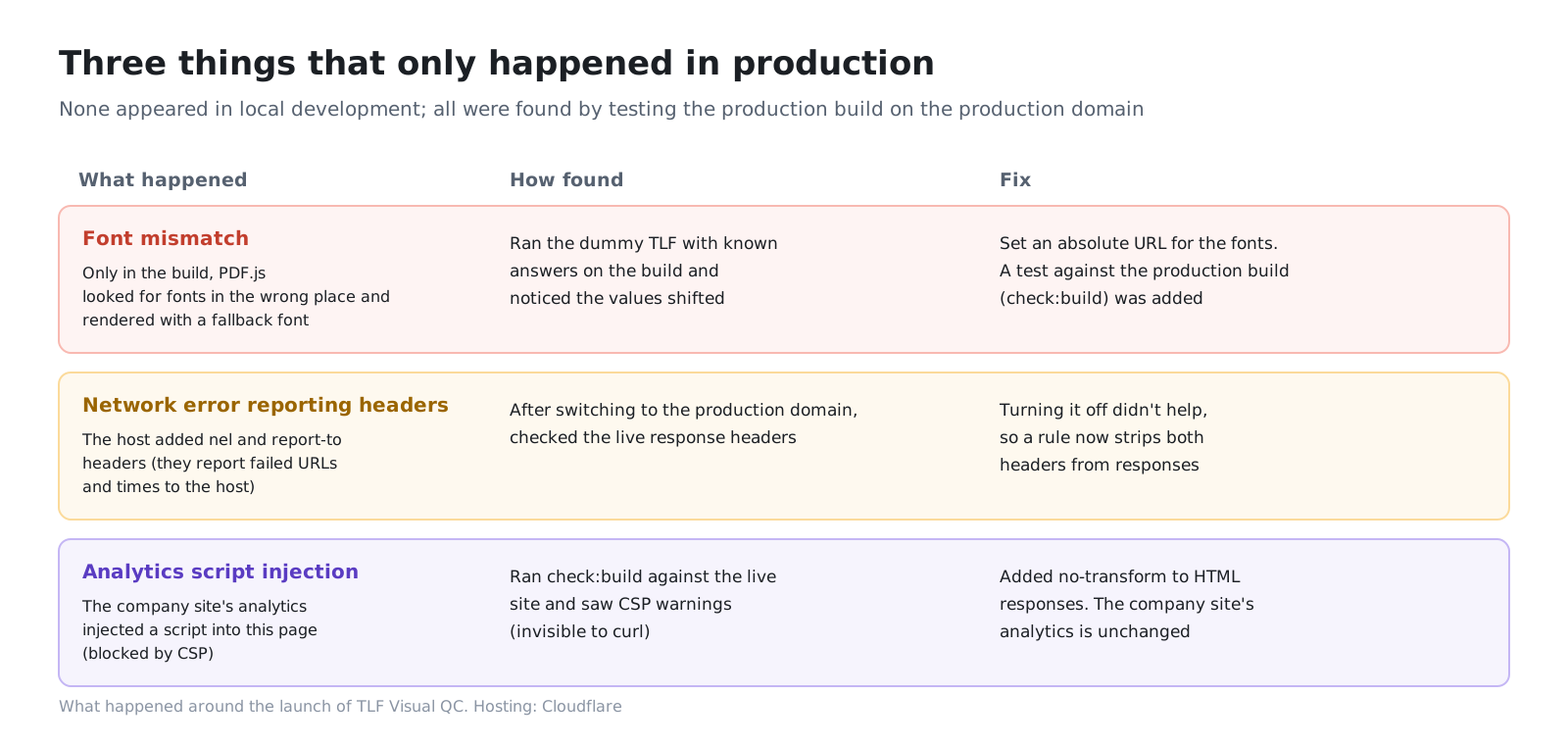
After switching to the production domain (visual-qc.herzleben.co.jp), while checking the public version’s responses and browser behaviour, we found two things that the hosting provider, Cloudflare, was adding automatically. Neither is something the tool sends out, but we stopped both so that we can state without qualification that there is no outbound traffic.
6-1. Network error reports (Network Error Logging)
Cloudflare was adding headers (nel and report-to) to responses that request network error reports (Network Error Logging).
- When the browser fails to communicate with the site (cannot connect, receives an error, and so on), it reports the failed URL, the time and similar details to Cloudflare
- Supported by Chrome and Edge
- PDF contents and file names are not included (PDFs never travel over the network)
- Not covered by CSP, and cannot be stopped from the page side
We turned this setting off in the dashboard, but the headers were still there ten minutes later. So we added a rule on the herzleben.co.jp domain that removes these two headers from responses, and confirmed that the headers are gone. Browsers that opened the site before may keep the old instruction for up to seven days.
6-2. Injection of an analytics script (Web Analytics)
The other one turned up when we ran the production-style test (check:build) against the public version. It showed an outbound request and a CSP violation warning.
The cause was Cloudflare Web Analytics, which was enabled on the herzleben.co.jp domain. It is set up to count visitors to the company site, but it was also automatically injecting its analytics script into this tool’s pages under the same domain. CSP blocked it, so nothing was actually sent, but the browser tried to load it and raised a warning.
- If you fetch the response with a tool like curl, the injection does not show; it appears only when the page is opened in a browser
- The fix: add
no-transform(an instruction telling the provider not to rewrite the content) to the tool’s HTML responses. Analytics for the company site remain as they were
7. Position as a tool that has not been validated
7-1. Disclaimer
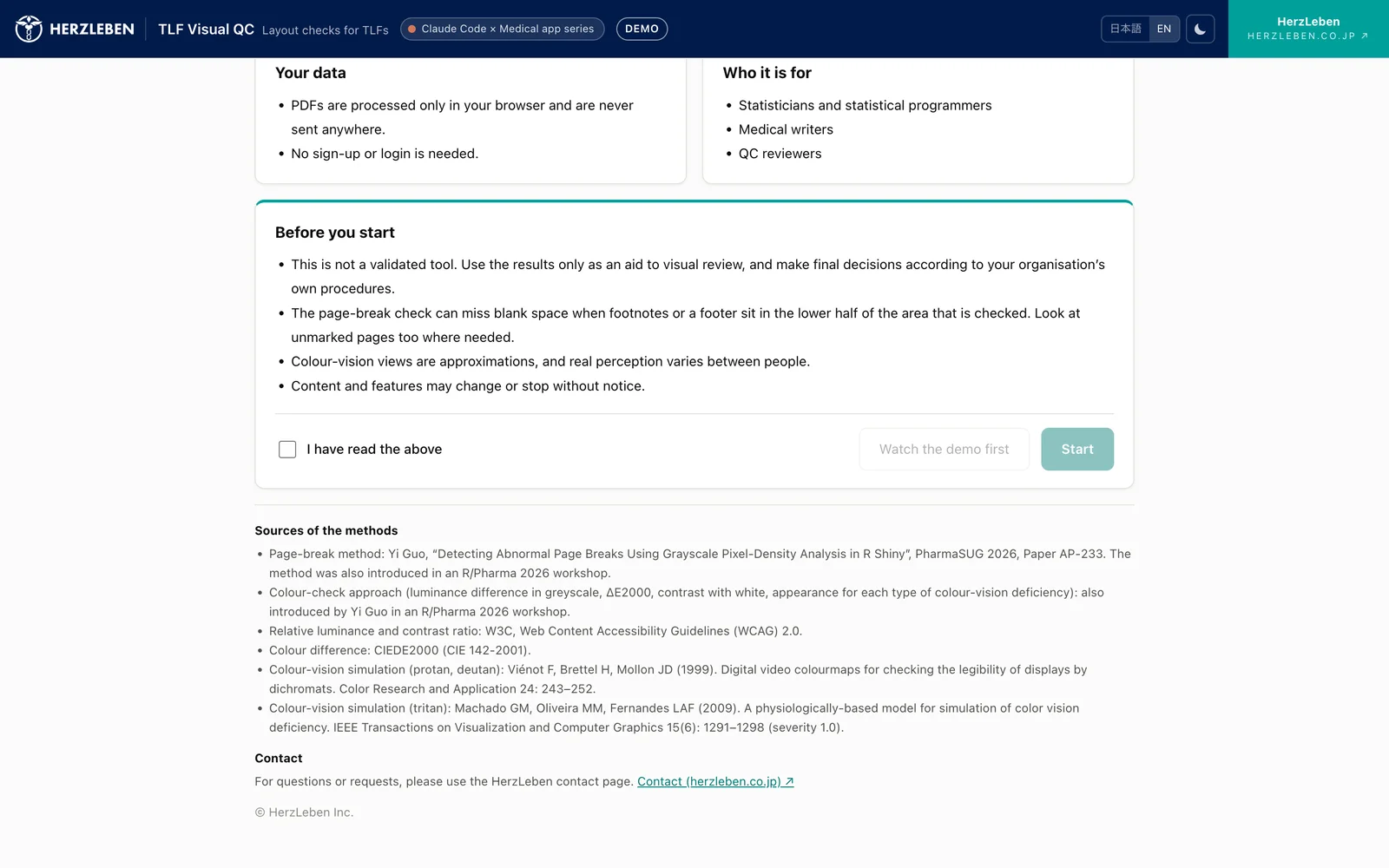
The tool’s start page and About page carry the following disclaimer.
This is not a validated tool. Use the results only as an aid to visual review, and make final decisions according to your organisation’s own procedures. PDFs and colours are processed only in your browser and are never sent anywhere.
On first use, the start page asks you to read this disclaimer together with the purpose, how to use the tool and how data is handled, and to agree before starting (the agreement is valid for 30 days).
7-2. Why we do not call it “validated”
At many companies, systems used in pharmaceutical work are put into use only after confirming, according to procedures, that they are fit for their intended use and keeping records (computerized system validation (CSV); recently the CSA approach, which focuses verification according to risk, has also been spreading. Explainer article (in Japanese)).
As described in Part 2, this tool is verified at three levels: components, the whole tool, and real-world outputs. But that is verification by the developer, not verification according to each company’s business procedures. Which outputs it is used on, at what stage and how all differ from company to company.
So this tool does not replace visual checking; it is positioned as an aid for narrowing down the pages and colours to look at by eye. To build it into internal procedures, each company needs to verify it according to its own procedures.
7-3. Stating the method’s limitations
The About page also lists the method’s limitations.
- CHECK is also shown for pages whose tables are short to begin with
- If footnotes or footers sit in the lower half of the measured area, the white ratio drops and an issue may be missed
- The colour vision simulation is a guide that assumes dichromacy and does not guarantee how colours actually appear
We list the limitations so that pages without a flag are not read as “no problems.”
8. Why the example TLFs are not bundled
The tool comes with a dummy TLF and example palettes from the start, so you can try it right away. The TLFs from the R Consortium submission pilot used in Part 2, on the other hand, are not bundled; we link to them instead.
- The submission pilot materials are published so that anyone can view them as a model for future submissions
- However, the TLF PDFs carry no licence notice, and nothing says HerzLeben may copy and distribute them
- If users download them themselves and load them into the tool, the PDFs are only processed inside their own browsers, and we are not distributing them
Being public does not mean something may be redistributed. We made our own dummy, and point to the public TLFs with links.
9. Summary
- Pre-submission TLFs cannot leave the company. So from the start, the tool was designed never to receive TLFs and to perform every calculation inside the browser
- The server only serves the screens, and CSP blocks outbound traffic. Anyone can verify this in the network log
- Only in the build for publishing, fonts were mixed up and the white ratios shifted. We added a test that checks a build made exactly as for production
- Everything needed is loaded in advance when the screen opens, so the tool produces the same results with the network disconnected
- We also stopped the network error report headers and the analytics script injection added by the hosting provider. Both were found by checking the production domain in a real browser
- As a tool that has not been validated, it is positioned as an aid to visual checking, stated clearly along with the method’s limitations
The most reliable way to protect data is not to receive it. And then to make it possible for anyone to verify that you do not receive it.
Next steps
That concludes the series. The overall picture and use cases are summarised in Part 0. For checks tailored to your company’s TLF conventions, or tools that handle data that cannot leave your company, please get in touch via our contact page.
Sources
- Yi Guo. Detecting Abnormal Page Breaks Using Grayscale Pixel-Density Analysis in R Shiny. PharmaSUG 2026, Paper AP-233. https://pharmasug.org/proceedings/2026/AP/PharmaSUG-2026-AP-233.pdf
- R Consortium R Submission Working Group. submissions-pilot1-to-fda. https://github.com/RConsortium/submissions-pilot1-to-fda
- Cloudflare. Understanding Network Error Logging. https://developers.cloudflare.com/support/network/understanding-network-error-logging/
- Cloudflare. Web Analytics FAQ. https://developers.cloudflare.com/web-analytics/faq/
- The screenshots on this page show a dummy TLF built from fictitious data loaded into the tool