
Claude Code × Medical Application
[Claude Code] Turning Visual Checks into Automated Checks, Part 0: Overview and Design
1. Introduction — the numbers are checked, but the layout is checked by eye
TLFs (tables, listings and figures), which present the analysis results of a clinical trial, are the foundation of the CSR (clinical study report), the submission dossier, congress presentations and publications. A single study can easily run to hundreds of pages.
Whether the numbers are right can be checked by methods such as independent double programming, where a second programmer reproduces the same analysis and the results are compared. Checks on the layout, like the ones below, are still in most cases done by someone paging through the PDF one page at a time.
- One footnote line was added, and every page break after it shifted
- A page has only one or two rows left at the bottom and a large empty area below
- Figure colours turn into the same grey when printed in black and white
- A figure that separates groups in red and green is hard to read for people with different colour vision
The more pages there are, the more is missed, and every rerun means reviewing everything again.
In this series, we introduce TLF Visual QC, a tool that runs these two checks automatically, together with how we developed it with Claude Code.
- 2checkspage breaks and figure colours
- About 30mscalculation time per page
- 0requeststo anywhere outside the site while the PDF is loaded and analysed
- 8 / 8deliberately broken pages in the dummy TLF that were flagged
The business background, such as what a TLF is, where and by whom it is read, and what the regulators’ PDF requirements are, is covered on the reference page.
2. What TLF Visual QC does
2-1. Page-break check
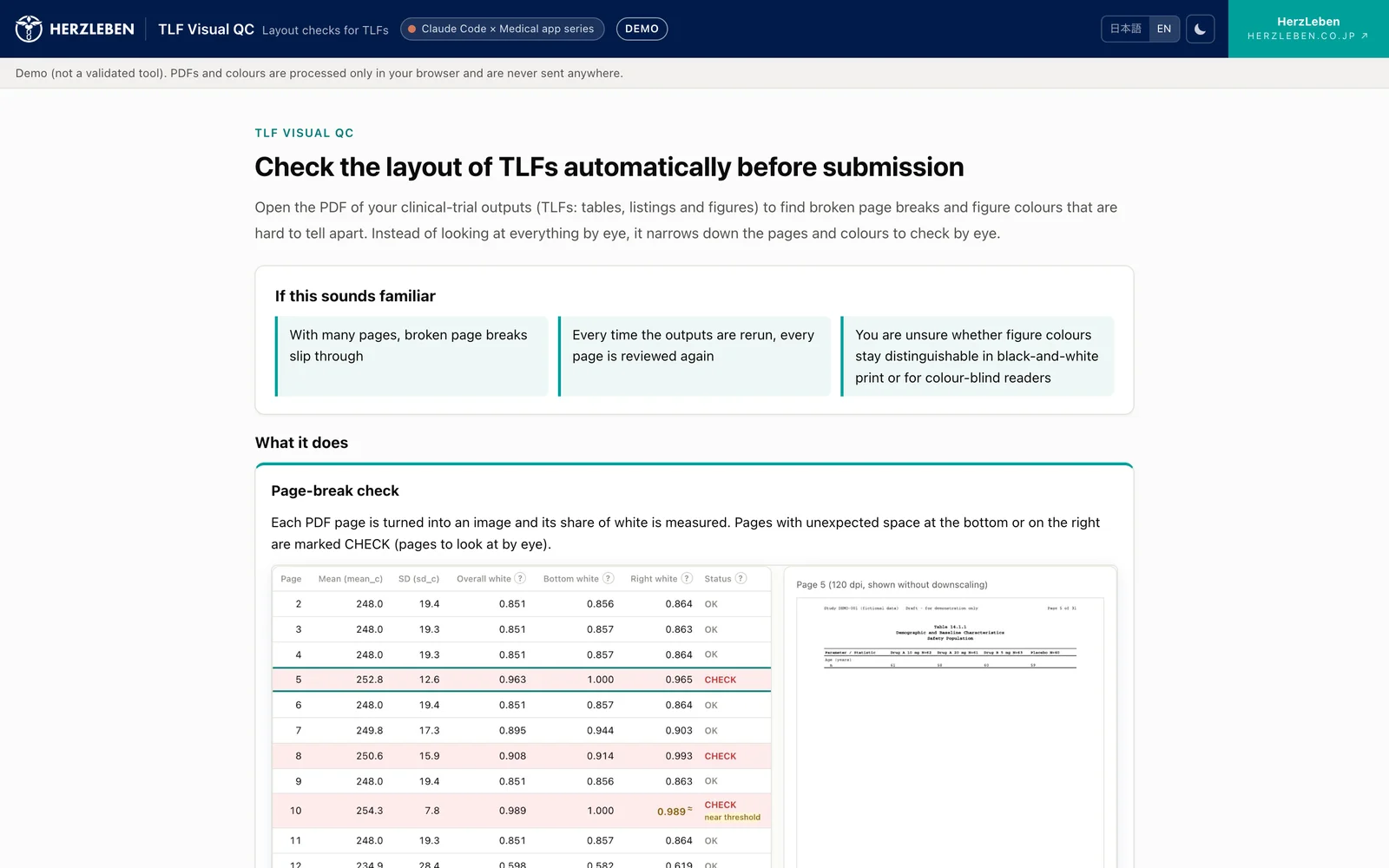
Each page of the PDF is rendered as an image and its share of white is measured. Pages with unnatural white space at the bottom edge or the right edge are marked CHECK. Pages close to the threshold also get a “near threshold” label, just in case.
2-2. Figure colour check
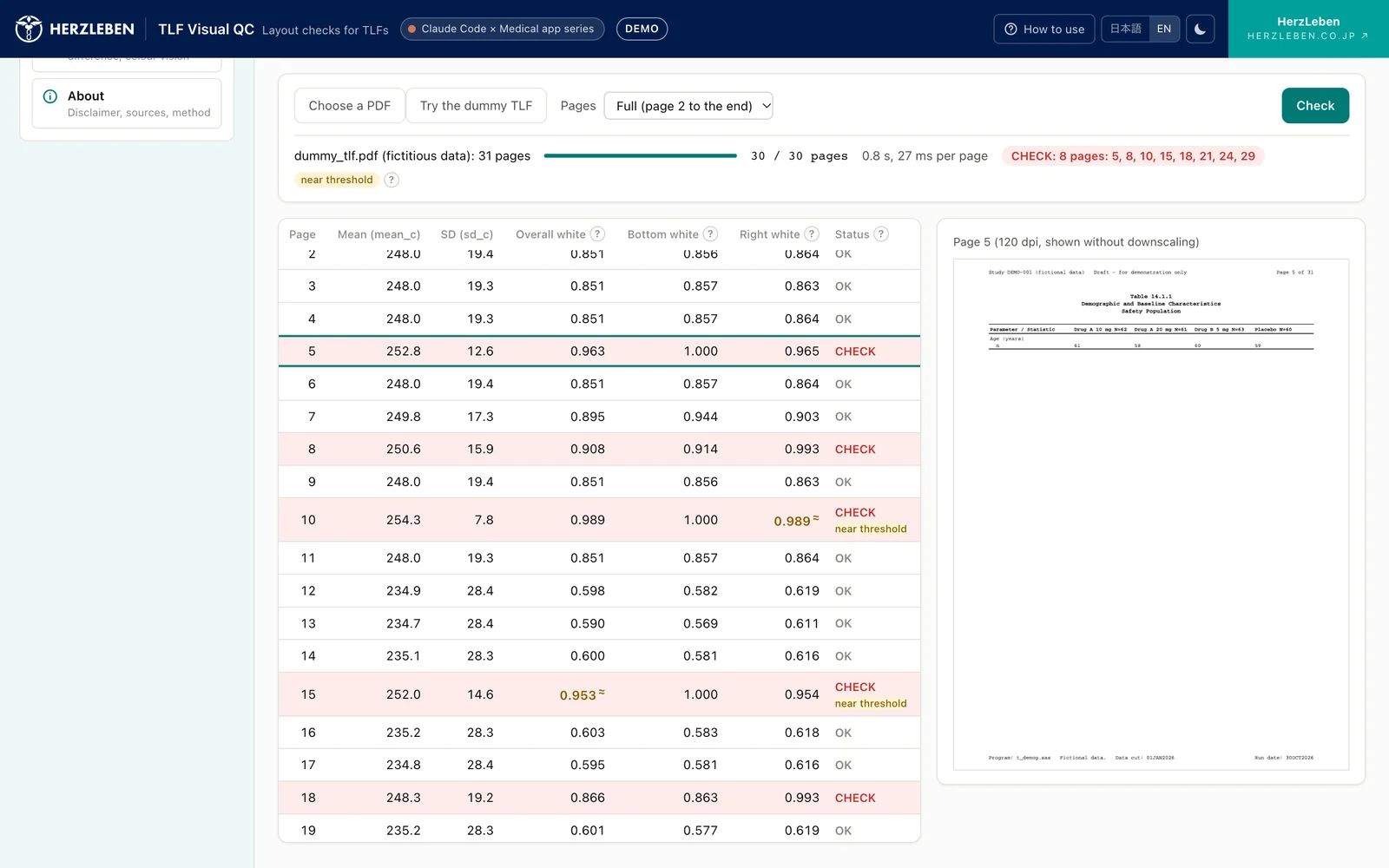
For each pair of colours used for groups, the tool measures the lightness difference in black and white, the colour difference, and how the pair looks under three types of colour vision, and flags pairs that are hard to tell apart. For flagged colours it can also suggest alternatives (experimental).
2-3. Three steps to use it
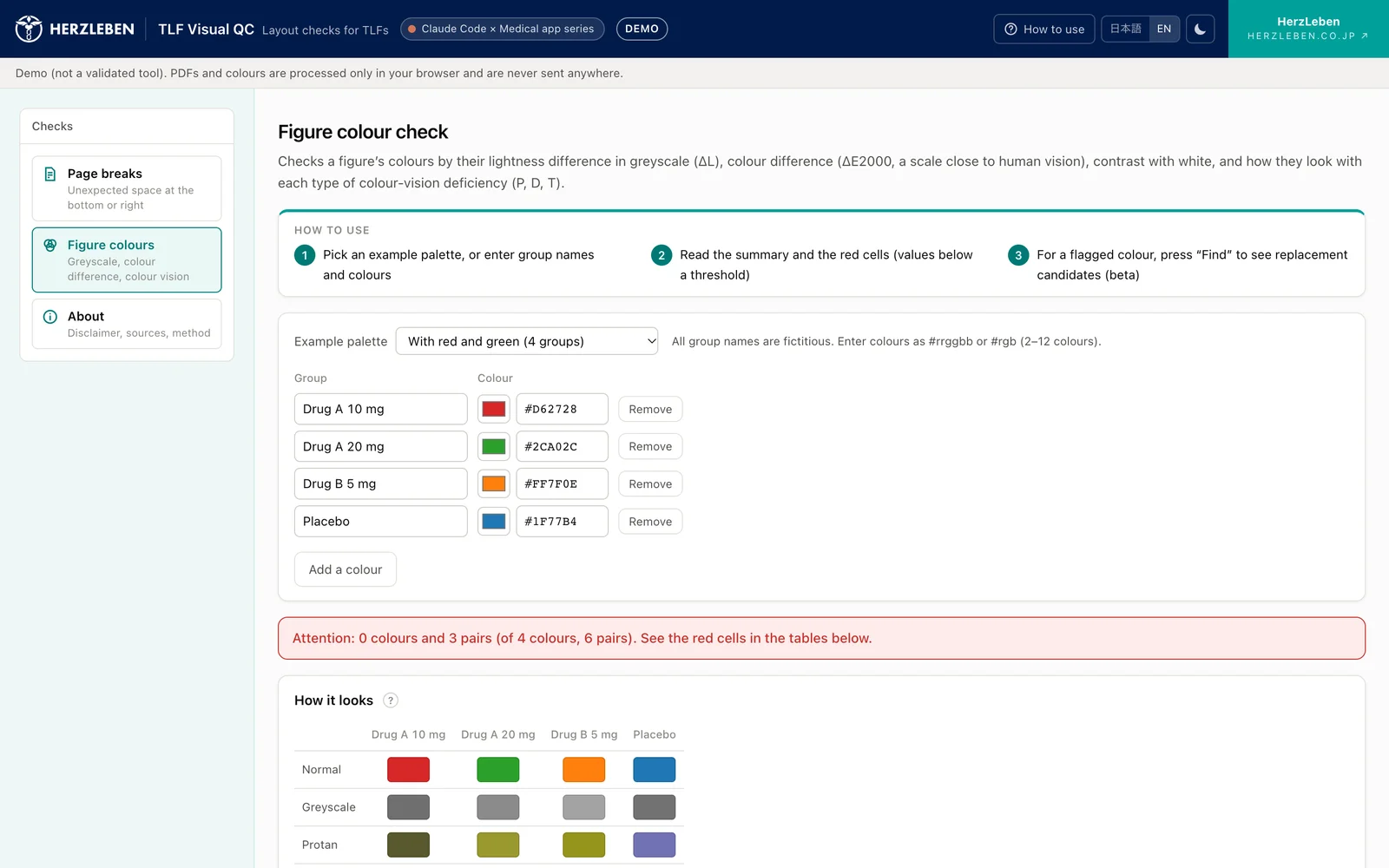
- Choose a PDF (or use the built-in dummy TLF and example palette)
- Run the check
- Look at the flagged pages and colour pairs yourself
No sign-up and no installation. The tool is available in Japanese and English.
3. Key design point — it never receives your outputs
Pre-submission outputs normally cannot be uploaded to an external service. So we designed TLF Visual QC as follows.
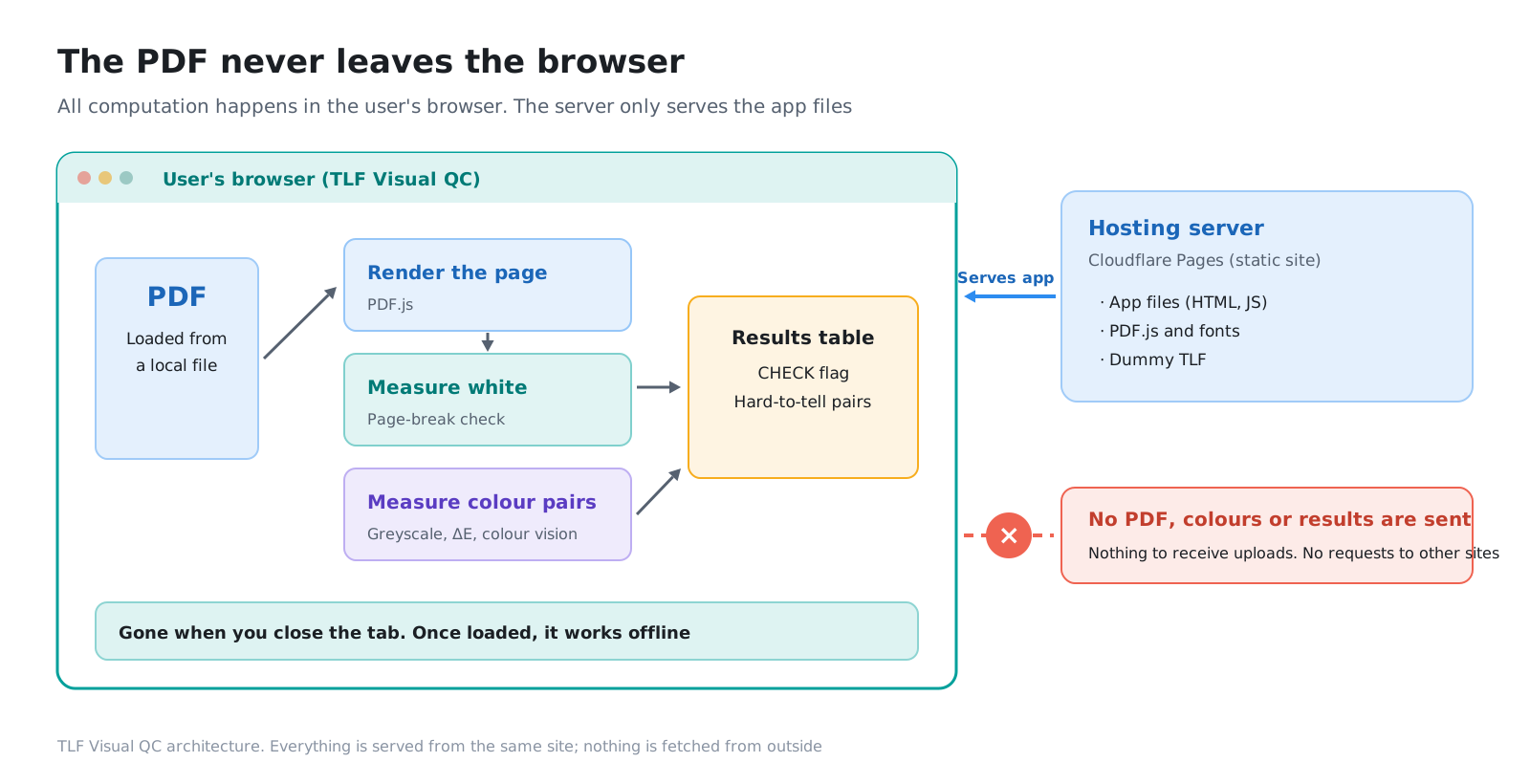
- All calculation happens in the user’s browser: the PDF is never sent to a server, and it is gone when the page is closed
- The server only delivers the page: it has no mechanism to receive files at all
- External requests are blocked: every component of the page is bundled, and nothing is fetched from outside the site
- It works offline: once the page has opened and finished loading, calculations still run with the network disconnected
Anyone can confirm that nothing is sent, using the browser’s developer tools (Part 4).
4. Where it helps
| Function | Setting | How it helps |
|---|---|---|
| Development (statistics and programming) | TLFs for the CSR and submission dossier | Find page-break problems every time outputs are rerun |
| Development (medical writing and QC) | Pre-submission review | Narrow hundreds of pages down to the ones to look at |
| Medical affairs | Congress presentations, publications, materials for healthcare professionals | Check whether figure colours are hard to tell apart in black-and-white print or under different colour vision |
| Responses to regulatory questions | Outputs for additional analyses | Cut the time spent on layout checks under tight deadlines |
In every setting, the tool does not replace visual review; it is an aid that narrows down the pages and colours to check by eye.
5. Where the methods come from
The page-break check is based on the method in a paper presented at PharmaSUG 2026 (Yi Guo, Paper AP-233). The same method was also presented at an R/Pharma 2026 workshop. TLF Visual QC reimplements it to run in the browser, following the paper’s procedure and default values as they are.
The figure colour check was implemented from the international colour-difference formula (CIEDE2000, ΔE2000), the relative luminance and contrast in the web accessibility standard (WCAG), and the formulas in published papers on colour vision simulation (Viénot et al. 1999, Machado et al. 2009).
6. Series outline
| Part | Title | Contents |
|---|---|---|
| Reference page | [Business Explainer] TLF Layout Checks — Page-Break and Colour Requirements for Analysis Outputs | Where TLFs are used, regulators’ PDF requirements, why page breaks go wrong |
| Part 0 | Overview and Design | This post |
| Part 1 | Detecting Page Breaks — Measuring White Space by Greyscale Intensity | The six-step procedure, the threshold and the “near threshold” label, limits of the method |
| Part 2 | Verifying the Results — Pixel Matching and an Answer-Keyed Dummy TLF | Checking at three levels (parts, whole, real), results on submission-format outputs |
| Part 3 | Checking Colours — Greyscale, Colour Difference and Colour Vision | Four measures, results for the seven example palettes, suggesting alternative colours |
| Part 4 | Publishing and Operation — A Design That Never Receives Your TLFs | A setup with no server-side processing, a bug that appeared only in production, how it works offline |
7. What we did with Claude Code
We left most of the implementation to Claude Code. What people decided was mainly the following:
- Use the paper’s procedure and default values as they are, without adding our own tweaks
- Verify against known answers, using a dummy TLF whose broken pages were decided in advance
- The design premises: never receive outputs, never communicate externally
- Which papers to take the colour vision simulation formulas from
- Where to draw the line (thresholds), and what to state as the tool’s limits
Implementing formulas, writing tests and building screens were easy to hand over, but what counts as the right answer, and what is enough checking, had to be decided by people. Each part shows concretely where that line fell.
Next steps
The tool is live at visual-qc.herzleben.co.jp. You can try it straight away with the dummy TLF and the example palette.
This tool is based on a method from a published paper. If you would like to discuss checks tailored to your company’s output standards, or tools that handle data that cannot leave your organisation, please get in touch through our contact page.
Sources
- Yi Guo. Detecting Abnormal Page Breaks Using Grayscale Pixel-Density Analysis in R Shiny. PharmaSUG 2026, Paper AP-233. https://pharmasug.org/proceedings/2026/AP/PharmaSUG-2026-AP-233.pdf (the method was also presented at an R/Pharma 2026 workshop)
- The screenshots on this page use a dummy TLF created with fictitious data and an example palette with fictitious group names. They are not related to any real study, drug or company